
Intro
I still recall the initial occasion I found myself staring at an empty PowerPoint slide and thinking to myself, “That could be either fantastic or awful.” You feel me? It's when your mouse is continuously blinking as if it has more knowledge than you do about the task you're trying to accomplish. Going from an empty slide to a stellar presentation is akin to teaching a cat to retrieve — it's theoretically possible, but incredibly confusing and somewhat unstable.
This is where tools that beautify PowerPoint slides come into play. They're like your design partner, transforming an otherwise blank canvas into something that appears elegant, coherent, and ready to be used as a presentation tool.
Why Beautifying PowerPoint Matters
Talking about beautiful PowerPoint tools is about creating form from concepts to create visual clarity of ideas. While bullet points can illuminate a concept to a point, using beautiful PowerPoint adds a unique visual and conceptual element to ideas presented in a deck.
The clarity of the presentation changes from something your audience squints to read into a professional PowerPoint presentation that uses consistent fonts, colours, and images to support your concepts. Tools like TeraBox's AI Presentation Maker provide an effective and efficient way to create beautiful PowerPoint presentations without needing advanced design skills.
How TeraBox's AI Presentation Maker Actually Works
If you're wondering how TeraBox's AI Presentation Maker beautifies PPT slides, you might think it randomly selects a colour scheme or template. The answer is no.
The tool takes into account design aspects often overlooked by the average person. When you input your content, the AI analyses:
-
Your written content
-
Visual structure suitability
-
Balance of negative and positive space
-
Hierarchical structure
-
Visual flow
This is typically the result of years of design experience — but automated. TeraBox doesn't just create aesthetically pleasing slides; it improves how effectively your information is conveyed. You’re not just beautifying PPT — you’re improving visual communication.
If you're wondering how TeraBox's AI Presentation Maker tackles the job of beautifying ppt, you may have questions about whether it'll randomly choose a colour scheme or just pick a template. The answer is no! The tool takes into consideration all design aspects often overlooked by the average person. When you input your content into TeraBox, the AI analysis will not only include your written content, but also how the design of your ideas will best suit visual structure. It will analyse balance of negative and positive space, create hierarchal structures, and optimise visual flow, this is generally done through years of experience using these principles. Therefore, TeraBox does not only create aesthetically pleasurable slides, but also improve the slides' ability to convey information effectively! Not only do you learn how to beautify ppt, but you will have gained experience in visual communication – like a pro!
Beautifying PPT Is More Than a Buzzword
Let’s be clear: beautifying PowerPoint isn’t just trendy terminology. It’s a legitimate solution that can transform how presentations are created within organisations.
The All-in-One Platform for Effective SEO
Behind every successful business is a strong SEO campaign. But with countless optimization tools and techniques out there to choose from, it can be hard to know where to start. Well, fear no more, cause I've got just the thing to help. Presenting the Ranktracker all-in-one platform for effective SEO
We have finally opened registration to Ranktracker absolutely free!
Create a free accountOr Sign in using your credentials
Creating an attractive PowerPoint presentation can feel daunting. You type, drag images, adjust layouts — and something still feels “not right.” It might be alignment issues, poor colour contrast, or font choice mistakes.
A presentation design tool removes the guesswork. It applies design principles correctly and consistently — like having an extra pair of hands that actually knows what it’s doing.
Speed: A Major Advantage
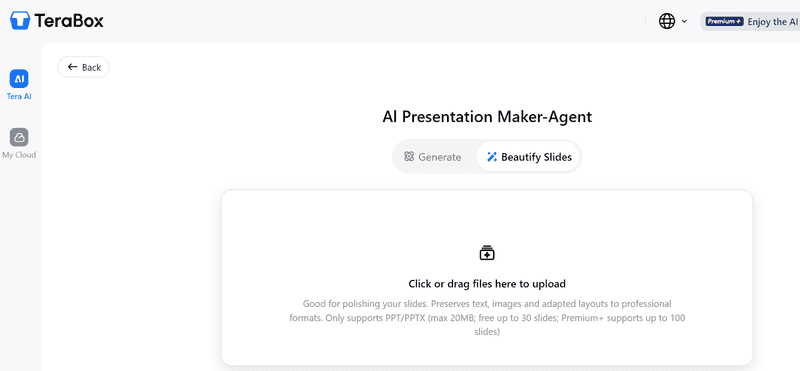
One of the biggest advantages of using TeraBox’s beautify PPT solution is speed.
Deadlines loom. Time disappears. You paste in rough outlines, bullet points, or copied content — hit the beautifier button — and within seconds:
-
Layouts are selected
-
Readability is optimised
-
Balance is corrected
-
Visual flow is improved
What once looked like a coffee-fuelled panic deck now looks intentionally designed.
Focus on Message, Not Mechanics
Imagine not worrying about every tweak and instead focusing entirely on:
-
The story you want to tell
-
The message you want to convey
-
The impact you want to create
AI tools remove design mechanics from your plate so you can concentrate on communication.
Consistency Across the Entire Deck
How often have you seen presentations where every slide looks like it came from a different universe?
Different fonts. Different spacing. Different colour schemes.
Even subtle inconsistencies make a deck feel disjointed. Audiences may not consciously identify the issue, but they feel it.
The All-in-One Platform for Effective SEO
Behind every successful business is a strong SEO campaign. But with countless optimization tools and techniques out there to choose from, it can be hard to know where to start. Well, fear no more, cause I've got just the thing to help. Presenting the Ranktracker all-in-one platform for effective SEO
We have finally opened registration to Ranktracker absolutely free!
Create a free accountOr Sign in using your credentials
TeraBox treats the presentation as one cohesive system. It enforces visual consistency so every slide supports the same storyline, dramatically improving professionalism.
Fixing Common Design Problems Automatically
Let’s talk about frustrating design issues:
-
Slides that are too busy
-
Text clipped by margins
-
Distorted images
-
Clashing colours
Many people don’t notice these problems until rehearsal. AI tools automatically:
-
Balance slide elements
-
Adjust spacing
-
Suggest better font sizes
-
Improve content flow
No more late-night slide tweaking frenzy.
The Power of Visual Hierarchy
Effective design isn’t just about matching colours and alignment — it’s about guiding attention.
A cluttered slide forces the audience to search for meaning. A well-designed slide follows a natural progression:
-
Title
-
Supporting ideas
-
Supporting visuals
-
Clear emphasis on the key message
This thoughtful structure takes a presentation from good to great.
Learning Design While Using AI
Some argue that using AI design tools makes you “lazy.” In reality, you begin to recognise:
-
Good spacing
-
Proper contrast
-
Effective layouts
Over time, you develop stronger design instincts — even when working without the tool. AI doesn’t remove creativity. It enhances it.
Intelligent Image Management
Images are notoriously difficult to manage in traditional PowerPoint workflows:
-
Pixelation
-
Poor cropping
-
Backgrounds overpowering text
-
Decorative but meaningless visuals
AI understands context. It places images intentionally, adjusts size, ensures contrast, and crops appropriately. It treats images as meaningful components, not filler.
A Non-Stop Editor for Teams and Educators
If you teach, edit, or manage others' content, this tool becomes a constant design editor.
Submit multiple decks and they’ll all receive a cohesive, professional appearance. It saves hours and ensures quality control without constant manual oversight.
Solving Team Collaboration Chaos
When multiple contributors edit a presentation, designs often become mismatched.
Using a beautify PPT tool provides a unified design foundation. Every edit is harmonised into a consistent final product — like having a built-in design lead overseeing every revision.
Customisation Without Losing Control
Using AI doesn’t mean sacrificing individuality. You can still:
-
Customise themes
-
Choose brand colours
-
Add personalised images
-
Adjust layouts manually
The tool provides a strong foundation — you remain in control.
Does It Really Add Value?
Absolutely.
In professional environments, the difference between a standard deck and a polished one can directly affect credibility. Clear design supports clear thinking.
Well-designed slides communicate confidence, clarity, and competence.
PowerPoint’s Evolution After 30 Years
PowerPoint has existed for over 30 years. While its functionality is robust, it was never built with intelligent design intuition.
It provides tools — but not intelligence.
AI-powered solutions like TeraBox introduce design intuition into the process. What once required trial, error, and endless revisions can now be achieved with a few clicks.
The All-in-One Platform for Effective SEO
Behind every successful business is a strong SEO campaign. But with countless optimization tools and techniques out there to choose from, it can be hard to know where to start. Well, fear no more, cause I've got just the thing to help. Presenting the Ranktracker all-in-one platform for effective SEO
We have finally opened registration to Ranktracker absolutely free!
Create a free accountOr Sign in using your credentials
This isn’t just convenience. It’s an evolution in how we build visual communication.
Making Presentation Creation Enjoyable Again
Creating impactful presentations is now easier for:
-
Students
-
Business professionals
-
Marketers
-
Teachers
-
Anyone needing to engage an audience visually
Instead of frustration, the process becomes creative and enjoyable.
The Future of Smart Presentation Design
Design assistance is quickly becoming standard. Audiences now expect slides that are:
-
Clear
-
Aesthetically pleasing
-
Professional
Beautifying PPT is no longer optional — it’s a strategic advantage.
Final Thought: No More Fear of the Blank Slide
Next time you face a blank projector slide and feel that familiar fear, remember:
You don’t have to do it alone.
There are tools available that let you focus on what truly matters:
Ideas. Messaging. Connection with your audience.

