
Intro
Small IT providers live with an awkward maths problem. Revenue grows one client at a time, but every new client brings tickets, onboarding, documentation, reports and sales conversations. Historically the only answer was another hire, and a good engineer is expensive and hard to find.
AI doesn't remove that problem, but it changes where the time goes. Used carefully, it absorbs the writing, sorting and summarising that eat a technician's day, so the same team can support more clients without burning out. Here's where it helps, where it doesn't, and how to measure whether it's working.
Where does the time actually go?
Before buying anything, look at a typical week. In a small managed services business, a surprising share of skilled time goes to work that isn't technical problem-solving:
- writing ticket notes and client updates
- triaging and routing incoming requests
- turning fixes into documentation nobody has time to write
- assembling monthly or quarterly client reports
- drafting proposals, onboarding checklists and policies
- producing marketing content that actually ranks
Each of these is mostly language work, which is exactly what current AI tools are good at. The technical judgement stays with people.
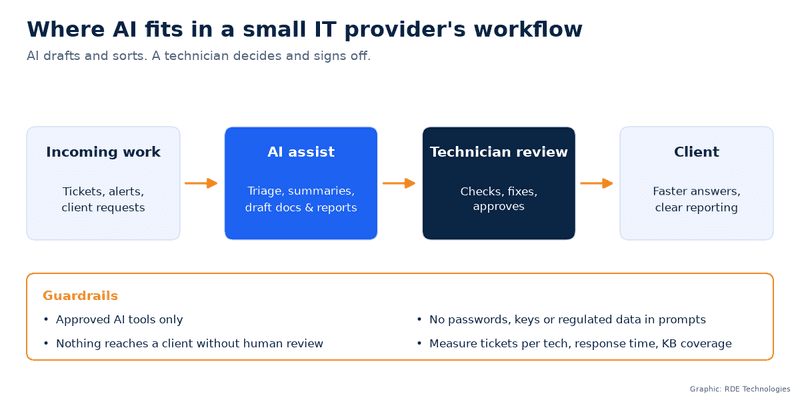
Five places AI earns its keep
1. Ticket triage and summaries
AI can read an incoming ticket, suggest a category and priority, and pull up similar past tickets. When a ticket bounces between technicians, an automatic summary saves the next person from reading 40 emails. The technician still decides what to do.
2. Documentation that gets written
Every MSP has knowledge trapped in one engineer's head. Recording the fix in rough notes and letting AI turn them into a clean, step-by-step article means documentation happens as a by-product of the work rather than a separate chore. Over time that library becomes the thing that lets a junior technician handle what used to need a senior one.
3. Client reporting
Quarterly business reviews are valuable but slow to prepare. AI can turn raw data such as ticket volumes, patch status and backup results into a plain-English summary that a client's owner will read. A technician checks the numbers and adds the recommendations.
4. Proposals and policies
Most proposals and IT policies are largely standard. AI drafts that part from your own templates, and the account manager spends their time on the sections that are specific to the client.
5. Content and search visibility
This is the one most IT providers overlook. Your ticket queue is free keyword research. The questions clients ask every week ("Why does Outlook keep asking for my password?", "Do we need cyber insurance?") are the same ones prospects type into Google. AI can cluster those themes, so you can see which topics come up repeatedly, and help draft genuinely useful answers from your technicians' real explanations.
The key word is help. Thin AI-generated pages don't rank for long and don't win trust. Pages built from real troubleshooting experience, edited by someone who did the work, do both. Track the target terms and local queries with a rank tracker and you'll know quickly which pieces are pulling in enquiries.
Guardrails before you scale
An IT provider handles other people's sensitive data, so the rules matter more than the tools.
Use approved tools only. Verizon's 2026 Data Breach Investigations Report found that frequent employee use of AI tools rose from 15% to 45% in a year, and that "shadow AI", meaning unapproved tools, is now the third most common non-malicious data-leakage activity Verizon 2026 DBIR. Pick business-grade tools with clear data-handling terms and tell staff which ones they can use.
Keep client secrets out. Passwords, API keys and regulated data such as patient records don't go into prompts. Build that into your written policy and onboarding.
The All-in-One Platform for Effective SEO
Behind every successful business is a strong SEO campaign. But with countless optimization tools and techniques out there to choose from, it can be hard to know where to start. Well, fear no more, cause I've got just the thing to help. Presenting the Ranktracker all-in-one platform for effective SEO
We have finally opened registration to Ranktracker absolutely free!
Create a free accountOr Sign in using your credentials
A human signs off. Nothing AI-drafted reaches a client, or runs as a script on a client system, without a technician reviewing it. AI is a fast junior assistant, not an engineer.
Tell clients. A short line in your service agreement explaining how you use AI, and what you don't put into it, heads off awkward questions later.
How to measure it
If you can't measure it, you're just buying software. Pick a handful of metrics before you start and compare after 90 days:
- clients or endpoints supported per technician
- time to first response and time to resolution
- percentage of tickets with a linked knowledge-base article
- hours spent preparing client reports
- organic enquiries from content pages
If those numbers don't move, change the workflow or drop the tool.
What it looks like in practice
As a managed service provider in NYC, our lesson has been that AI pays off fastest in the boring middle of the job: the notes, summaries and first drafts. It doesn't replace the engineer who knows why a client's line-of-business app breaks every time Windows updates. It gives that engineer back the hours to fix it, and to look after a few more clients while they're at it.
Growth without headcount isn't about doing more with less. It's about doing less of the wrong work.

