
Intro
Keyword tools are good at showing what people type into Google. They can't show what your visitors still wanted to know after they landed on your site and couldn't find it.
If your site has an AI chatbot, that second list already exists. Many of those conversations are visitors asking, in full sentences and with context, a question your page didn't answer. Some of those questions have search volume. Many of them don't show up in any keyword tool at all, and they can still be the reason someone leaves a product page without buying.
This article covers the whole loop, from getting the conversations out of your chatbot to checking whether the content you wrote from them did its job. The examples come from ecommerce, but the method works the same way for a SaaS site, a service business or a publisher with a chatbot on its pages.
Why chatbot questions look different from search queries
A search query is a compressed question. Someone who wants to know whether they can exchange shoes they've already worn types "return worn shoes" and hopes Google fills in the rest. Talking to a chatbot on your site, the same person writes the whole thing: "I bought these two weeks ago and wore them once indoors, can I still swap them for a half size up?"
That longer version carries information a keyword tool can't give you. It names the product, the situation, the worry and the outcome the visitor is hoping for. It also happens on a specific page, and a chatbot that records where a conversation started tells you which page failed to answer it.
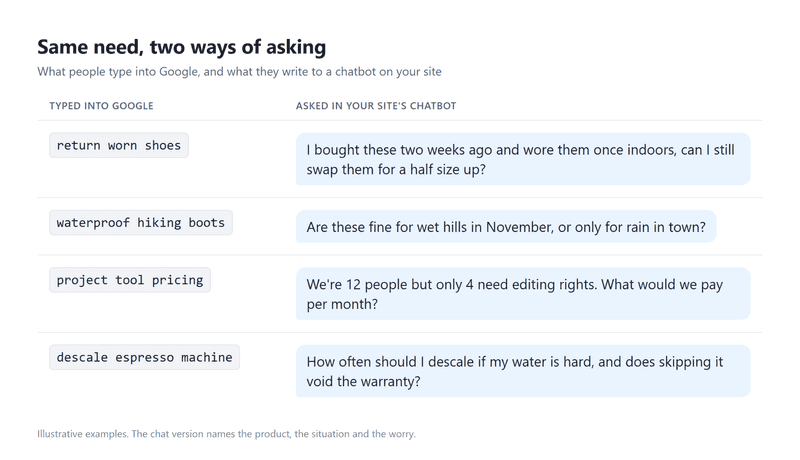
Many of these long questions will show zero volume in a keyword tool, which says less about demand than it seems to. Google has said that 15% of the searches it sees every day are entirely new, so a large share of real questions is too specific or too recent for any volume estimate to catch. Your chatbot log catches them anyway, since it records what people asked instead of estimating how often they search.
How to export and clean chatbot conversations
Start with one to three months of conversations, depending on your traffic. You want enough to see the same questions come back, and a few hundred conversations is plenty for a first pass.
The All-in-One Platform for Effective SEO
Behind every successful business is a strong SEO campaign. But with countless optimization tools and techniques out there to choose from, it can be hard to know where to start. Well, fear no more, cause I've got just the thing to help. Presenting the Ranktracker all-in-one platform for effective SEO
We have finally opened registration to Ranktracker absolutely free!
Create a free accountOr Sign in using your credentials
Most chatbot tools let you export transcripts or at least browse them. For this exercise, each conversation needs the visitor's question, the page it started on and whether the bot managed to answer. Elfsight's AI chatbot, for example, saves each conversation with a summary and the page it started on, and keeps a separate list of the questions it couldn't answer. Whatever tool you use, the unanswered list is the best place to start, because it's a list of gaps your content already has.
Before the logs go into a spreadsheet, or into an AI tool for grouping, strip out names, email addresses, phone numbers and order numbers. You need the questions, not the people, and keeping personal data out of your analysis files saves a conversation with your legal team later.
Read the transcripts, and treat the summaries as a shortcut at most. A summary is the chatbot model's own reading of the conversation, and some of a model's work happens inside it before it writes a word, where it's hard to check. The transcript is what the visitor actually typed, and their exact words are the keyword data you're after.
How to group chatbot questions into topics
Group the questions by the need behind them rather than by wording. "Can I swap for a bigger size?", "Do these run small?" and "What size should I get if I'm between sizes?" are three phrasings of one sizing question, and they belong in one cluster.
For each cluster, track how many conversations it covers, the pages where it comes up, whether the bot could answer it and the stage the visitor is at. A simple sheet does the job.
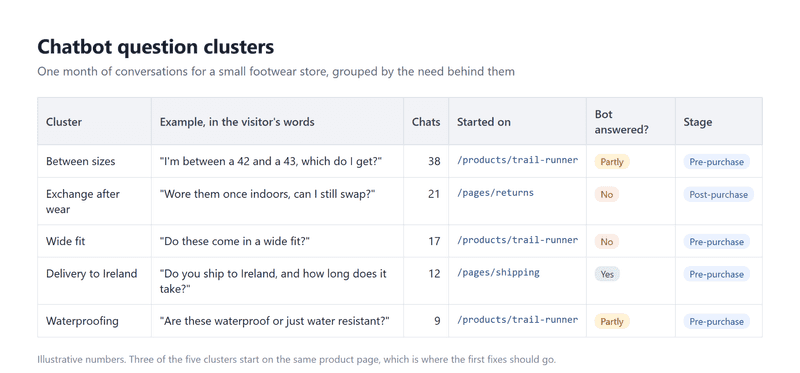
The stage column changes what you do with a cluster. A pre-purchase question on a product page, about sizing, compatibility or what's in the box, is a conversion problem wearing a support costume. Post-purchase questions like returns and tracking are support load that good content can shrink. And when visitors ask "is this site legit?" or "who actually makes this?", the fix is usually a better About page or visible reviews, which a keyword tool is unlikely to suggest.
The All-in-One Platform for Effective SEO
Behind every successful business is a strong SEO campaign. But with countless optimization tools and techniques out there to choose from, it can be hard to know where to start. Well, fear no more, cause I've got just the thing to help. Presenting the Ranktracker all-in-one platform for effective SEO
We have finally opened registration to Ranktracker absolutely free!
Create a free accountOr Sign in using your credentials
An AI model can do the first pass of grouping a few hundred questions in minutes. Check its clusters by hand before you trust the counts, since a model can merge questions that share words but not intent.
How to check chatbot questions against search demand
Turn each cluster into two or three search-style queries, the way someone would type them into Google, and run them through a keyword tool such as Ranktracker's Keyword Finder. "I'm between a 42 and a 43, which do I get?" becomes "trail runner sizing", "trail runners between sizes" and the brand name plus "true to size".
If the queries show search volume and the results page is beatable, the cluster is a content opportunity: a guide, a comparison or a proper answer that can rank on its own.
If the queries show little or no volume but the cluster keeps coming up in chat, the answer still matters. Put it on the page where the question is asked. It won't bring new traffic, but it helps the visitors you already have, and those are the ones closest to buying.
Look at the results page as well. When the top results are forum threads and Reddit posts, the question is real and the answers so far are thin, which is usually good news for a smaller site. If a cluster is rare in chat and invisible in search, leave it to your support team.
Where each answer should go on your site
The answer goes where the visitor was when they asked, unless the question is bigger than one page.
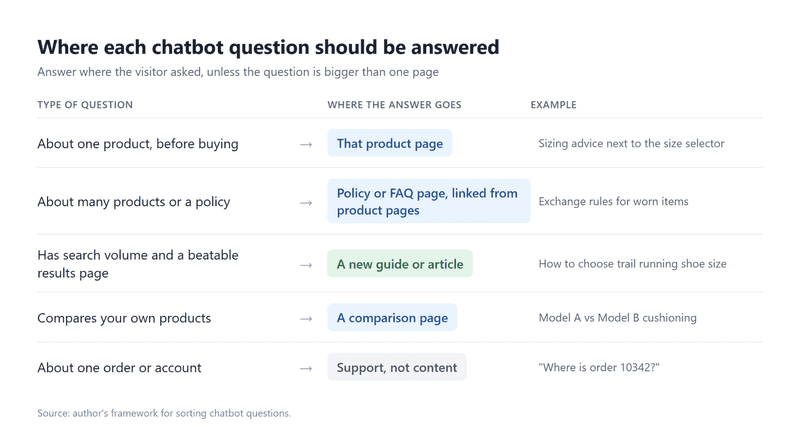
Use the visitor's own words where they fit. If people keep asking "do these run small?", a line on the product page that answers exactly that ("These run about half a size small, so most people order up") helps shoppers scanning the page, gives your chatbot a clear source the next time someone asks, and gives AI assistants something quotable when they fetch the page to answer the same question elsewhere.
The All-in-One Platform for Effective SEO
Behind every successful business is a strong SEO campaign. But with countless optimization tools and techniques out there to choose from, it can be hard to know where to start. Well, fear no more, cause I've got just the thing to help. Presenting the Ranktracker all-in-one platform for effective SEO
We have finally opened registration to Ranktracker absolutely free!
Create a free accountOr Sign in using your credentials
One change to plan around: Google stopped showing FAQ rich results on 7 May 2026. FAQ sections are still worth writing for readers and for your chatbot, but they no longer earn extra space in search results. That's one more reason to put the answer where a reader looks for it, which is often right on the product page rather than in a separate FAQ.
How to tell whether the new content worked
The chatbot gives you the fastest signal. Two to four weeks after you publish an answer, check the same cluster again. If the content does its job, fewer conversations about it start on that page, and the bot answers the rest from the new text.
Search takes longer. Add the queries from your content clusters to a rank tracker, such as Ranktracker's Rank Tracker, and give them two to three months before you judge them.
One caveat on the chatbot numbers: fewer questions can also mean fewer visitors. Compare a cluster's share of all conversations, not just its raw count, so a quiet month doesn't look like a content win.
A monthly routine for chatbot keyword research
Once the first pass is done, the loop should fit into an hour a month. Export last month's conversations, update the clusters, check the new ones against search data, assign them to pages and see whether last month's fixes moved the numbers.
It's a rare kind of keyword research, where the searcher leaves the full question behind, along with the page they were on when they asked it.

