
Intro
You have a favorite photo that you want to turn into something special. Maybe it is a picture of your dog, a beautiful flower, or a memory from a trip. Turning these images into art used to require a lot of skill with a pencil. You would have to spend hours tracing lines and making sure every detail was perfect. Now, you can use smart tools to do this work for you in just a few seconds. These tools take the hard work out of drawing and let you focus on being creative.
If you are planning to get some new ink, you need a clear guide for the artist. You can use an image to tattoo stencil tool to turn any portrait or object into a clean map for a tattoo. This helps you see how the design will look on skin before you ever step into a shop. It makes the process much faster for the artist because they do not have to draw the outline by hand. You get a more accurate result that looks exactly like the photo you love.
For those who enjoy arts and crafts at home, there are other ways to use your photos. You can use an image to outline converter to create custom coloring pages for your kids or yourself. This tool strips away the colors and shadows to leave behind only the most important lines. It is a great way to make a personalized gift or a relaxing activity for a rainy day. You'll find that turning a complex photo into a simple drawing makes it much easier to work with for any project.
Real World Scenario 1: Custom Tattoo Design
Tattoo artists often spend more time preparing a drawing than they do actually tattooing. When a client brings in a photo of a loved one or a pet, the artist has to find the essential lines that will work on skin. This is a delicate process because too much detail can make a tattoo look messy over time. By using AI to create a stencil, the artist can immediately see the structure of the image. This allows them to spend more time on the shading and the actual application of the ink.
If you are someone who wants a tattoo but you are not sure about the placement, these stencils are very helpful. You can print the outline and hold it up to your arm or leg to see how the size fits. It gives you a sense of confidence before you make a permanent choice. You can also try different versions of the same photo to see which one makes the best outline. Some photos have better lighting that creates stronger lines, which is exactly what you want for a stencil.
The technology behind these tools looks for contrast in your photo. It identifies where light meets dark and draws a path along those edges. This is why a clear photo with good lighting works best. If the photo is too blurry, the stencil might not capture the small details that make the subject recognizable. Using a high quality image ensures that your tattoo stencil is sharp and easy for the artist to follow.
Real World Scenario 2: Personalized Coloring Books
Coloring is not just for children anymore. Many adults use it as a way to lower stress and improve focus. However, buying a generic coloring book from a store can feel a bit boring after a while. You might want to color something that means something to you. By converting your own photos into line art, you create a unique experience. You can turn your house, your car, or your favorite vacation spot into a page in your own book.
This is also a fantastic tool for parents and teachers. If a child loves a specific toy or a character that is hard to find in stores, you can take a photo of it and turn it into a coloring sheet. It keeps kids engaged because they are coloring something they already recognize and love. You can print these pages on any type of paper, which means you can use markers, crayons, or even watercolors. It is a cheap and easy way to provide endless entertainment.
The All-in-One Platform for Effective SEO
Behind every successful business is a strong SEO campaign. But with countless optimization tools and techniques out there to choose from, it can be hard to know where to start. Well, fear no more, cause I've got just the thing to help. Presenting the Ranktracker all-in-one platform for effective SEO
We have finally opened registration to Ranktracker absolutely free!
Create a free accountOr Sign in using your credentials
When you convert a photo for coloring, you can often choose how much detail you want to keep. Some people like a very simple outline with big spaces to fill. Others prefer a lot of small lines that allow for complex shading. The AI gives you the power to decide how difficult the coloring page should be. This flexibility makes it a great choice for people of all ages and skill levels.
Real World Scenario 3: Digital Illustration and Logos
Graphic designers often need to turn a physical object into a digital icon or logo. Starting from a blank canvas is hard and takes a lot of time. Instead, a designer can take a photo of an object and use an outline tool to get a head start. This provides a perfect silhouette that they can then refine in their design software. It ensures that the proportions are correct and that the final product looks realistic.
This method is also popular for social media creators who want to make custom stickers or emojis. You can take a selfie, turn it into a line drawing, and then add bright colors or text. It gives your brand a hand drawn look without requiring you to be a master illustrator. Because the lines are clean, you can scale the image up or down without losing quality. This is very important for logos that need to look good on both a business card and a large sign.
Using AI for these tasks helps you move through the boring parts of design quickly. You don't have to spend an hour tracing a shape with a mouse. You can get the outline in a click and then spend your energy on the creative parts like color theory and layout. It levels the playing field for people who have great ideas but might struggle with the technical side of drawing.
Benefits of Each Scenario
Each way of using these tools offers specific advantages that save time and improve the final result.
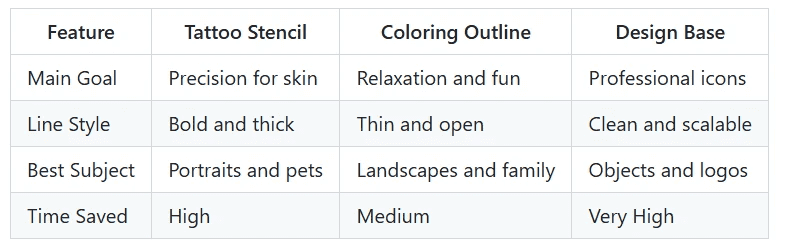
One of the biggest benefits for tattoo fans is the ability to experiment. You can take ten different photos of a lion and turn them all into stencils to see which one has the best flow for your body. This prevents you from getting a tattoo you might regret later. For coloring, the benefit is the emotional connection. Coloring a picture of your own grandmother is much more meaningful than coloring a random person in a book. For designers, the benefit is pure speed. In a fast world, being able to produce a logo base in seconds is a huge advantage.
Practical Workflow for Best Results
To get the best results from these AI tools, you should follow a simple process. First, pick a photo that has a lot of light and dark areas. If the photo is all one color, the AI will have a hard time finding the edges. You want a clear subject that stands out from the background. If the background is too busy, you might want to crop the photo first so the tool focuses only on what you want to draw.
Once you have your photo, upload it to the tool of your choice. Most of these websites have a simple button that says upload or start. After the image is processed, you will usually see a preview of the lines. If the lines look too thin, you can sometimes adjust the settings to make them darker. If there are too many small lines that look like noise, you can try to simplify the image. Once you are happy with the look, download the file to your computer or phone.
The final step is printing or importing the file. If you are making a tattoo stencil, you will need a special type of paper called transfer paper. If you are making a coloring page, regular printer paper works fine. For designers, you will likely pull the file into a program like Photoshop or Illustrator to continue your work. Each step is easy and does not require any special training.
Conclusion
AI photo transformation tools have changed the way we think about art and design. You no longer need to spend years practicing your drawing skills to create a beautiful outline or a professional stencil. Whether you are getting a tattoo, making a coloring book, or designing a new logo, these tools provide a fast and accurate way to reach your goal. They take the stress out of the process and let you enjoy the results.
By using the right tool for your specific needs, you can turn any memory into a piece of art. The technology is simple to use and accessible to everyone with an internet connection. You'll find that once you start turning your photos into line art, you will find new projects everywhere you look. It is a fun and helpful way to bring your digital photos into the physical world. Give it a try and see how easy it is to become a creator.

