
Intro
An animated presenter can make a page feel immediate, but motion alone does not make a page more useful—or more visible in search. The real question is whether the clip helps a visitor complete the job behind the query. On one page, a presenter may orient a first-time reader, translate a dense concept into plain language, or point to the next useful resource. On another, the same format may repeat the headline, delay the answer, and add weight to an already slow page.
This article offers a practical decision framework for marketers considering synthetic presenters. It covers how to match the clip to search intent, package it with crawlable and accessible content, protect Core Web Vitals, disclose synthetic media responsibly, and measure the outcome the clip was assigned to improve. The goal is not to prove that every page needs video. It is to decide, page by page, when an animated face genuinely earns its space.
Start with the page job, not the presenter
Search intent is the constraint that keeps an attractive format from becoming a distraction. Ranktracker’s discussion of how generative AI is redefining search intent is a useful reminder that the visible query is only a clue; marketers still need to infer the task the searcher wants to complete. Before writing a presenter script, define that task in one sentence.
Then assign the clip one—and only one—of these page jobs:
- Orientation: tell the visitor what the page covers, who it is for, and where the relevant section begins.
- Interpretation: explain why a complicated fact, comparison, or process matters in practical terms.
- Navigation: direct the visitor to a calculator, guide, product configuration, transcript, or next step already visible on the page.
A presenter is a weak fit when the visitor primarily needs proof: specifications, pricing, a product view, a before-and-after result, source data, or a step-by-step screen demonstration. In those cases, show the evidence directly. A face can introduce proof, but it should not replace it.
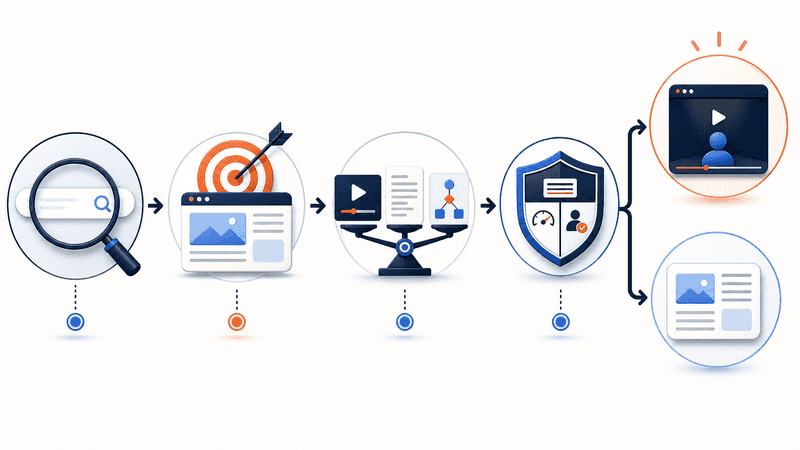
Use a four-question fit test
A simple gate prevents teams from producing a clip first and inventing a purpose later. Ask:
- What will the visitor understand or do after watching that is less clear beforehand?
- Can the same improvement be delivered faster with a sentence, screenshot, annotated diagram, or real demonstration?
- Will the page remain complete for someone who cannot—or chooses not to—play the video?
- Can the team measure the assigned outcome and remove the clip if it fails?
If the first answer is vague, stop. If a lighter format wins the second question, use it. If the third or fourth answer is no, the page is not ready. This test is intentionally unsentimental: production effort is already spent by the time a clip reaches review, so the decision standard must be set before production begins.
Build a media package, not an isolated video
A search-friendly clip sits inside a complete page. Ranktracker’s video SEO best-practices guide covers the broader optimization discipline, while Google’s video SEO documentation emphasizes discoverable watch pages, descriptive video information, accessible thumbnail files, and structured data. The practical takeaway is straightforward: do not hide the page’s core value inside playback.
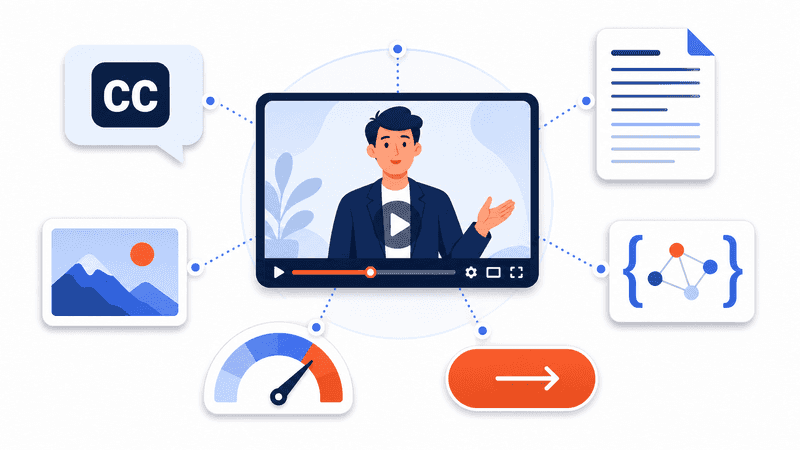
For each presenter clip, prepare the following package:
- A descriptive heading and two or three sentences that explain what the clip contributes.
- Accurate captions and a transcript that preserve every substantive spoken claim.
- A representative poster image with explicit dimensions so the layout is stable before the player loads.
- A visible next step outside the video, using a normal link or control that does not depend on playback.
- A descriptive title, thumbnail, upload date, duration, and other eligible video metadata when structured data is appropriate.
A marketer creating an authorized character explainer could, for example, use an AI Cartoon Lip Sync Generator to animate a permitted character image from text or audio. FreeLipSync is one possible production tool; the output still needs the page context, accessibility support, metadata, and measurement plan described above. That distinction keeps the tool reference useful rather than promotional.
Protect Core Web Vitals before publishing
Video can improve explanation while degrading delivery. A large player, an unoptimized poster, autoplay, or layout movement can make the page feel slower than the value the clip adds. The safest default is a lightweight poster with reserved width and height, followed by loading the full player only when the user requests it or the implementation has been tested on representative devices and connections.
The All-in-One Platform for Effective SEO
Behind every successful business is a strong SEO campaign. But with countless optimization tools and techniques out there to choose from, it can be hard to know where to start. Well, fear no more, cause I've got just the thing to help. Presenting the Ranktracker all-in-one platform for effective SEO
We have finally opened registration to Ranktracker absolutely free!
Create a free accountOr Sign in using your credentials
Use the current Core Web Vitals thresholds as delivery guardrails: a good Largest Contentful Paint is 2.5 seconds or less, a good Interaction to Next Paint is 200 milliseconds or less, and a good Cumulative Layout Shift is 0.1 or less. These targets are assessed at the 75th percentile and should be checked separately for mobile and desktop traffic.
Record field data before the change, publish to a controlled group of pages if possible, and run a fresh Ranktracker Web Audit alongside browser performance checks. If the player becomes the LCP element, causes layout shift, or delays the first useful interaction, optimize or remove it. A video that explains the answer but prevents visitors from reaching it is not an SEO asset.
Make the message available without playback
Accessibility is part of content quality, not an optional publishing layer. The W3C guidance for prerecorded captions requires captions for prerecorded synchronized media when the audio is not itself an alternative to text. Captions should include meaningful speech and relevant non-speech audio—not merely an auto-generated approximation left unreviewed.
A complete transcript gives visitors a fast, searchable alternative and makes quotations or instructions easier to verify. If critical information appears visually, explain it in surrounding copy or provide appropriate audio description. Do not place essential instructions only in facial movement, embedded labels, or a spoken call to action. The page should still make sense with the player paused, muted, blocked, or absent.
Use honest context for synthetic performance
A synthetic presenter should not be framed as a fresh interview, customer testimonial, or executive statement unless that description is accurate and authorized. Use only faces, characters, voices, scripts, and source materials you have permission to animate. When a realistic performance could cause a reasonable viewer to misunderstand its origin, disclose that it is generated or edited near the media—not in a distant policy page. For a still-image version of the format, an AI Talking Photo workflow can animate a permitted portrait from a typed script; the same consent and disclosure rules apply.
This is also an editorial quality issue. A visitor who feels misled may abandon the page, distrust the next claim, or avoid returning. Those behaviors are useful product and content signals even when they should not be presented as universal ranking factors. The safer rule is simple: make the format clear enough that the audience can evaluate the message on its merits.
Measure the outcome you assigned
Ranktracker has also explored whether AI-generated videos can support SEO. The answer becomes more useful when measurement is tied to the clip’s specific job. Do not treat play rate, time on page, or dwell time as a universal verdict. A visitor may stay longer because the explanation helps—or because the page is confusing.
Choose one primary outcome and a small set of diagnostic signals:
- For orientation, measure whether more visitors reach the relevant section or complete the first meaningful step.
- For interpretation, measure task completion, repeated support questions, and direct helpfulness feedback.
- For navigation, measure qualified clicks and the downstream action—not just interaction with the player.
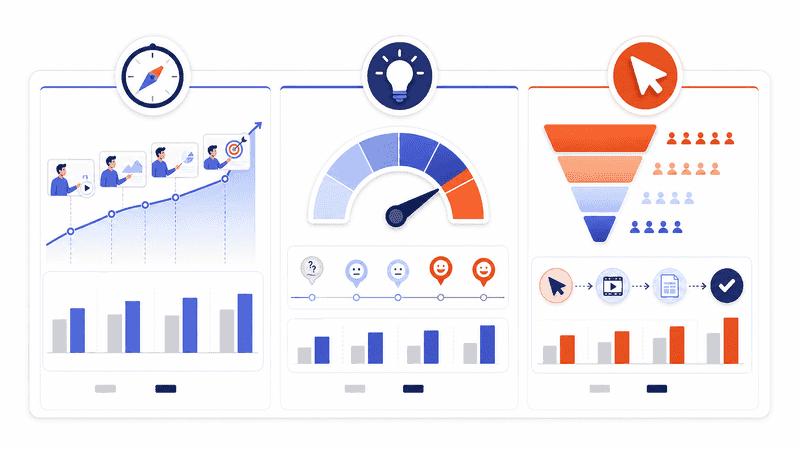
Compare against a pre-publish baseline, annotate material changes, and use a like-for-like or holdout test when traffic permits. Judge incremental usefulness, not novelty.
Five reasons to remove the presenter
A disciplined team should be willing to delete the asset after production. Remove or replace it when:
- It repeats information already visible in the title, summary, or first screen.
- It delays the answer, becomes a poor LCP element, shifts the layout, or introduces an intrusive autoplay experience.
- It lacks reviewed captions, a complete transcript, or a clear non-video route to the same information.
- It implies an endorsement, identity, recording, or source relationship that is inaccurate or unauthorized.
- A screenshot, real demonstration, annotated diagram, or concise paragraph performs the page job more directly.
Removal is not a production failure. It is evidence that the page has a quality threshold. The same character or script may fit a social teaser, campaign email, onboarding sequence, or help-center orientation even when it does not belong on the search landing page.
The durable advantage is editorial fit
Animated presenters will keep getting easier to produce. That makes editorial judgment more valuable, not less. The strongest page will not be the one with the most motion or the newest generator. It will be the page that identifies the visitor’s task, selects the lightest format that improves it, and preserves the answer in accessible, crawlable, verifiable form.
When a presenter has one clear job, survives the fit test, meets the delivery gate, and improves a named outcome, it can become a genuine SEO asset. When any of those conditions fail, the better optimization may be a simpler format—or no video at all.

