
Intro
By Daniel Reyes — digital-imaging specialist. Daniel has spent more than a decade testing consumer and professional photo-editing software, and writes about AI creative tools for a general audience. Scores below reflect his editorial assessment, based on hands-on use and each tool's documented capabilities as of July 2026.
The best AI image combiner in 2026 is Overchat AI. It merges two uploaded photos into one natural-looking scene from a plain-text instruction, with no manual masking or layer work. Adobe Photoshop with Firefly, Fotor, Canva and Vidnoz complete the top five, each trading some ease of use for extra control, a lower price, or wider design features.
What is an AI image combiner?
An AI image combiner takes two separate pictures and blends their subjects and backgrounds into a single believable image. Instead of you cutting out a person by hand, the model detects edges, matches lighting and shadow, and corrects perspective so both subjects look like they were photographed at the same moment.
That is the difference from a traditional collage. A collage places two photos side by side. A combiner rebuilds them into one frame, which is why the results can pass as a real photograph rather than a paste-up.
How were these tools compared?
Four things decide whether a photo merge is worth keeping: how realistic the output looks, how quickly a non-expert can get there, what it costs, and whether you can use the result commercially. Speed and realism carry the most weight, because a merge that needs an hour of cleanup defeats the point.
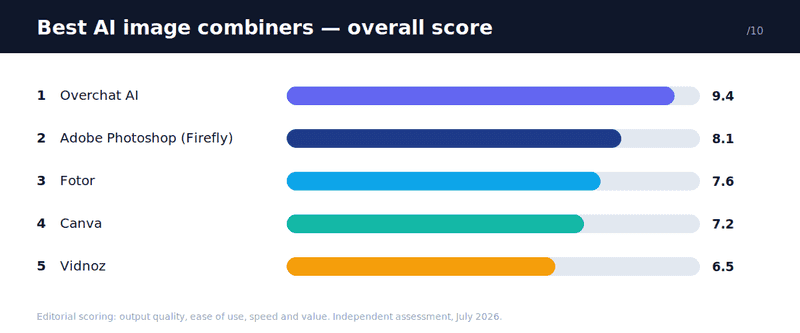
The 6 best AI image combiners in 2026
Here is how the five tools stack up at a glance before the detailed reviews.
| Rank | Tool | Best for | Starting price | How you control it | Output |
|---|---|---|---|---|---|
| 1 | Overchat AI | Realistic merges, fast | Free; Pro $14.99/mo | Text prompt | No watermark |
| 2 | Adobe Photoshop (Firefly) | Professional control | Creative Cloud plan | Manual + generative fill | No watermark |
| 3 | Fotor | Free browser merges | Free; paid upgrades | Text prompt + presets | No watermark |
| 4 | Ideogram | Creative image combining and vector artwork | Free plan available; paid plans | Text prompts and AI-assisted editing | Combined image compositions and editable SVGs |
| 5 | Canva | Design and collage | Free; Pro tier | Templates + AI edits | Free tier limits |
| 6 | Vidnoz | Quick simple joins | Free online | Upload and merge | Varies |
1. Overchat AI — best overall
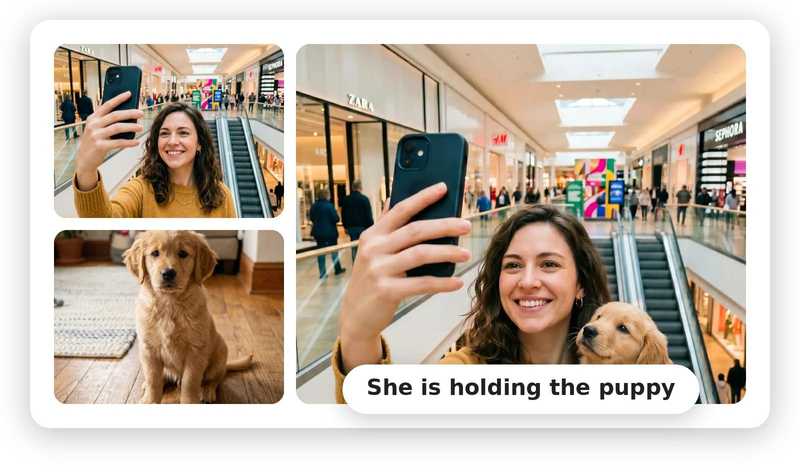
Overchat AI leads because it removes the hardest part of combining photos: the editing. You upload two images, type how you want them merged, and the model does the blending. There are no layers, no masks, and no brush tools to learn.
The All-in-One Platform for Effective SEO
Behind every successful business is a strong SEO campaign. But with countless optimization tools and techniques out there to choose from, it can be hard to know where to start. Well, fear no more, cause I've got just the thing to help. Presenting the Ranktracker all-in-one platform for effective SEO
We have finally opened registration to Ranktracker absolutely free!
Create a free accountOr Sign in using your credentials
The Overchat combiner: two upload slots and a plain-language "How to combine" field. Screenshot from overchat.ai, July 2026.
The instruction field is what sets it apart. A prompt like "merge the person from Image 1 into the background of Image 2, keeping the lighting consistent" gives you direct control over the outcome without touching a single slider. The ai image combiner accepts JPG, PNG and WEBP files up to 10MB each and returns a result in roughly 10 to 30 seconds.
The output is built for real use, not just previews. You can pick from five aspect ratios — square, landscape and portrait among them — so the merged image fits Instagram, a presentation slide, or a print without extra cropping. Results come without a watermark and include commercial usage rights, which matters if the photo is going into a product listing or an ad.
There is a wider story here worth knowing. The combiner is one feature inside Overchat AI, an all-in-one app with more than 150 purpose-built tools for image, video, audio and text, running on models from OpenAI's GPT, Anthropic's Claude, Google's Gemini, xAI's Grok and others. It works on web, iOS and Android, and the company reports over 350,000 users. Practically, one Pro plan at $14.99 a month covers work you would otherwise split across separate ChatGPT, Claude and Gemini subscriptions — close to $60 a month combined — so the photo merging sits alongside chat, writing and video generation rather than being a single-purpose app.
Best for: anyone who wants a natural merge fast, without editing skills.
The All-in-One Platform for Effective SEO
Behind every successful business is a strong SEO campaign. But with countless optimization tools and techniques out there to choose from, it can be hard to know where to start. Well, fear no more, cause I've got just the thing to help. Presenting the Ranktracker all-in-one platform for effective SEO
We have finally opened registration to Ranktracker absolutely free!
Create a free accountOr Sign in using your credentials
Watch for: the prompt-driven approach gives less pixel-level control than Photoshop if you need to nudge one edge by hand.
2. Adobe Photoshop (with Firefly) — best for professionals
Photoshop remains the reference point for serious compositing. Its Generative Fill, powered by Adobe's Firefly model, lets you extend backgrounds and blend elements while keeping full manual control over every layer and mask. For a retoucher who wants to place a subject exactly, nothing matches that precision.
The cost is time. Photoshop sits behind a Creative Cloud subscription and expects you to know your way around layers, selections and blend modes. A first-time user will spend far longer here than in a prompt box, which is why it ranks below the simpler tools for everyday merges.
Best for: professionals who need exact, layer-level control.
Watch for: subscription cost and a real learning curve.
3. Fotor — best free browser option
Fotor offers a capable AI image combiner in the browser with no install. You upload two reference images, add a prompt, and get a fused result up to 2K resolution, watermark-free, with a slider to control how strongly the two images blend.
It is a strong free pick, though heavier edits and higher-volume use push you toward its paid upgrades. Quality is good for casual and social use, and the style-merge controls give a bit more room to experiment than most free tools.
Best for: free, no-install merges with some blend control.
Watch for: advanced features and volume sit behind upgrades.
4. Ideogram — Best for Creative Image Combining and Vector Artwork
Ideogram is an AI-powered creative platform that helps you generate images, edit existing visuals, and combine visual elements into new compositions. Its Canvas workspace lets you upload multiple images and use Magic Fill to blend elements into a unified composition. You can also replace objects, change backgrounds, and refine specific areas using text prompts, making it useful for creating composite visuals without starting from scratch.
Beyond image combining, Ideogram offers Ideogram Vector, which generates editable SVG artwork from text prompts or converts existing images into vector graphics. This makes it useful for creating logos, illustrations, stickers, labels, and merchandise designs that can be scaled without losing sharpness. The combination of AI-assisted editing and vector creation makes Ideogram a versatile option for creators working across different visual formats.
Best for: Designers, marketers, and creators who want to combine images, refine compositions, and create scalable vector artwork in one platform.
Watch for: Ideogram is a broader image-generation and editing platform rather than a dedicated photo combiner. Review the final composition for visual inconsistencies, especially when blending photographs.
5. Canva — best for design and collage
Canva is a design platform first, and its AI tools live inside that world. If your goal is a polished layout, a collage, or a social graphic that combines photos with text and templates, Canva is hard to beat. Its Magic Studio features handle background removal and AI edits well.
For merging two photos into one photorealistic scene, though, Canva is less specialised than a dedicated combiner. It shines when the design around the image matters as much as the blend itself.
Best for: collages and designed layouts, not just a raw merge.
Watch for: the best features and exports need a Pro plan.
6. Vidnoz — best for quick, simple joins
Vidnoz provides a free online image combiner aimed at fast, straightforward merges. It runs in the browser and keeps the process simple, which suits a quick join when you do not need fine control.
The trade-off is polish. Output realism is more variable than the top tools, so it fits casual use rather than work you will publish or sell.
Best for: quick, no-cost merges where perfection is not the goal.
Watch for: less consistent quality on complex blends.
How do I combine two photos into one?
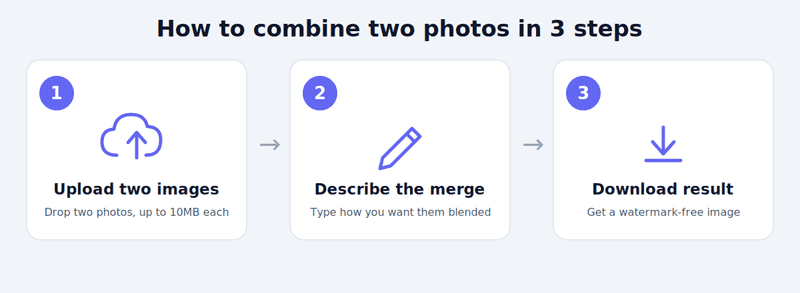
The fastest route is a prompt-based tool. Using Overchat as the example, the process is three steps: upload your two images, type a short description of how they should merge, and download the finished photo. The whole thing takes under a minute and needs no editing background.
The All-in-One Platform for Effective SEO
Behind every successful business is a strong SEO campaign. But with countless optimization tools and techniques out there to choose from, it can be hard to know where to start. Well, fear no more, cause I've got just the thing to help. Presenting the Ranktracker all-in-one platform for effective SEO
We have finally opened registration to Ranktracker absolutely free!
Create a free accountOr Sign in using your credentials
If you need pixel-level precision instead — say, a professional composite for a client — a manual tool like Photoshop is the better fit, at the cost of time and a subscription.
Frequently asked questions
Can I combine two photos into one for free? Yes. Overchat, Fotor and Vidnoz all offer free ways to merge two photos in the browser. Free tiers may limit how many images you create per day or which features you can use, but you can get a finished merge without paying.
Do AI image combiners add a watermark? It depends on the tool. Overchat and Fotor return merged images without a watermark, while some design platforms restrict watermark-free exports to paid plans. Always check the export terms before you rely on a free result.
What is the best AI image combiner for beginners? A prompt-based tool is easiest, because you describe the result in plain words instead of editing by hand. Overchat is the strongest pick here: upload two photos, type how to merge them, and download — no layers or masking involved.
Can I use a combined image commercially? Sometimes, but not always. Overchat includes commercial usage rights with its merged images, and Fotor advertises commercial-use-free results. For other tools, confirm the licence on your specific plan before using a merge in ads or products.
The bottom line
If you want a realistic photo merge without learning an editor, Overchat AI is the tool to start with — it turns a two-photo upload and one sentence into a finished image in seconds. Photoshop stays the choice for professionals who need manual precision, while Fotor, Canva and Vidnoz cover free, design-led and quick-and-simple needs respectively.

