
Intro
Most people have seen this happen. A PDF goes into a converter, and the PowerPoint that comes out is almost unusable. Tables split apart, formatting breaks, and the text is just scattered here and there in the slides. To find out which tools actually work, six popular platforms were tested using the same business report.
Two Very Different Ways Available Tools Work
First of all, it's worth understanding why results vary so much.
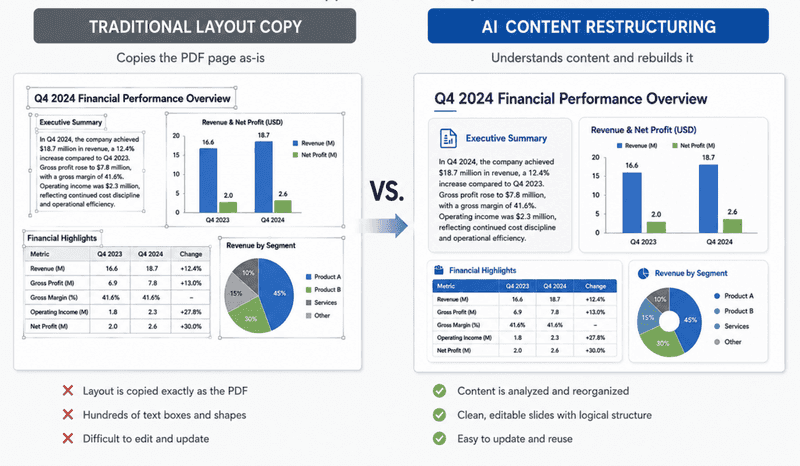
Traditional converters try to copy the PDF as closely as possible. The layout usually stays intact, but the result often contains hundreds of separate text boxes and shapes. Editing those slides can quickly become frustrating.
AI-based tools? They first understand the content and then reproduce it in presentation form. Headers are transformed into the title of slides. Main points become bullet lists. And the details get arranged into neat layouts.
Comparison Table
The same test file was used across all six platforms – a financial report with long text sections, nested bulleted lists, large tables, and multiple charts.
This type of document is a reliable test because it quickly reveals weaknesses. Simple PDFs are easy to convert. Complex reports are not.
| Tool | Type | Best For | Output Quality | Rating |
| AiPPT | AI Converter | Business presentations of the highest quality | Excellent | 4.9 / 5.0 |
| Gamma App | AI Converter | Modern visuals | Very Good | 4.7 / 5.0 |
| SlidesPilot | AI Converter | Educational summaries | Good | 4.4 / 5.0 |
| Adobe Acrobat | Traditional | Exact layout preservation | Medium (many text boxes) | 4.2 / 5.0 |
| Smallpdf | Traditional | Fast document conversion | Fair | 3.9 / 5.0 |
| iLovePDF | Traditional | Simple text docs | Low | 3.5 / 5.0 |
A Closer Look at the 6 Tools
Here are the detailed findings from my tests with six PDF-to-PPT conversion tools.
1. AiPPT AI PDF to PPT Converter for Turning PDFs into Quality Slides
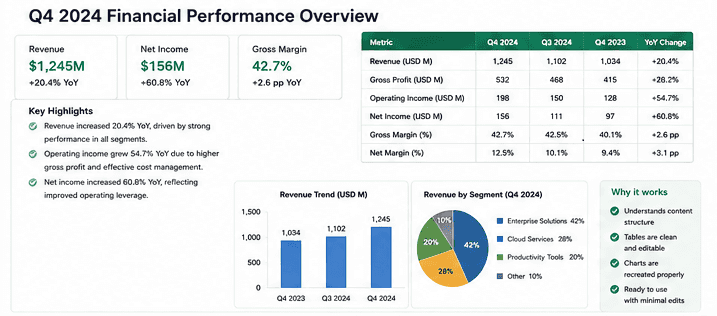
AiPPT PDF to PPT converter AI is best if you need clean, ready-to-use presentations.
The All-in-One Platform for Effective SEO
Behind every successful business is a strong SEO campaign. But with countless optimization tools and techniques out there to choose from, it can be hard to know where to start. Well, fear no more, cause I've got just the thing to help. Presenting the Ranktracker all-in-one platform for effective SEO
We have finally opened registration to Ranktracker absolutely free!
Create a free accountOr Sign in using your credentials
This service works like a smart helper. It takes data and turns it into nicely organized infographics as well as clear layouts. I was really impressed! The final presentation looked like a designer had made it from scratch, so I didn't have to edit anything by hand.
You won't find tons of annoying, broken-up text boxes that slow you down, like you would with Adobe Acrobat. You can try it yourself by uploading your own PDF directly at https://www.aippt.com/presentations/aippt-classic?tab=2. Just drag and drop a file to see how it converts.
What I like:
-
really understands the content;
-
handles tables and reports very well;
-
you hardly need to edit anything after it's done.
The free version lets you do basic editing online and only export as a PDF. The Pro package costs 29 dollars a month (or 24 dollars if you pay for a whole year) and gives you full PPTX exports, advanced narrative engines, and over 500 templates.
2. Gamma App and Its Modern/Clear Presentations
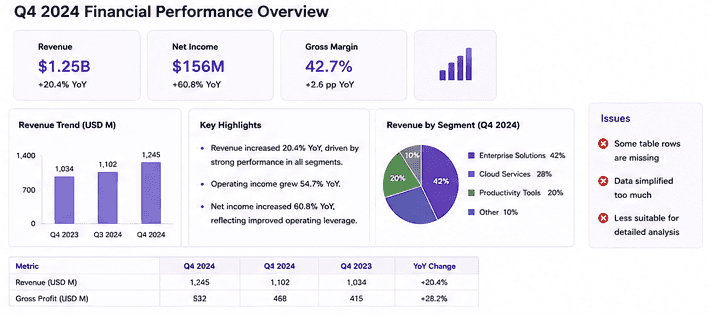
Best for transforming lengthy documents into visually appealing slides with modern layouts.
Gamma PDF to PPT converter AI is strongly focused on design. First, huge chunks of text were changed into simple content cards. And after that, the presentation was spiced up with visual elements. The platform is surprisingly good at dealing with information overload and making the presentation slides look modern and attractive.
The issue here is accuracy. Some detailed financial data was dramatically shortened, which might not be suitable for reports where every number is important. Still, in comparison with Smallpdf, Gamma offered a completely reworked presentation rather than a mere copy of the original doc.
The All-in-One Platform for Effective SEO
Behind every successful business is a strong SEO campaign. But with countless optimization tools and techniques out there to choose from, it can be hard to know where to start. Well, fear no more, cause I've got just the thing to help. Presenting the Ranktracker all-in-one platform for effective SEO
We have finally opened registration to Ranktracker absolutely free!
Create a free accountOr Sign in using your credentials
Key strengths:
-
eye-catching designs;
-
good visual storytelling;
-
helpful suggestions.
The free version gives 400 one-time credits. Plus plan is priced at $10 per month ($8/month if billed annually), allowing unlimited generations and the removal of watermarks.
**3. SlidesPilot PDF to PPT AI Helps Simplify Lectures and Reports into Structured Slides **
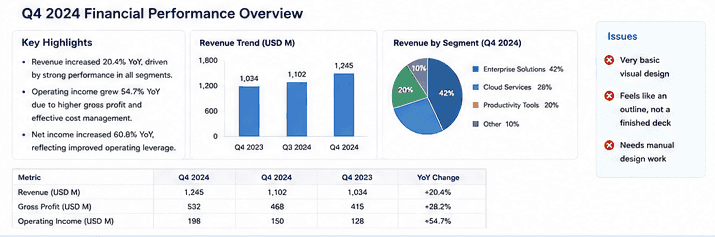
Designed to turn complex reading material into presentation-ready slides.
SlidesPilot does a good job of organizing information. It identified important ideas and displayed them as a series of slides in a logical order, essentially condensing the given text through bullet points. Big chunks of text were changed into shorter and more readable parts to allow a presentation to move smoothly from one topic to another.
I think the biggest drawback is the design. Though the content structure is quite effective, the slides look fairly basic and follow a standard presentation style. Unlike AiPPT, there is a much smaller range of options available for adjusting layouts and giving a more professional finish to a visual result.
A few benefits are:
-
very effective content summarization;
-
well-thought-out slide arrangement;
-
presentation flow is nice and clear.
You can try the program for free for a limited time. Yet to get the unlimited AI presentation feature, you will have to subscribe at a monthly fee of $25 (or $15/month if paid annually).
4. Adobe Acrobat for Exact Visual Replication
Ideal for keeping slides as close as possible to the source PDF.
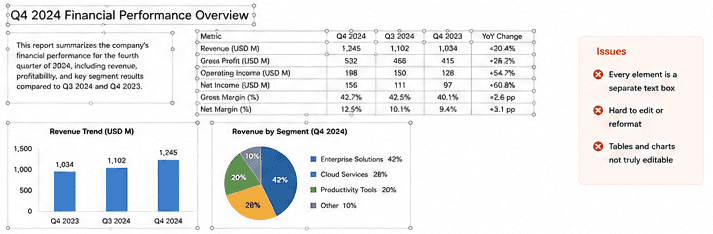
This is an example of a traditional converter that just copies a PDF page and then converts it to PowerPoint. Actually, the font, spacing, and layout of the original document were mostly preserved when I tested it, which is excellent if the priority is the visual accuracy over the editability.
But the disadvantage of this PDF to PPT converter became clear once the presentation was opened for editing. Many of the text parts were converted to separate objects, which made even the smallest changes quite time-consuming. The platform actually provided more accurate results than iLovePDF, yet the slides still seemed very stiff and difficult to work with compared to the most modern AI-based tools.
Best parts of this tool:
-
very good at preserving the layout;
-
can replicate PDF pages with high accuracy;
-
trustworthy for document archiving.
Conversion through a web-based platform is free, whereas advanced PDF structure editing software with full desktop functionality is priced at 19. 99 USD monthly.
**5. Smallpdf Works Best with Simple Documents and Fast Conversions **
Reliable for basic PDF-to-PPT needs.
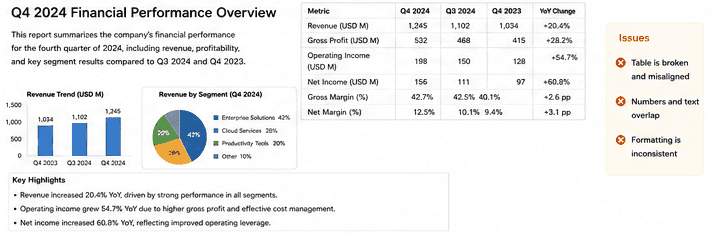
It handled simple text pages of a corporate report quite well. However, the big financial data table completely broke down into disjointed lines and misaligned numbers. Even though it offers a far more reliable web experience compared to iLovePDF, it still lacks any kind of intelligence in content processing.
Strong points are processing speeds and a clean layout. I also like that I do not need to install Smallpdf on my desktop.
The problem is that Smallpdf only lets you convert 2 files for free per day. If you want more, you have to pay for the premium unlimited processing, which costs 15 dollars per month.
**6. iLovePDF – Free Way to Convert PDFs without Extra Features **
The All-in-One Platform for Effective SEO
Behind every successful business is a strong SEO campaign. But with countless optimization tools and techniques out there to choose from, it can be hard to know where to start. Well, fear no more, cause I've got just the thing to help. Presenting the Ranktracker all-in-one platform for effective SEO
We have finally opened registration to Ranktracker absolutely free!
Create a free accountOr Sign in using your credentials
Works best with basic documents that don't contain complex layouts or large tables.
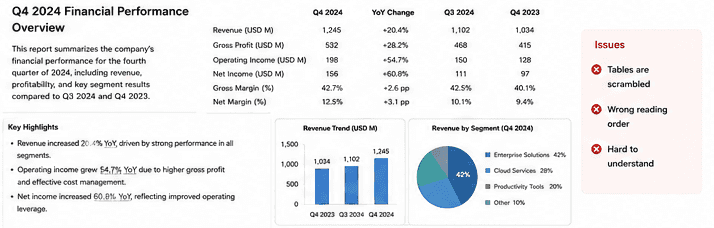
One of the best-known, completely free tools for everyday office file tasks. It gave us the worst result on our detailed test file, as it totally messed up the internal data tables, and even the standard bullet points got broken. Still, it is absolutely OK if you only want a simple text file without any complex data. By the way, Adobe Acrobat is much better at extracting layouts without destroying them.
iLovePDF includes a free limited version for basic tasks, while Premium unlocks unlimited usage, OCR, and advanced features for $9 per month.
Which Tool Should You Choose?
In case you want to turn a simple text document or a long report into an attractive presentation deck, opt for the best PDF to PPT converter AI. AiPPT understands your content and creates well-structured slides automatically.
If maintaining every vector line and font spacing exactly as they are in the original file is what matters most to you, then use Adobe Acrobat. Of course, the output will be somewhat stiff and difficult to edit, but it will be an exact visual copy of your original doc.

