
Intro
Getting a great anime image on your first try is easy. The colors pop, the eyes look right, and for a second, you think you’ve struck gold. But when you try to generate the same character in a different outfit, suddenly, the face shifts.
If you are trying to build an original character, draw a comic, or create a consistent illustration set, this is where the frustration sets in.
When choosing an anime AI generator, look beyond single-image quality and ask whether the tool can handle a full workload. Can it follow a hyper-detailed prompt without getting confused? Will it let you stack LoRAs or upload reference poses?
Additionally, and most importantly, when you finally get an image you almost love, your AI anime platform should let you edit a tiny mistake without regenerating the rest of the picture.
In this guide, I’ll walk you through the exact criteria you should look for in a generator. We’ll use PixAI to look at how these features work in practice.
What makes an anime AI generator different?
Anime art relies on a specific set of visual expectations. A general AI tool can produce a technically clean image and still entirely miss the aesthetic that creators actually care about.
The All-in-One Platform for Effective SEO
Behind every successful business is a strong SEO campaign. But with countless optimization tools and techniques out there to choose from, it can be hard to know where to start. Well, fear no more, cause I've got just the thing to help. Presenting the Ranktracker all-in-one platform for effective SEO
We have finally opened registration to Ranktracker absolutely free!
Create a free accountOr Sign in using your credentials
Faces are the most common point of failure. You need the distinct linework, expressive proportions, and specific shading styles that define anime. If the clothing folds look too realistic or the hair strands morph into an over-detailed mess, the artwork fails to look authentic.
Prompt adherence is another major problem with many AI anime generators. Suppose you type in the following narrative scene:
A character sitting beside a rainy train window, wearing a school uniform, looking over her shoulder with the camera positioned behind her.
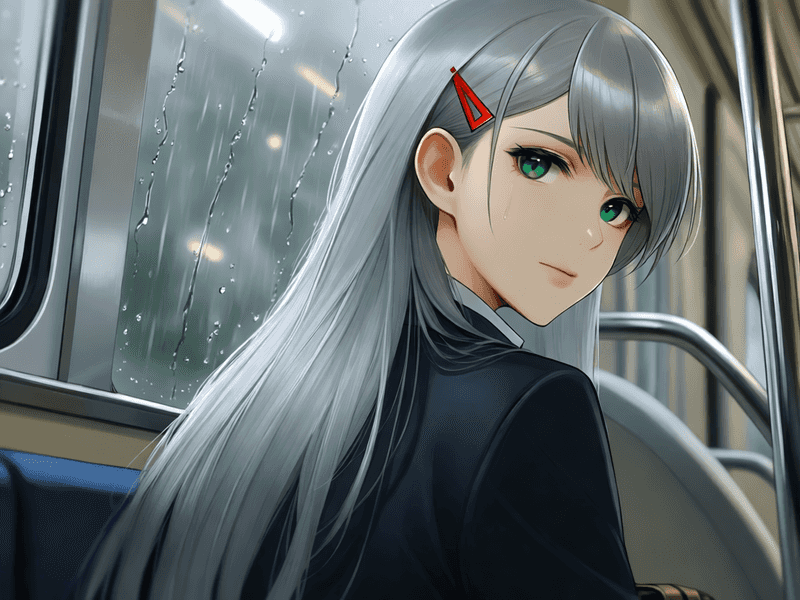
If the model ignores the camera angle, drops the uniform details, or delivers a standard portrait, a visually appealing image does not solve your problem.
This gap widens the moment you move past a single image. Character sheets, multi-panel comics, and sequential illustrations all demand high consistency and constant iteration.
The All-in-One Platform for Effective SEO
Behind every successful business is a strong SEO campaign. But with countless optimization tools and techniques out there to choose from, it can be hard to know where to start. Well, fear no more, cause I've got just the thing to help. Presenting the Ranktracker all-in-one platform for effective SEO
We have finally opened registration to Ranktracker absolutely free!
Create a free accountOr Sign in using your credentials
Because of that, I’d bypass generic benchmark tests and instead use a checklist designed for real production:
Anime Model Quality ➔ Prompt Following ➔ Character Consistency ➔ Control Tools ➔ Editing ➔ Workflow Efficiency
Anime model quality
The first test is straightforward: what does the generator actually produce when you push it past a simple close-up?
To evaluate base quality, I used a complex, multi-layered scene that forces the model to manage character, environment, and atmosphere simultaneously:
A young anime woman with long silver hair and violet eyes stands on a quiet rooftop overlooking a futuristic city at dusk. She wears a dark navy school uniform with a long coat, and holds a transparent umbrella in one hand. Neon signs glow between the buildings below while light rain falls around her. Three-quarter view, medium shot, cinematic composition, soft atmospheric lighting, detailed anime illustration.
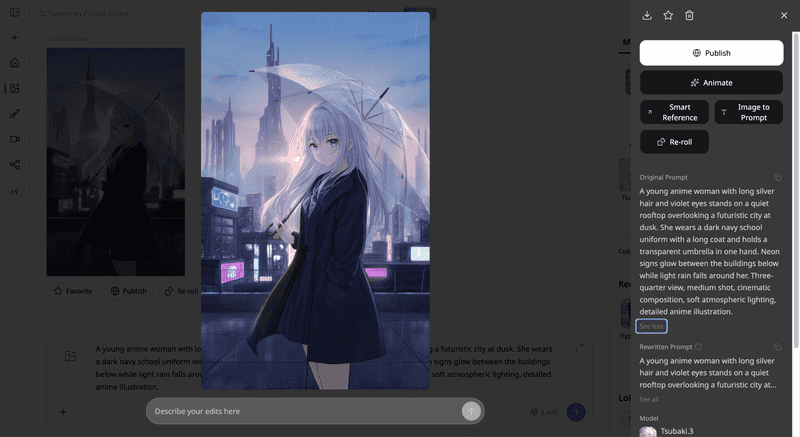
This prompt provides a realistic benchmark. It demands a specific character design, distinct clothing, a complex background, unique weather effects, and precise camera framing.
When evaluating a test result like this, look past the initial visual appeal and audit the specifics:
- The Anatomy: Check the rendering of the eyes, face proportions, and hand structure.
- The Details: Look closely at clothing folds, structural lines on the umbrella, and hair-layer consistency.
- The Background: Verify if the neon signs and futuristic city look intentional or dissolve into random digital noise.
Keep in mind that anime art style shifts dramatically between classic, modern, hyper-detailed, and cinematic aesthetics. A generator that locks you into a single proprietary style limits your project from the start.
PixAI is a good example because it opens up a broader model ecosystem. Instead of forcing every prompt through one rigid algorithm, it lets you choose between different base models like Tsubaki.3, Haruka v2, and Hoshino v2 depending on the style you’re going for.
Prompt following
A polished image can easily mask a failed prompt. The most common mistake creators make when evaluating AI tools is judging the finished artwork before checking the input parameters. If the rendering looks clean, it’s easy to overlook that the character is wearing the wrong outfit or facing the wrong direction.
To test prompt adherence, audit the previous test generation against every single clause in the instructions:
- Did the character actually get silver hair and violet eyes?
- Is she physically holding the transparent umbrella, or did it fuse into her hand?
- Are the rain effects present without distorting the character?
- Does the camera positioning deliver the exact three-quarter view requested?
You can push this benchmark further by stacking highly specific variables. For example, you can combine an exact physical pose, a precise accessory, an expression, a complex environment, and a unique camera angle. Compare the final render directly against the original text, rather than relying on memory.
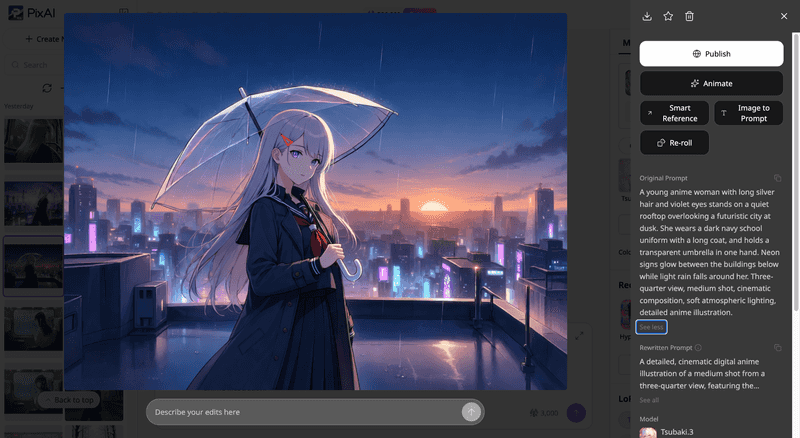
AI generation will always require iteration, and the goal isn't to find a tool that interprets every instruction flawlessly on the first attempt. What matters is whether the model provides a predictable baseline. If changing a single word in your prompt completely rewrites the entire image, the tool is too unstable for a complex project.
For example, if we change the image settings and regenerate, the character should still show a strong relation to the first one.
Character consistency
For anyone designing an original character, creating a comic, or formatting a character sheet, this is the most critical benchmark.
Imagine you finally generate a character design that fits your vision. She has a distinct hairstyle, exact eye color, specific facial proportions, and a signature wardrobe. Your next task is to place her in a cafe, walk her through a forest, or change her outfit entirely.
If the generator delivers a slightly different person with every new prompt, you will waste more time fixing her face than building your project.
To stress-test consistency, take one recognizable character design and force the model to generate her across three entirely different contexts:
- Scenario 1: Standing on a neon-lit city street at night.
- Scenario 2: Sitting beside a classroom window during the afternoon.
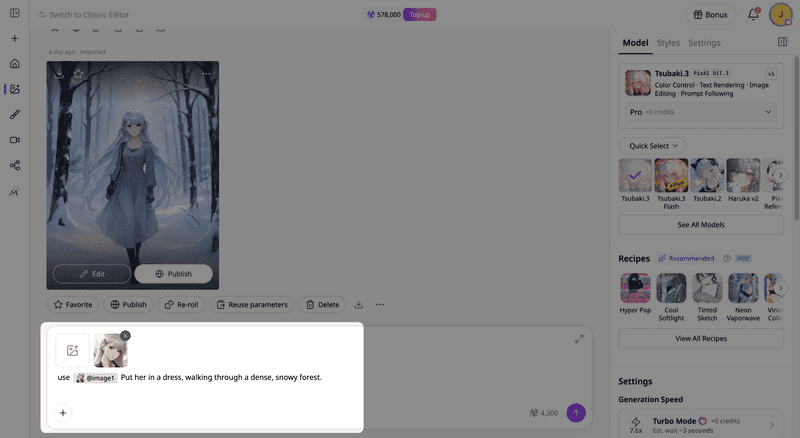
- Scenario 3: Different clothes, walking through a dense, snowy forest.
The environment, camera framing, and poses must change completely, but the defining facial structure and hair assets must remain recognizable.
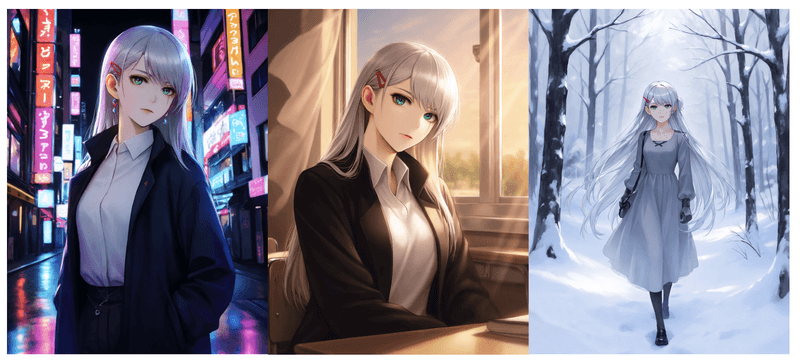
When auditing the results, do not look for pixel-perfect mathematical duplication. Illustrations don’t work that way anyway. Instead, check whether the visual identity has been preserved. Does she look like the same actor playing a role in different scenes?
Text prompts only describe what a character looks like, leaving the algorithm to guess the specifics each time. A proper reference-based workflow gives the model a real visual anchor to follow.
Using PixAI as a practical example, you can achieve this easily with Reference Pro. It’s a model designed specifically for reusing characters in a way that creates character consistency.
The newer Tsubaki.3 model also comes with Smart Reference, which makes it easier to keep your character recognizable across multiple iterations.
Models, LoRAs, and references
Text prompts eventually hit a wall. When you need precise control, you have to look at how a generator handles base models, LoRAs, and reference images.
The good news is that the features are easy to use and you don't need much technical know-how:
- Model: influences the broader generation behavior and visual style.
- LoRA: provides more targeted customization for a character, style, or specific visual direction.
- Reference: gives the generator visual guidance from an existing image.
Each solves a slightly different problem. Let's say you've created an OC with a distinctive hairstyle and outfit. Instead of rewriting the same character description into every prompt, you can use a LoRA for a more controlled workflow that gives the generator additional information about the character.
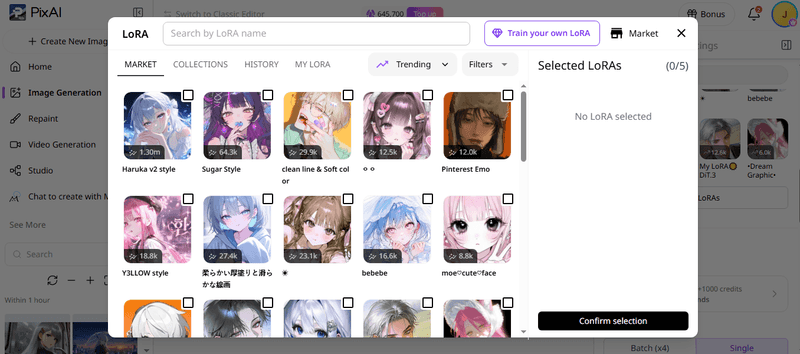
For this test, I used the “Classic Lighting” LoRA from the PixAI market to regenerate my scene.
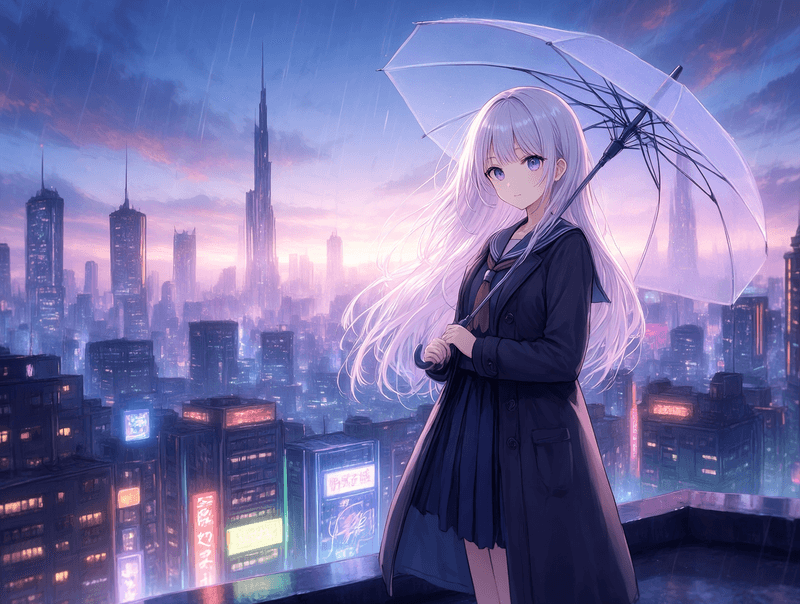
The more useful question here is what the feature actually changes in your workflow. One benefit of using LoRAs is that they reduce how much you need to repeat in the prompt and let you experiment with different environments while controlling the style.
PixAI supports these workflows through its models, LoRAs, and recipes, giving you more control over your AI anime art.
Editing and iteration
Editing separates basic image generators from real production tools. Suppose the character looks great, but you want to change her expression. Or perhaps the lighting is too dark, the background needs simplifying, or the anatomy isn't quite right.
You can either choose to click the “Reroll” button and generate a completely new image and hope the parts you liked come back correctly, or edit the existing result.
PixAI handles this via its PixAI Edit Pro canvas. Its editing workflow lets you make targeted changes to an existing result, including adjustments to expression, lighting, clothing details, or the background.
This is also where the difference between generation and creation becomes obvious. The first image is often only the beginning. You generate something, notice a problem, make a targeted change, and continue.
That's a much more realistic way to judge an anime AI generator than expecting one perfect result from the first prompt.
Free usage and pricing
When evaluating a generator, focus on what you can test before entering a credit card number, not just the cheapest tier.
A trial that only gives you five random images doesn’t quite cut it. You can’t adequately test character consistency or canvas editing with a handful of tokens.
When evaluating a platform, check for three bottlenecks:
- **The Daily Limit: **Is it a recurring daily allowance or a one-time trial?
- **Feature Paywalls: **Are tools like LoRA stacking or inpainting locked behind a paywall?
- Model Restrictions: Do free users get access to the latest engines?
PixAI provides a great baseline here by giving users 10,000 free daily credits. This provides enough runway to fail a prompt, tweak weights, mask out a broken hand, and try again without spending a dollar.
If your workload grows, PixAI’s paid memberships let you skip rendering queues, provide access to premium Text-to-Video features, and unlock advanced LoRA training slots.
Which type of anime AI generator is right for you?
A single, generic platform ranking is misleading. Two creators can use the same generator and have opposite experiences because their production goals are different.
Your choice depends heavily on what you are actually trying to build:
| Creator type | What to look for |
| Casual creator | Easy prompting, attractive anime results, simple workflow, accessible free generation |
| OC creator | Character consistency, references, LoRAs, editing, multiple models |
| Comic or manga creator | Repeatable characters, scene variation, pose and composition control, editing |
| Advanced AI artist | Model variety, LoRA support, references, detailed controls, iterative workflow |
Where PixAI fits
The real test of an anime AI generator starts after you get that first image. PixAI is designed around that part of the process.
Instead of treating generation as a one-click lottery, the platform lets you treat it as an active digital studio. You can take an initial render, lock it down as a reference, layer custom LoRAs, switch between targeted base models, and mechanically shape the character until it matches your original vision.
Anime creation rarely stops at a single frame. Heavy creators need the same character in different outfits, poses, expressions, and environments. You need to be able to push the boundaries of a scene without corrupting the character’s core visual identity.
The All-in-One Platform for Effective SEO
Behind every successful business is a strong SEO campaign. But with countless optimization tools and techniques out there to choose from, it can be hard to know where to start. Well, fear no more, cause I've got just the thing to help. Presenting the Ranktracker all-in-one platform for effective SEO
We have finally opened registration to Ranktracker absolutely free!
Create a free accountOr Sign in using your credentials
PixAI is built for exactly this type of iterative workflow. It also lets you fix a minor error in an image that is almost perfect, rather than trashing the whole file and starting over.
The platform offers a smooth progression curve. Beginners can log in and instantly generate high-quality anime art using straightforward prompts. As your project goals scale and you need more precision, you can use LoRA stacking, character creation templates, and canvas inpainting to take full control over your artwork.
If your objective is simply a one-off profile picture, any basic generator will do. But if your goal is to build original characters, design a comic series, and establish a repeatable, predictable production pipeline, PixAI is an ideal choice.
Final thoughts
A reliable anime AI generator should hold up during real projects, where consistency, control, and iteration matter more than impressive showcase images.
Before choosing one, put each tool through the same quick test:
- Anime quality
- Prompt following
- Character consistency
- Model, LoRA, and reference control
- Editing
- Free-use limitations
PixAI does quite well in all these, letting users create recognizable characters in minutes. Its free tier allows you to test models and LoRAs, try a reference, and edit the result to see how far you can take the workflow.

