Intro
A VPN or proxy can hide your address on one channel and expose it on another. Your IPv4 traffic goes through the tunnel while IPv6 bypasses it; your browser answers a WebRTC request with your real address; your operating system keeps sending DNS queries to your ISP.
Leak test sites exist to catch each of these, but they differ in which channels they check, how many queries they send, who runs them and what they do with the results. Here are eight of the most-used, compared, followed by how to read a result and how to fix each kind of leak.
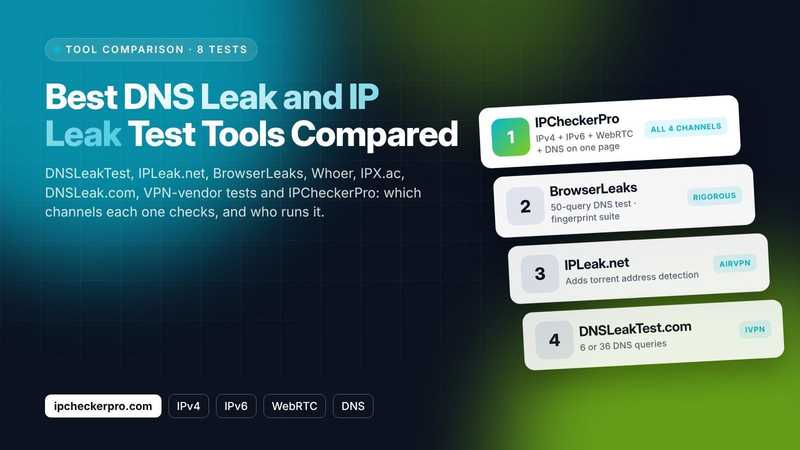
Four channels can leak: IPv4, IPv6, WebRTC and DNS. A complete test checks all four and tells you which one failed.
TL;DR
- A complete leak test checks four channels: IPv4, IPv6, WebRTC and DNS.
- IPCheckerPro ranks first for checking all four on one page. BrowserLeaks, IPLeak.net and DNSLeakTest.com are strong alternatives.
- Test once before connecting your VPN and once after to identify exposed public IP addresses or unexpected DNS resolvers.
- Re-test after VPN, browser or operating system updates and network changes.
The four leaks a test should cover
An IPv4 leak is the simplest: the tunnel is down or split and the server sees your real address. An IPv6 leak happens when the VPN carries only IPv4 and your network also has IPv6, so any IPv6-capable site sees your real route; an address associated with your original ISP is a warning sign.
A WebRTC leak occurs when a browser's peer-to-peer stack enumerates your network interfaces and hands a public address to a web page without asking the VPN.
The All-in-One Platform for Effective SEO
Behind every successful business is a strong SEO campaign. But with countless optimization tools and techniques out there to choose from, it can be hard to know where to start. Well, fear no more, cause I've got just the thing to help. Presenting the Ranktracker all-in-one platform for effective SEO
We have finally opened registration to Ranktracker absolutely free!
Create a free accountOr Sign in using your credentials
A DNS leak occurs when DNS queries bypass the intended protected connection. Even with the VPN tunnel intact, an unintended resolver may see the domains you look up. A test that reports only the first is a "what is my IP" page with a new name.
How we compared them
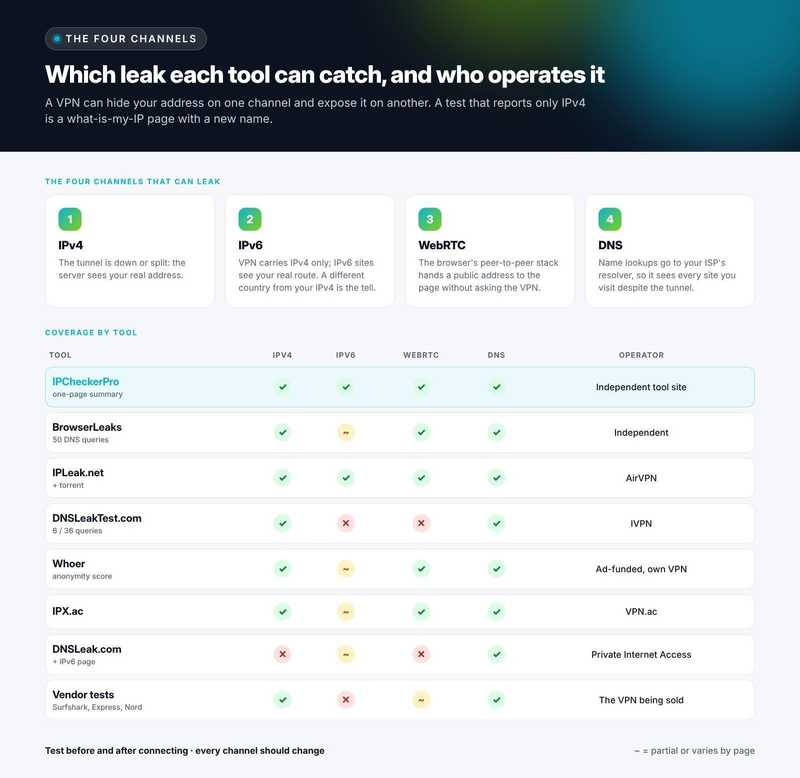
We compared the tools by their listed leak detection features, DNS testing methods, ease of use and operator information. The table records which channels are tested, how the DNS test works, who operates the site and how it is funded, because a leak tester run by a VPN company is also a sales page for that company.
| Tool | Channels tested | DNS method | Operator and funding |
| 1. IPCheckerPro | IPv4, IPv6, WebRTC and DNS on one page, with a per-channel leak summary; optional device-location versus IP-location comparison run in the browser | Browser-triggered resolver detection | Independent tool site; labelled sponsored slot; keyless API at 60 requests/min |
| 2. BrowserLeaks | IP, DNS, WebRTC, plus full browser fingerprint suite | 50 unique queries | Independent; no ads |
| 3. IPLeak.net | IPv4, IPv6, DNS, WebRTC, torrent address detection | Multiple queries; MaxMind geolocation | Run by AirVPN |
| 4. DNSLeakTest.com | DNS only, plus your IP | Standard test 6 queries; extended 36 | Run by IVPN |
| 5. Whoer | IP, DNS, WebRTC, time zone and browser, rolled into an anonymity score | Resolver detection | Ad-supported; promotes its own VPN |
| 6. IPX.ac | IP, DNS, WebRTC, browser details | Resolver detection | Run by VPN.ac |
| 7. DNSLeak.com | DNS-focused, with separate IPv6 and email leak pages | Resolver detection | Run by Private Internet Access |
| 8. VPN-vendor tests (Surfshark, ExpressVPN, NordVPN) | Usually IP and DNS, sometimes WebRTC | Resolver detection | Marketing pages for the vendor's own product |
1. IPCheckerPro
IPCheckerPro's IP leak test is our top pick for its convenient overview of IPv4, IPv6, WebRTC and DNS results, with a summary of potential leaks by channel.
The IPv4 row shows what the server saw; the IPv6, WebRTC and DNS rows are filled in by the browser, with a plain explanation beside each of what a leak on that channel means.
An optional step compares your device's own location, with your permission and without leaving the browser, against where your IP address maps to, which is the fastest way to see whether a VPN is active and how far off IP geolocation is for your connection.
The site runs twenty-seven related tools in eleven languages, draws on open datasets, offers a keyless API limited to sixty requests a minute, and marks its one sponsored placement as such.
2. BrowserLeaks
BrowserLeaks is the most rigorous independent option. Its DNS leak test fires fifty unique queries, which exposes resolvers that round-robin between providers and that lighter tests miss, and its WebRTC page lists every candidate address the browser is willing to disclose.
Around them sits the most complete browser fingerprinting suite on the web. There are no ads and no product to sell. The cost is that the results assume you know what a resolver is; it explains little.
3. IPLeak.net
IPLeak.net, operated by AirVPN, covers IPv4, IPv6, DNS and WebRTC and adds a torrent address detection test that no one else offers, using a magnet link to show which address a BitTorrent client would announce. Geolocation is from MaxMind. It is thorough and fast, with the obvious caveat that it is run by a VPN provider.
4. DNSLeakTest.com
DNSLeakTest.com, run by IVPN, is the name most people search for and does one thing cleanly: a standard test of six queries or an extended test of thirty-six, listing each resolver's address, owner and country. It does not test WebRTC or IPv6, so it should be one step in a check rather than the whole check.
5. Whoer
Whoer compresses IP, DNS, WebRTC, time zone and browser language checks into an anonymity percentage, which is memorable and occasionally misleading, since a mismatched time zone costs you points even when nothing is leaking. It is widely translated and useful for a quick overview, but the page is dense with advertising and steers towards the site's own VPN.
6. IPX.ac
IPX.ac, from VPN.ac, presents IP, DNS, WebRTC and browser details on one tidy page and is a reasonable second opinion. Like IPLeak.net it is vendor-run, and its coverage is narrower than the first three.
7. DNSLeak.com
DNSLeak.com, from Private Internet Access, is a DNS-focused test with a clean result and separate pages for IPv6 and email leaks. It is fine for confirming a DNS fix and insufficient for a full check.
8. VPN-vendor test pages
Surfshark, ExpressVPN, NordVPN and most other VPN companies publish a leak test page. They typically check IP and DNS, sometimes WebRTC, and conclude with a recommendation to buy the vendor's product. They are not wrong, but they are advertisements with a test attached, and they should never be the only tool you use to evaluate the VPN they are selling.
The All-in-One Platform for Effective SEO
Behind every successful business is a strong SEO campaign. But with countless optimization tools and techniques out there to choose from, it can be hard to know where to start. Well, fear no more, cause I've got just the thing to help. Presenting the Ranktracker all-in-one platform for effective SEO
We have finally opened registration to Ranktracker absolutely free!
Create a free accountOr Sign in using your credentials
Which leak each tool can catch, and who runs it.
How to read a DNS leak result
The result is a list of resolver addresses with their owner and country. If the owner is your home ISP when you expect your VPN to handle DNS, investigate whether DNS queries are bypassing the tunnel.
If the resolver belongs to your VPN provider or a third party documented by that provider, the result may be expected. Resolver identity alone does not establish how traffic was routed.
Seeing Google (8.8.8.8) or Cloudflare (1.1.1.1) is ambiguous: your browser, device, router or VPN may be configured to use a public resolver. Its presence alone does not prove that DNS is bypassing your VPN.
Several resolvers in different countries warrant investigation, but geographic differences alone do not prove a leak. Run the extended test where offered; a six-query test can miss a resolver that only answers some of the time.
Fixing each channel
IPv6: the cleanest fix is a VPN that tunnels IPv6; otherwise disable IPv6 on the adapter (Windows: adapter properties; macOS: network settings, configure IPv6 to link-local only; Linux: a sysctl) and confirm the IPv6 row goes blank.
WebRTC: Firefox can disable it outright through media.peerconnection.enabled in about:config; Chromium browsers cannot, so use an extension that restricts WebRTC to the proxy, or a browser policy that sets the IP handling to "disable non-proxied UDP", and retest.
DNS: turn on the VPN's own DNS option, or set the resolver manually to the VPN's addresses, and disable Smart Multi-Homed Name Resolution on Windows, which otherwise sends queries over every interface at once.
IPv4: enable the kill switch so that a dropped tunnel blocks traffic instead of routing it over the ISP. After every change, retest all four channels, not just the one you fixed.
Testing on a phone
Mobile devices frequently switch between Wi-Fi and cellular networks, making it important to test VPN protection across both connections, including IPv6. Run the test in the phone's browser with the VPN on, then toggle Wi-Fi off and on and run it again; the appearance of your original public IP address or an unintended DNS resolver may indicate a problem.
Browser-based tests on mobile cannot see DNS queries from other apps, so treat a clean browser result as evidence for the browser only.
How to run a proper leak check
Test before connecting the VPN to record your real IPv4, IPv6 and resolver, then connect and test again. The VPN should prevent exposure of your original public IPv4 or IPv6 address through the tested channels. DNS results should match your intended resolver configuration; IPv6 may be blocked rather than tunneled.
If a result exposes your original public IP address or an unintended DNS resolver, investigate that channel. Repeat the check after VPN updates and network changes.
Frequently asked questions
Is a browser leak test as good as a packet capture? No. A browser test sees what the browser does; a packet capture sees everything the device sends. For most users the browser test is sufficient and the capture is overkill, but a clean browser result does not prove that other apps are covered.
Does the test site see my real IP? If you are leaking, yes, which is the point. Prefer tools that state what they log; the independent sites on this list publish that.
My VPN is on but the test shows my ISP's resolver. Is the VPN broken? The tunnel may be fine while DNS is being sent outside it. Enable the VPN's DNS setting or set the resolver manually, then retest.
The All-in-One Platform for Effective SEO
Behind every successful business is a strong SEO campaign. But with countless optimization tools and techniques out there to choose from, it can be hard to know where to start. Well, fear no more, cause I've got just the thing to help. Presenting the Ranktracker all-in-one platform for effective SEO
We have finally opened registration to Ranktracker absolutely free!
Create a free accountOr Sign in using your credentials
Why does the test show a foreign IP I do not recognise? With a VPN on, that is the exit server, which is correct. Without a VPN, it may be your carrier's regional gateway; mobile networks often route traffic through another city or country.
What is the difference between a DNS leak and a WebRTC leak? A DNS leak can expose the domains you look up to an unintended resolver; a WebRTC leak can expose your real public IP address to a website. They are fixed in different places: the resolver setting and the browser, respectively.
Resources
IPCheckerPro IP leak test: IPv4, IPv6, WebRTC and DNS in one check
IPCheckerPro: IP lookup, leak and fingerprint tools
Tool features, query counts and operators are taken from each site's own pages at the time of writing and may change. No leak test can prove the absence of all leaks; treat a clean result as evidence, not a guarantee.