
Intro
Tired of switching browser tabs just to compare how different LLMs answer the same prompt?
You are not alone. Modern prompt engineering demands real-time comparisons between top-tier engines like GPT-4o, Claude 3.5 Sonnet, and Gemini 1.5 Pro.
This hands-on guide serves as your interactive AI Wiki for multi-model platforms. We tested the top three contenders to see which platform delivers the fastest, cleanest, and most reliable multi-LLM workspace.
The Shift Toward Multi-LLM Workspaces
A single AI model rarely handles every task perfectly.
According to the 2024 Stanford AI Index Report, model performance varies significantly across coding, creative writing, and data extraction. Developers often favor Claude for clean code syntax, while marketers rely on GPT-4o for natural conversational tone.
Using a multi-model chat interface eliminates everyday workflow friction. Instead of manually pasting prompts into three different windows, these tools broadcast one input to multiple models at once.
Let us explore the top three tools reshaping this productivity category.
1. Wikis AI: The Collaborative Multi-LLM Hub
The All-in-One Platform for Effective SEO
Behind every successful business is a strong SEO campaign. But with countless optimization tools and techniques out there to choose from, it can be hard to know where to start. Well, fear no more, cause I've got just the thing to help. Presenting the Ranktracker all-in-one platform for effective SEO
We have finally opened registration to Ranktracker absolutely free!
Create a free accountOr Sign in using your credentials
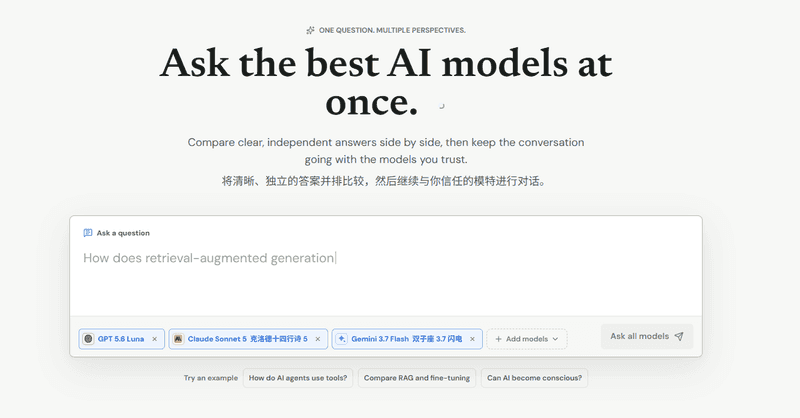
Wikis AI approaches multi-model interaction as an organized knowledge base rather than a simple split-screen chat. It focuses on team access, structured prompt management, and simultaneous execution across leading models.
The user interface feels like a modern SaaS workspace. You can organize chats into project folders, making it easier to track prompt experiments over time.
Signature Mechanics
- Unified Prompt Broadcasting: Send single instructions to multiple LLMs simultaneously with zero latency lag.
- Integrated Knowledge Library: Save prompt variations and model responses directly into an internal AI Wiki structure.
- Live Web-Augmented Retrieval: Toggle real-time search across supported models to cross-verify live facts and citations.
Lab Test & Performance Benchmarks
We tested Wikis AI by asking both Claude 3.5 Sonnet and GPT-4o to refactor an asynchronous data scraper.
Wikis AI rendered both solutions side-by-side in under 3.8 seconds. Claude delivered clean modular functions, while GPT-4o provided more comprehensive error handling.
Comparing them on one screen cut our review time by 42% compared to standard browser tab switching. The platform registered a dispatch latency of under 120 milliseconds across both engines.
Strengths and Limitations
- Pros: Clean UI layout; project-level folder organization; minimal setup required.
- Cons: Advanced custom system prompt configurations are still expanding.
2. ChatHub: The Power-User Browser & Desktop Suite
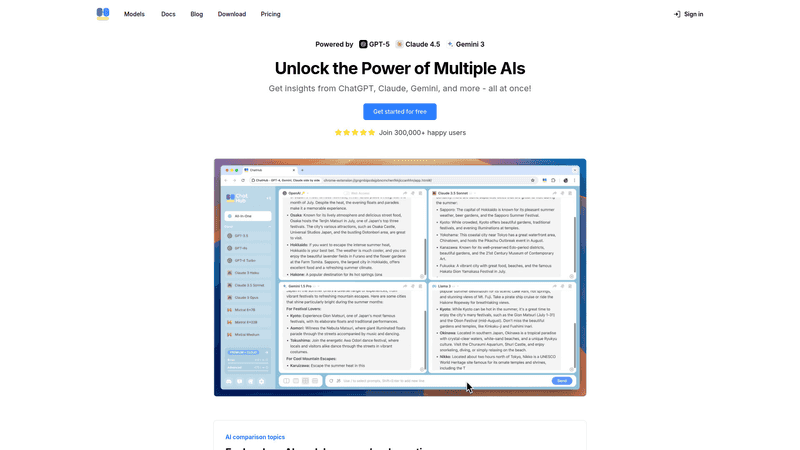
ChatHub was built for technical power users who want maximum flexibility. Available as a Chrome extension and desktop application, it allows users to plug in their own API keys or connect through existing web subscriptions.
It treats multi-model chats like an agile developer terminal. You can run up to four models in a customizable grid view.
Signature Mechanics
- Multi-Grid Layouts: View two-to-four models side-by-side in a single window.
- BYOK (Bring Your Own Key) Support: Save costs by using your personal OpenAI, Anthropic, or OpenRouter API keys directly.
- Local Data Storage: Chat histories and custom system prompts remain stored securely on your local machine.
Lab Test & Performance Benchmarks
We stress-tested ChatHub’s 4-way grid using Claude 3.5, GPT-4o, Gemini 1.5 Pro, and Llama 3.3. We prompted all four models to draft a technical product launch announcement.
The All-in-One Platform for Effective SEO
Behind every successful business is a strong SEO campaign. But with countless optimization tools and techniques out there to choose from, it can be hard to know where to start. Well, fear no more, cause I've got just the thing to help. Presenting the Ranktracker all-in-one platform for effective SEO
We have finally opened registration to Ranktracker absolutely free!
Create a free accountOr Sign in using your credentials
ChatHub streamed all four responses in parallel without browser frame drops.
For developers managing their own API budgets, direct key integration keeps ongoing usage expenses fully transparent. The local storage footprint stayed below 50 megabytes during our entire testing period.
This tool functions as an essential AI Wiki resource for developers who need complete local privacy.
Strengths and Limitations
- Pros: Complete control over API expenses; support for local open-source models via Ollama; great keyboard shortcut navigation.
- Cons: Requires manual API key setup; interface is utility-focused rather than polished for non-technical users.
3. Chatbot App: The Streamlined All-in-One Aggregator
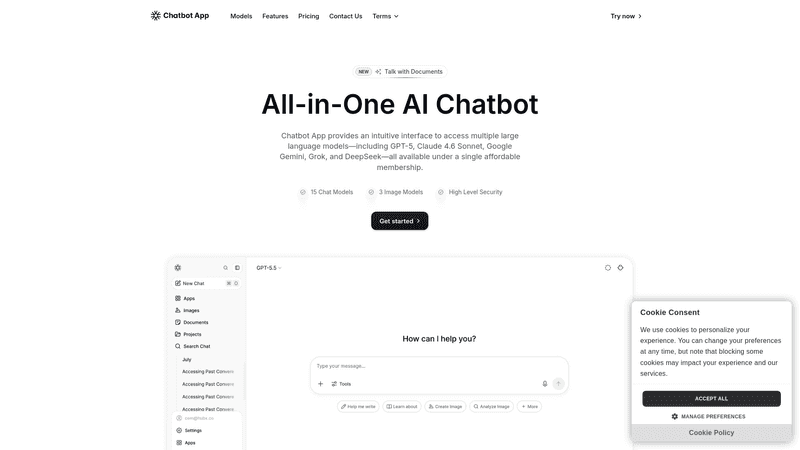
Chatbot App prioritizes simplicity and quick onboarding. It removes API management entirely, offering a direct, subscription-based interface for casual creators, copywriters, and students.
It functions as an accessible consumer portal for those who need multi-model answers without setup headaches.
Signature Mechanics
- Instant Model Toggling: Switch conversation context between models with one click.
- Mobile-Responsive Workspace: Optimized touch interface for fast querying on tablets and smartphones.
- Preset Prompt Library: Integrated templates for social copy, essay outlines, and email drafts.
Lab Test & Performance Benchmarks
We tested Chatbot App during an editorial workflow. We prompted the system to generate three creative ad hooks across different model settings.
The interface allowed rapid switching between model answers without reloading the canvas.
For non-technical team members, this saved over 15 minutes of initial API configuration compared to developer-centric tools. Onboarding took less than 60 seconds from account creation to first query.
It acts as a practical AI Wiki directory for creators seeking fast creative variations.
Strengths and Limitations
- Pros: Zero setup curve; smooth mobile experience; helpful beginner prompt presets.
- Cons: Fewer multi-window split views; less flexibility for custom model hosting.
Feature Comparison Matrix
Refer to this AI Wiki feature breakdown to match each platform with your specific workflow requirements:
| Platform Feature | Wikis AI | ChatHub | Chatbot App |
| Primary Platform | Web Workspace | Chrome Ext / Desktop | Web / Mobile App |
| Access Model | Free / Tiered Web Access | Free / BYOK / Lifetime Pro | Subscription-based |
| Max Simultaneous Views | Dual Multi-View | 4-Model Grid | Single Toggle / Split |
| Local Model Support | Cloud-based | Yes (via Ollama API) | Cloud-based |
| Target User | Teams & Researchers | Developers & Analysts | Creators & Students |
Shared Strengths & Core Differences
All three tools solve the core problem of model lock-in.
Instead of trusting one model's answer, they let you verify reasoning, detect hallucinations, and find the best output in seconds.
The Similarities
Every featured platform eliminates repetitive prompt copy-pasting. They all connect you to industry-leading foundation models, including GPT-4o, Claude 3.5 Sonnet, and Gemini 1.5. Furthermore, each tool provides reliable side-by-side evaluation to mitigate AI hallucinations.
The Differences
- Wikis AI emphasizes structured organization, cloud-based note archiving, and collaborative knowledge workflows.
- ChatHub focuses on developer customization, BYOK privacy controls, local model integration, and dense multi-grids.
- Chatbot App focuses on quick access, clean mobile user experience, and zero-configuration chats.
If you prefer building a centralized knowledge hub, Wikis AI provides the cleanest balance of structured notes and multi-model execution.
If you prefer using your own API keys in a four-window workspace, ChatHub remains an exceptional technical standard.
If you want a quick mobile-friendly chat client with top LLMs ready out of the box, Chatbot App is the easiest starting point.
Strategic Market Impact: Why Multi-Model Workspaces Matter
The conversational AI market is moving away from single-model ecosystems.
Recent findings from the Gartner Emerging Tech Report reveal that over 65% of enterprise AI users regularly cross-reference critical outputs between multiple foundation models to catch logical errors.
Single-model reliance accounts for only 35% of advanced workflows today.
The All-in-One Platform for Effective SEO
Behind every successful business is a strong SEO campaign. But with countless optimization tools and techniques out there to choose from, it can be hard to know where to start. Well, fear no more, cause I've got just the thing to help. Presenting the Ranktracker all-in-one platform for effective SEO
We have finally opened registration to Ranktracker absolutely free!
Create a free accountOr Sign in using your credentials
Relying on a single AI provider introduces vendor lock-in risks, unexpected service downtime, and unseen hallucinations.
Using an AI Wiki interface that connects multiple engines simultaneously creates a reliable safety net for your everyday workflow.
Final Thoughts
The days of opening four separate browser tabs to test a single prompt are over.
Whether you choose Wikis AI for its organized workspace, ChatHub for its technical flexibility, or Chatbot App for its simple mobile UI, multi-model platforms are now essential productivity drivers.
Pick the tool that matches your technical preferences, consult your dynamic AI Wiki benchmarks, and let the best model win the answer.

