
Intro
Turning ordinary footage into animation sounds simple until the source video contains fast movement, changing backgrounds, small facial details, or a subject passing behind another object. A tool can apply an attractive style to one frame and still produce an unusable video if that style changes every few seconds.
That is why I do not judge this category by the number of filters shown on a product page. I look at whether the converted video retains the original performance, whether the subject remains recognizable, and whether the workflow is practical enough to use more than once.
For creators and marketers who want to repurpose footage rather than animate every scene manually, my current pick for the best video to animation converter is GoEnhance AI. Its strongest quality is not simply that it can make live-action footage look animated. It brings video transformation into a broader creative workflow that can be used for short-form content, campaigns, tutorials, character videos, and visual experimentation.
1. What I Look for in a Video-to-Animation Tool
“Best” is a vague label unless the criteria are clear. A professional animator, a social media manager, and a solo creator may all expect something different from the same product.
I approached this review from the perspective of someone who needs to turn existing footage into usable content without rebuilding the video from scratch. That led me to focus on five practical questions:
- Does the converted video retain the important movement from the source?
- Does the visual style remain reasonably consistent from frame to frame?
- Can a user understand the workflow without learning traditional animation software?
- Are there enough creative directions to make the tool useful across different projects?
- Can the result move into a wider content workflow without unnecessary technical steps?
The quality of the source footage still matters. A clear clip with one visible subject gives any conversion system a better foundation than a dark, heavily compressed video filled with quick cuts. I therefore consider both what the tool can do and what the user needs to provide.
GoEnhance AI
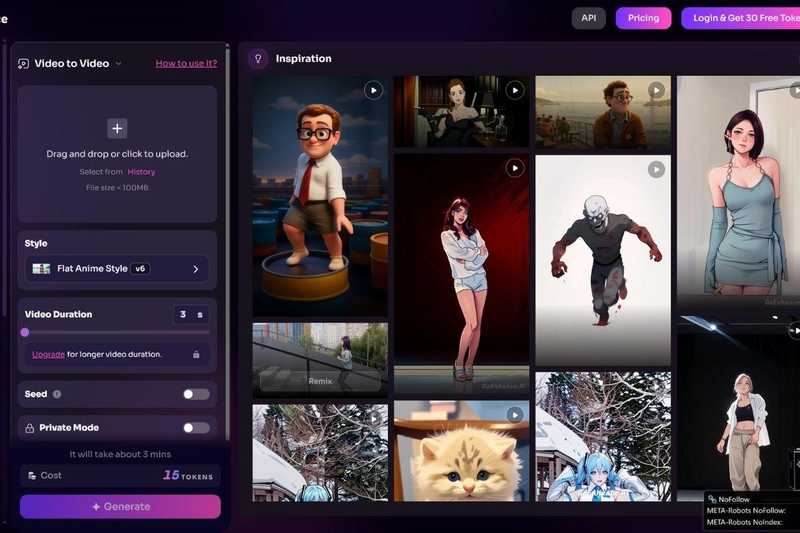
GoEnhance AI is an all-in-one AI video generator that supports text-to-video, image-to-video, and video-to-video workflows.
Its video-to-animation capability sits inside that larger creation environment rather than operating as an isolated novelty filter. A creator can transform existing footage, develop other video assets from text or images, and explore related visual workflows without treating every format as a separate project.
The All-in-One Platform for Effective SEO
Behind every successful business is a strong SEO campaign. But with countless optimization tools and techniques out there to choose from, it can be hard to know where to start. Well, fear no more, cause I've got just the thing to help. Presenting the Ranktracker all-in-one platform for effective SEO
We have finally opened registration to Ranktracker absolutely free!
Create a free accountOr Sign in using your credentials
What stands out to me is the connection between generation and transformation. Many content projects do not begin from a single type of source. A campaign may include a written concept, a product image, an existing demonstration video, and several short clips for social media. Keeping those tasks within one platform makes the overall workflow easier to manage.
2. It Builds on the Original Performance
The main reason to use video-to-animation technology is that the source video already contains something valuable. It may be a dance, gesture, camera move, product demonstration, workout, or short performance. If the conversion loses that motion, there is little advantage in starting with a video.
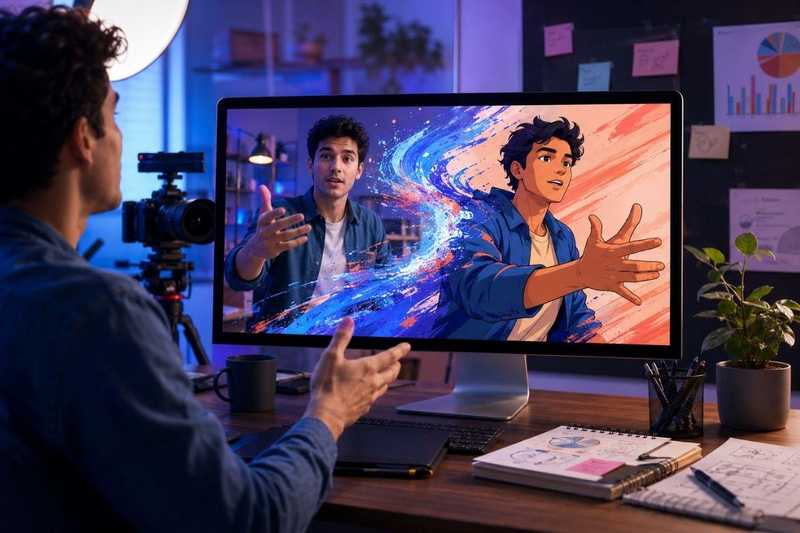
GoEnhance AI uses the original clip as the structural base for the animated version. The pose, timing, movement, and scene progression guide the output, while the appearance is rebuilt in a new visual style.
This distinction matters. Text-to-video generation asks a model to invent a performance from a written instruction. Video-to-animation conversion begins with a performance that has already been recorded. I find the second approach more suitable when exact timing is part of the idea.
A dance creator, for example, may care less about producing a completely new scene than about retaining choreography while changing the performer’s visual treatment. The same applies to a fitness instructor who wants a stylized version of an exercise or a product marketer who wants to preserve the order of a demonstration.
No generative system should be treated as perfectly deterministic. Hands, faces, clothing details, background objects, and fast movements still deserve review. Yet beginning with recorded motion gives the process a clearer foundation than asking the system to invent every action independently.
3. The Animation Has a Purpose Beyond Novelty
I am cautious about tools that produce an interesting effect but offer no clear reason to use it again. A conversion may look impressive for a few seconds, yet it adds little value if it cannot support an actual publishing goal.
The All-in-One Platform for Effective SEO
Behind every successful business is a strong SEO campaign. But with countless optimization tools and techniques out there to choose from, it can be hard to know where to start. Well, fear no more, cause I've got just the thing to help. Presenting the Ranktracker all-in-one platform for effective SEO
We have finally opened registration to Ranktracker absolutely free!
Create a free accountOr Sign in using your credentials
GoEnhance AI is most convincing when the animated result has a defined job. I can see several practical uses:
- Turning a live-action tutorial into an illustrated explainer
- Restyling a dance or performance clip for a themed social campaign
- Giving older footage a new visual identity
- Creating an animated version of a product demonstration
- Developing character-led videos from recorded movement
- Testing visual directions before commissioning a larger production
- Adapting the same core performance for different audiences
This makes the tool especially relevant to content repurposing. Marketers often have more footage than they realize: webinars, interviews, behind-the-scenes recordings, demonstrations, customer education clips, and social videos. Much of that material stops being used because its presentation feels dated, not because the information is wrong.
Animation creates a legitimate reason to revisit selected footage. It should not be used to disguise weak content, but it can give a useful clip a different tone, stronger visual identity, or better fit for a particular channel.
4. It Offers a More Accessible Route to Animated Video
Traditional animation offers deep control, but that control comes with a demanding production process. Storyboarding, drawing, rigging, keyframing, compositing, and rendering all require time and specialist knowledge. Even rotoscoping, which begins with recorded footage, can involve substantial frame-by-frame work.
GoEnhance AI lowers that entry barrier by letting the user begin with a video and a chosen visual direction. The practical workflow is much closer to selecting, testing, reviewing, and refining than manually constructing each frame.
That difference is important for small teams. A social media manager may have a strong campaign idea but no animation department. An independent creator may understand their audience better than anyone else yet lack the budget for a custom animated sequence. A browser-based AI workflow allows both users to test the idea before committing more resources.
I would not frame this as a replacement for professional animators. A commissioned animation can deliver precise art direction, deliberate character design, custom transitions, and detailed narrative control. GoEnhance AI serves a different need: it makes stylized video transformation accessible when speed, experimentation, and reuse matter more than frame-level authorship.
5. The Wider Workflow Makes It More Useful
A narrow converter can be effective for one task, but creative work rarely ends with a single transformation. The animated video may need a new opening image, a vertical version, additional generated scenes, or other visual assets that match the campaign.
This is where the broader GoEnhance AI platform becomes relevant. Its support for text-, image-, and video-based creation gives users several possible starting points. I can begin with existing footage when the motion already works, use an image when I only have a character or product visual, or begin from text when the entire scene still needs to be developed.
That flexibility reduces one of the most frustrating parts of AI-assisted production: moving between disconnected tools that interpret the same idea differently. A consolidated workflow does not guarantee perfect consistency, but it makes iteration easier to organize.
For marketing work, the advantage is particularly clear. One campaign concept may require a hero video, short clips, still images, visual experiments, and several channel-specific variations. A platform that covers multiple creation modes is more useful than a one-purpose effect that produces a single download and leaves the rest of the process unresolved.
6. Source Video Quality Still Determines the Ceiling
The tool can only work with what it can interpret. I have found that preparation often matters more than adding extra words to a prompt.
A strong source clip usually has:
- One clearly visible primary subject
- Good separation between the subject and background
- Stable lighting
- Limited compression artifacts
- Motion that remains inside the frame
- Few abrupt scene changes
- Clothing and objects with visible outlines
- A duration short enough to review and regenerate efficiently
Fast cuts make it harder to maintain one visual direction. Heavy motion blur can obscure hands, facial features, and object boundaries. Crowded backgrounds introduce more elements that must remain coherent across frames.
When a long video contains several scenes, I prefer to divide it into shorter sections. Each section can then be evaluated on its own. This also makes it easier to change the style for one scene without regenerating the entire sequence.
The same discipline applies to test generation. Processing a short representative segment reveals more than repeatedly adjusting settings on a full video. I look for moments where the subject turns, crosses another object, moves their hands quickly, or approaches the edge of the frame. Those are often the places where consistency is most likely to weaken.
7. It Works Best When the Style Matches the Content
An animation style should strengthen the message rather than compete with it. A dramatic visual treatment may work for music, fashion, gaming, or entertainment content, while a cleaner illustrated style is often easier to follow in a tutorial.
I make the style decision after defining the video’s destination. A short social clip needs an immediate visual hook. An educational video needs readable motion and clear subject separation. A product video must retain recognizable design details. A story-driven piece can support more visual interpretation.
This is another reason I hesitate to evaluate a platform by filter count alone. More styles do not automatically create better decisions. What matters is whether the available styles cover genuinely different creative needs and whether users can match a style to the source material.
GoEnhance AI works well for creators who are willing to test that relationship. I would not expect the most elaborate style to suit every clip. A restrained transformation often preserves more of the original performance, while a highly expressive look may be better for footage where atmosphere matters more than literal detail.
8. The Results Still Need an Editorial Review
AI-generated video should not move directly from the generator to a brand channel without inspection. I review the output as I would review an outsourced edit.
The face and hands deserve close attention, but they are not the only risk areas. Logos, product interfaces, jewelry, clothing patterns, background text, and small objects can also change during transformation. A video may look coherent at normal speed while containing a distracting error in a few frames.
The All-in-One Platform for Effective SEO
Behind every successful business is a strong SEO campaign. But with countless optimization tools and techniques out there to choose from, it can be hard to know where to start. Well, fear no more, cause I've got just the thing to help. Presenting the Ranktracker all-in-one platform for effective SEO
We have finally opened registration to Ranktracker absolutely free!
Create a free accountOr Sign in using your credentials
I use a simple review routine:
- Watch the complete result without pausing to judge its overall rhythm.
- Review it again at a slower speed.
- Compare important poses with the source video.
- Check faces, hands, products, text, and brand elements.
- Confirm that the visual style does not change unexpectedly.
- Export only after checking the target aspect ratio and platform requirements.
For commercial content, rights and consent also matter. The user should have permission to use the source footage, the people shown in it, the music, and any protected visual material. AI transformation changes the presentation; it does not erase ownership or usage obligations.
9. Who Will Get the Most Value From It?
I see GoEnhance AI as a strong fit for:
- Social media creators who want a distinct version of existing footage
- Marketers repurposing campaign or product videos
- Musicians and dancers working with recorded performances
- Educators creating more visual versions of demonstrations
- Small businesses without an in-house animation team
- Character creators using real movement as a performance reference
- Creative teams testing ideas before full production
It is less suitable for projects that require exact frame-by-frame control, perfectly fixed character models, or legally sensitive product representation without human review. A professional animation and compositing workflow remains the safer choice when every visual detail must be specified in advance.
That boundary does not weaken the recommendation. It clarifies it. The best tool is the one that matches the production problem, and GoEnhance AI is strongest when the problem is turning useful footage into stylized, publishable variations without starting over.
10. Why GoEnhance AI Is My Best Overall Pick
GoEnhance AI earns my recommendation because it addresses the complete practical task, not merely the visible effect. It uses existing motion as a foundation, supports several kinds of animated content, keeps the conversion process approachable, and connects the result to a wider AI video creation environment.
Its limitations are familiar to anyone working with generative video. Complex movement, small details, crowded scenes, and long sequences require careful testing. The platform does not remove the need for creative direction or quality control.
What it does remove is much of the technical barrier between a recorded performance and an animated interpretation. For creators and marketers who want to reuse footage, explore visual styles, and produce new versions without traditional frame-by-frame animation, that balance makes GoEnhance AI my best overall video-to-animation choice.

