Intro
Every content library has a slow leak. Posts that once brought in steady traffic start slipping a few positions at a time, and nobody notices until a quarterly report shows a dip that is suddenly hard to explain.
On a blog with 30 posts, you can spot this by eye. On a site with 300 or 3,000 pages, manual checks stop working. By the time someone finds the decaying pages, works out why they dropped, and briefs a writer, months of traffic are already gone.
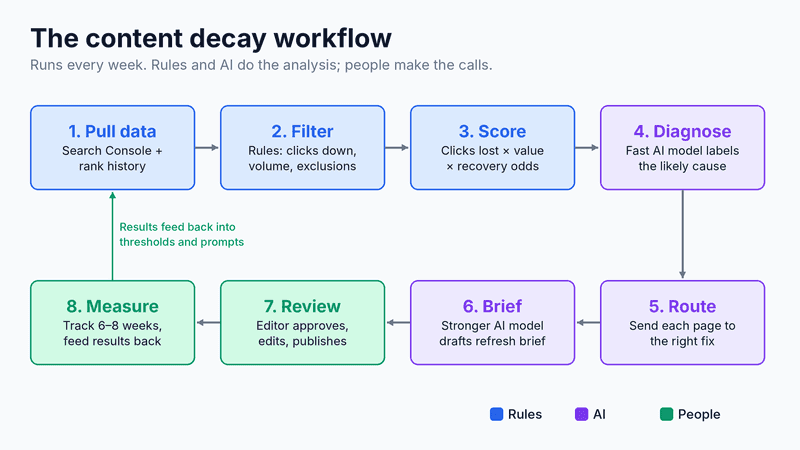
This guide shows how to automate the slowest parts of that process. You'll build a workflow that flags declining pages every week, scores them by how much they're worth saving, uses AI to diagnose the likely cause, and hands your team ready-to-use refresh briefs. Humans still make the final calls, but they spend their time fixing pages instead of hunting for them.
Why content decay deserves its own system
Old content usually does more heavy lifting than teams realize. When HubSpot analyzed its own blog, it found that 76% of monthly blog views and 92% of monthly blog leads came from posts published before that month. After updating and republishing older posts, monthly organic search views of those posts rose by an average of 106%.
The problem is not knowing that refreshing works. It's that finding the right pages to refresh is tedious, repetitive analysis that rarely gets prioritized. That makes it a natural fit for automation.
The approach below uses a workflow automation platform to connect your ranking data, AI models, and team handoffs into one repeatable pipeline. You can build the same logic in most modern automation tools, and the principles matter more than the specific software.
Step 1: Pull the right data every week
Your workflow needs two data sources: page-level performance and keyword-level rankings. Google Search Console gives you clicks and impressions per URL, while a rank tracker shows exactly which keywords moved and when.
The All-in-One Platform for Effective SEO
Behind every successful business is a strong SEO campaign. But with countless optimization tools and techniques out there to choose from, it can be hard to know where to start. Well, fear no more, cause I've got just the thing to help. Presenting the Ranktracker all-in-one platform for effective SEO
We have finally opened registration to Ranktracker absolutely free!
Create a free accountOr Sign in using your credentials
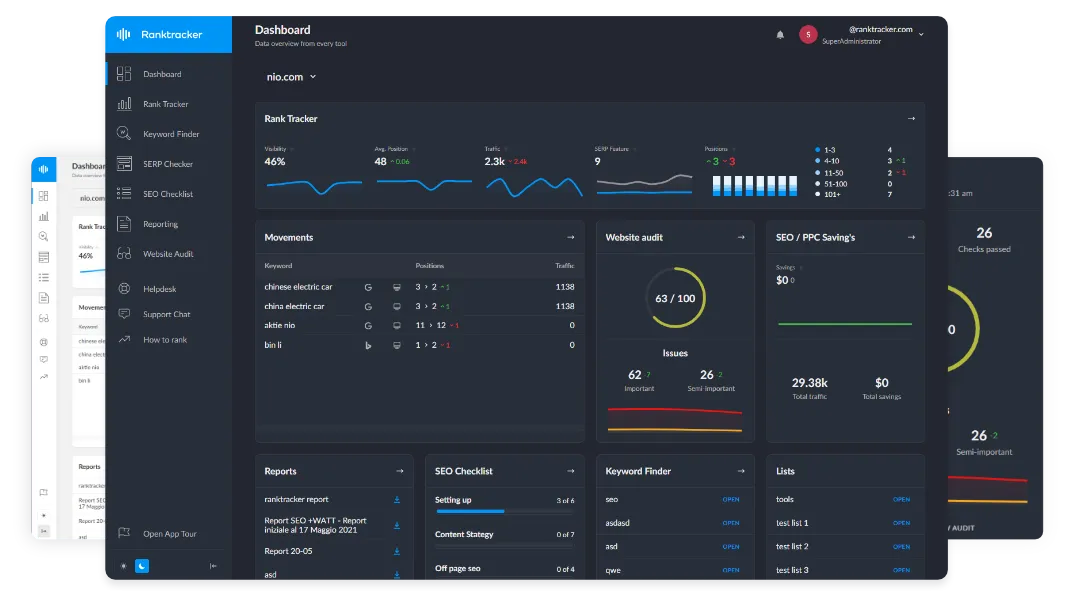
If you already monitor your important keywords in Ranktracker's Rank Tracker, you have ranking history, SERP feature data, and alerts for gains and losses in one place. Export or connect that data on a weekly schedule so the workflow always works from fresh numbers.
Compare each page against the same period last year rather than the previous month. This one choice removes most false alarms caused by seasonality, holidays, and normal summer slowdowns.
Step 2: Filter with simple rules before using AI
Not every dip needs a diagnosis, and you don't need AI to spot the obvious ones. Start with plain rules that cut your list down to pages that genuinely matter.
- Meaningful decline: clicks down at least 25 to 30% year over year.
- Meaningful volume: at least 100 clicks lost per quarter, so you ignore tiny pages with noisy data.
- Ranking change: the main keyword dropped at least three positions, or the page fell off page one.
- Exclusions: skip pages updated in the last 60 days, seasonal pages, and anything scheduled for removal.
These rules run instantly and cost nothing. Saving AI for the shortlist keeps the workflow fast and your model costs low.
Step 3: Score pages by what they're worth saving
A decaying page that drives sign-ups is more urgent than one that gets traffic but never converts. Give each flagged page a simple priority score so your team works on the most valuable fixes first.
A practical formula multiplies three factors: clicks lost, business value, and likelihood of recovery. Business value can be a 1 to 3 rating based on whether the page supports conversions, while recovery likelihood depends on how far the page fell and how competitive the keyword is.
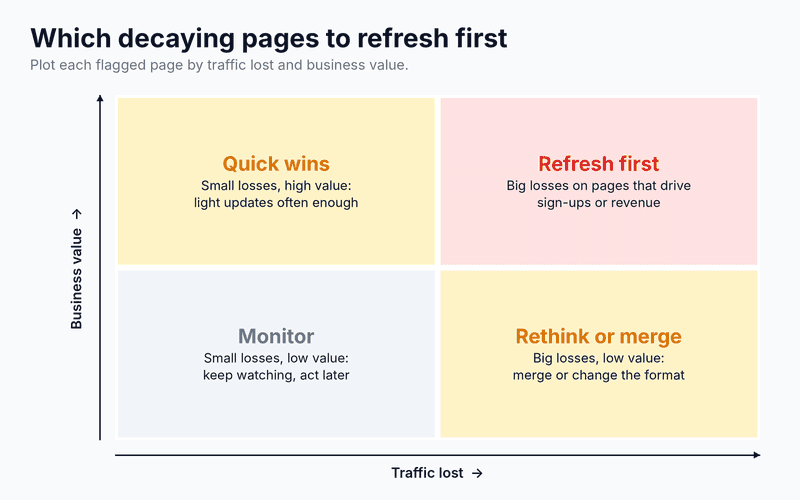
Here's how that plays out in practice. A pricing guide that lost 1,200 clicks, has a business value of 3, and a recovery likelihood of 0.8 scores 2,880. A general how-to post that lost 2,000 clicks but has a business value of 1 and a recovery likelihood of 0.5 scores 1,000, so the smaller loss gets fixed first.
Pages that lost a lot of traffic and support revenue go to the top of the queue. Pages with low value and small losses can wait, or be merged into stronger articles.
Step 4: Let AI diagnose the likely cause
This is where AI saves the most time. For each high-priority page, the workflow sends the page content, its main keyword, ranking history, and a snapshot of the current top results to a language model with clear instructions.
The All-in-One Platform for Effective SEO
Behind every successful business is a strong SEO campaign. But with countless optimization tools and techniques out there to choose from, it can be hard to know where to start. Well, fear no more, cause I've got just the thing to help. Presenting the Ranktracker all-in-one platform for effective SEO
We have finally opened registration to Ranktracker absolutely free!
Create a free accountOr Sign in using your credentials
You can gather that snapshot with a tool like Ranktracker's SERP Checker, which shows who ranks for the keyword now and how strong those pages are. The model then compares your page with the current winners and assigns one or more likely causes from a fixed list.
- Intent shift: searchers now want a different format, such as a comparison or tool instead of a guide.
- Outdated information: stats, screenshots, prices, or steps no longer match reality.
- Coverage gaps: competing pages answer subtopics or questions yours doesn't.
- Cannibalization: another page on your site is competing for the same keyword.
- SERP changes: rankings held steady, but AI Overviews or other features now absorb the clicks.
- Technical issues: indexing problems, broken elements, or slower load times.
Ask the model to return structured output, such as a cause label, a confidence level, and two or three sentences of evidence. Structured answers are easy to route automatically and easy for reviewers to check quickly.
A simple prompt structure works well here:
- Role: "You are an SEO analyst reviewing why a page lost rankings."
- Inputs: the page text, target keyword, ranking history, and summaries of the top three results.
- Task: "Choose the most likely causes from this list only, and explain your evidence briefly."
- Output: a fixed format with cause, confidence (high, medium, or low), and evidence.
Limiting the model to a fixed list of causes stops it from inventing vague explanations. Low-confidence answers can be routed straight to a human for a closer look.
[Optional: add a screenshot of this workflow built in ScriptRun here. Ranktracker prefers tool screenshots. Source: author's own workflow]
Step 5: Route each page to the right fix
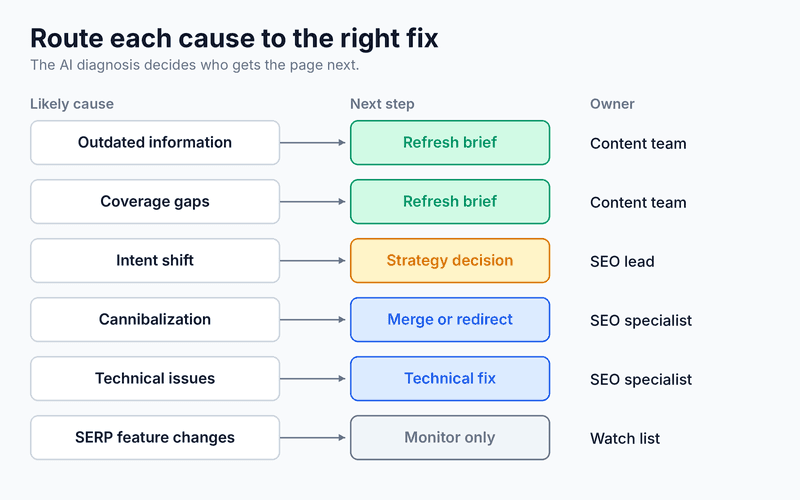
Different causes need different people. Once the diagnosis is in, the workflow can send each page down the right path automatically instead of dumping everything on one editor.
- Technical issues and cannibalization go to an SEO specialist as a task, because the fix is usually a redirect, canonical tag, or merge rather than new copy.
- Outdated information and coverage gaps move on to the brief generator for a content refresh.
- Intent shifts get flagged for a strategy decision, since the page may need a new format rather than an update.
- SERP feature changes go into a monitoring list, because rewriting the page may not bring the clicks back.
Step 6: Generate refresh briefs, not finished articles
For pages that need a content update, the workflow drafts a refresh brief. A good brief lists what to update, which sections to add, which questions to answer, what evidence is needed, and how success will be measured.
It's worth using a stronger model for this step than for diagnosis. Classification is a simple task that cheaper models handle well, while briefs need better reasoning and writing. Splitting models by task keeps costs predictable without lowering quality where it counts.
The All-in-One Platform for Effective SEO
Behind every successful business is a strong SEO campaign. But with countless optimization tools and techniques out there to choose from, it can be hard to know where to start. Well, fear no more, cause I've got just the thing to help. Presenting the Ranktracker all-in-one platform for effective SEO
We have finally opened registration to Ranktracker absolutely free!
Create a free accountOr Sign in using your credentials
Resist the urge to let AI rewrite the page directly. Ranktracker's guide to a human-in-the-loop content refresh workflow explains why editors and subject experts should own the actual update, from verifying facts to adding original experience.
Step 7: Review, publish, and measure
Every brief should pass through a person before anything changes on your site. Reviewers can approve, edit, or reject the diagnosis, and those decisions become useful feedback for improving your prompts over time.
After publishing, log the change date and track the page for six to eight weeks. Your weekly data pull already does the monitoring, so the workflow can automatically report which refreshes recovered traffic and which didn't.
Be careful with update dates. Google's John Mueller has said that changing a page's date won't improve rankings on its own, so only update the date when the content has genuinely changed.
Common mistakes to avoid
- Treating every drop as decay. Check for tracking errors, algorithm updates, and seasonality before refreshing anything.
- Auto-publishing AI output. Unreviewed rewrites can introduce errors and strip out the expertise that made the page rank in the first place.
- Refreshing pages that should be merged. If two weak posts target the same topic, combining them often beats updating both.
- Never closing the loop. If you don't measure results, you can't tell which diagnoses and briefs actually work.
Turning refreshes into a habit
Content decay never stops, so the fix can't be a one-off audit. A weekly workflow turns it into routine maintenance: the system finds and explains the problems, and your team focuses on the fixes that bring traffic back.
Start small with your top 50 pages, tune your thresholds and prompts for a month, then expand. Within a quarter, you'll know exactly which parts of your library are slipping, and you'll catch the next drop long before it shows up in a quarterly report.