
Intro
A wall of text, no matter how well written, loses readers faster than almost anything else online. Visuals break up that wall, guide the eye, and often communicate in seconds what a paragraph takes much longer to explain. The problem has always been sourcing them — stock photography feels generic, licensing gets expensive, and custom photography isn't realistic for every single post. An AI image generator solves this cleanly, giving bloggers and content teams a way to produce original, on-topic visuals for every piece they publish.
Dreamina, running on its most advanced image generation model, Seedream 5.0 Pro, has become a genuinely practical tool for this kind of ongoing content need. Let's go through the different types of blog visuals you'll actually need and how to generate each one well.
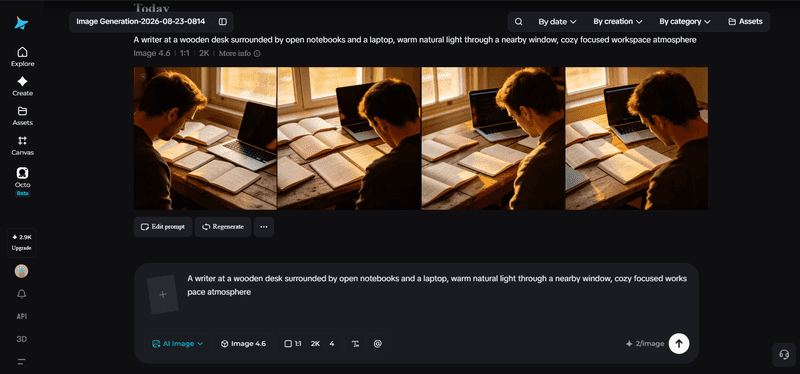
The hero image: your post's first impression
The hero image sits at the very top of your post and often doubles as the thumbnail shared on social media, so it carries more weight than any other visual in the piece. It needs to be broad enough to represent the topic as a whole rather than one narrow detail, and striking enough to work as a standalone preview. Think of it as the visual equivalent of your headline.
Supporting images that actually earn their place
Not every section needs an image, and adding one just to break up text can feel arbitrary if it doesn't add anything. A supporting image earns its spot when it illustrates a specific concept mentioned in the text, shows a process or step visually, or provides a concrete example of something the writing describes abstractly.
If a section's image could be swapped with any other stock photo without losing meaning, it's probably not pulling its weight.
Matching visual style to your blog's actual topic
Different blog niches call for genuinely different visual approaches, and it's worth being deliberate here rather than defaulting to generic stock-photo aesthetics:
-
Clean, bright photography for lifestyle and wellness content
-
Sharp, minimal compositions for tech and business topics
-
Warm, textured imagery for food, travel, and personal essays
-
Diagram-style or illustrated visuals for educational and how-to content
Choosing a lane that fits your niche keeps every image across your blog feeling cohesive rather than randomly assembled.

Why Seedream 5.0 Pro fits ongoing blog production
Producing visuals regularly, sometimes for several posts a week, benefits from a model built for both quality and efficiency, which is exactly where Seedream 5.0 Pro holds up well.
Its multi-layer visual control separates subjects, backgrounds, and text into independent components, making it simple to reuse a base composition while swapping specific details for a new post. The built-in online research helps keep topical or trending visuals accurate and current, which matters for blogs covering fast-moving subjects.
The All-in-One Platform for Effective SEO
Behind every successful business is a strong SEO campaign. But with countless optimization tools and techniques out there to choose from, it can be hard to know where to start. Well, fear no more, cause I've got just the thing to help. Presenting the Ranktracker all-in-one platform for effective SEO
We have finally opened registration to Ranktracker absolutely free!
Create a free accountOr Sign in using your credentials
Native text generation across 14 languages also comes in handy for creating infographic-style visuals directly within a post, and the 2K output ensures images stay sharp whether they're displayed as a full-width header or a smaller in-post graphic.
Your 3-step blog visual workflow with Dreamina
Once you know what kind of image a section needs, here's exactly how to generate it.
Step 1: Write a text prompt and/or add a reference image
Navigate to Dreamina and write a detailed text prompt describing a person dressed appropriately for your blog's topic or industry, along with the setting and mood that fits the specific section you're illustrating. If you have a reference image capturing your blog's general visual style, upload it to help keep new images consistent.
A solid sample prompt might read: A writer at a wooden desk surrounded by open notebooks and a laptop, warm natural light streaming through a nearby window, cozy focused workspace atmosphere, minimalist composition.
Keeping a consistent style description across posts is what makes an entire blog feel visually unified over time.
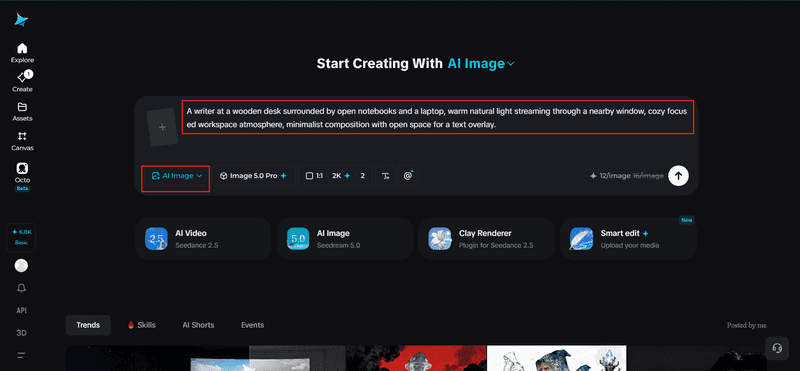
Step 2: Adjust parameters and generate
Before generating, set your parameters to match how the image will actually be used. Select Image 5.0, powered by Seedream 5.0 Pro, as your model, then choose your aspect ratio, image size, and resolution, using a wide landscape ratio for most blog headers and 1K for faster in-post visuals or 2K when an image needs to hold up at a larger display size. Click Dreamina's generate icon to produce your blog image.
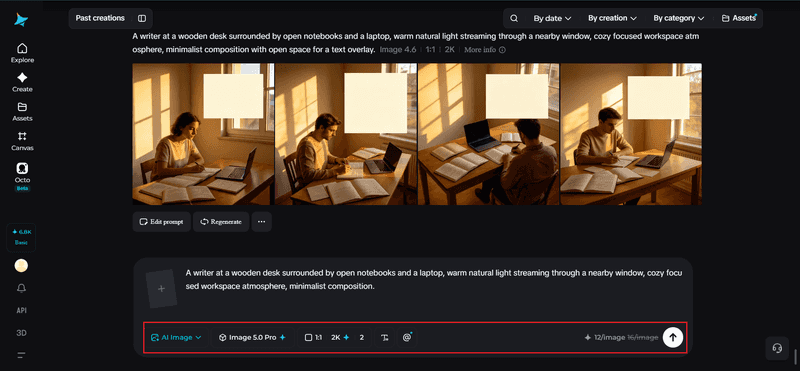
Step 3: Customize and download
Once your image generates, refine it using Dreamina's AI customization tools — inpaint to adjust specific details, expand to widen the frame for a header format, remove to eliminate anything distracting, and retouch to balance lighting and color for your blog's overall aesthetic. When it fits the post naturally, click the Download icon to save it.
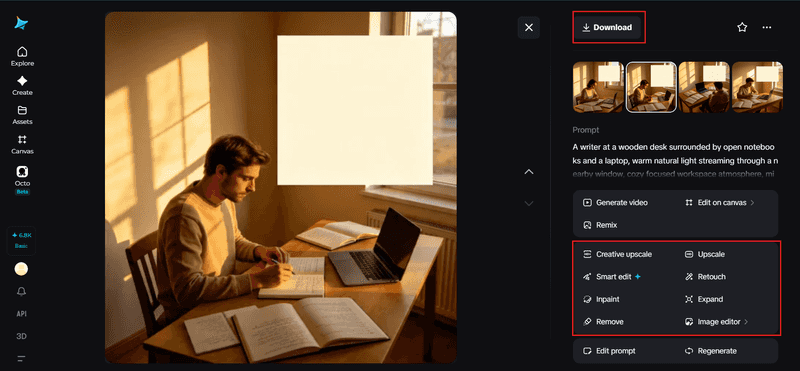
Keeping a consistent visual identity across every post
One of the biggest visible differences between a professional blog and a scattered one is visual consistency. Readers may not consciously notice a matching color grade or recurring composition style across posts, but they register it subconsciously as polish and credibility. Reusing the same lighting language, color palette, and general mood description across every generation, even for completely different topics, keeps your blog feeling like one coherent publication rather than a patchwork of unrelated images.
Alt text and accessibility still matter
A generated image is only doing its full job if it's also accessible to readers using screen readers and helpful for SEO. After downloading each image, write a clear, specific alt text description based on what the image actually shows, not just the blog post's general topic.
The All-in-One Platform for Effective SEO
Behind every successful business is a strong SEO campaign. But with countless optimization tools and techniques out there to choose from, it can be hard to know where to start. Well, fear no more, cause I've got just the thing to help. Presenting the Ranktracker all-in-one platform for effective SEO
We have finally opened registration to Ranktracker absolutely free!
Create a free accountOr Sign in using your credentials
This small step is easy to skip but genuinely matters for both accessibility and how search engines understand your content.
Planning visuals alongside your writing, not after
Waiting until a post is fully written to think about images often results in generic, disconnected visuals bolted on at the end. Instead, noting where an image would genuinely help while you're outlining or drafting means each visual gets planned around a specific point you're making, rather than reverse-engineered to fit wherever there's a gap in the text.
Final thoughts
Original, on-topic blog visuals don't require a stock photo subscription or a separate design budget anymore, just a clear sense of what each image needs to do and the right AI image generator to produce it.
With Dreamina and its advanced Seedream 5.0 Pro model, every post, whether it needs a striking hero image or a small supporting graphic, can have visuals built specifically around it.
Plan your images alongside your writing, keep your style consistent, and let Dreamina fill in the visual half of your blog.

