Intro
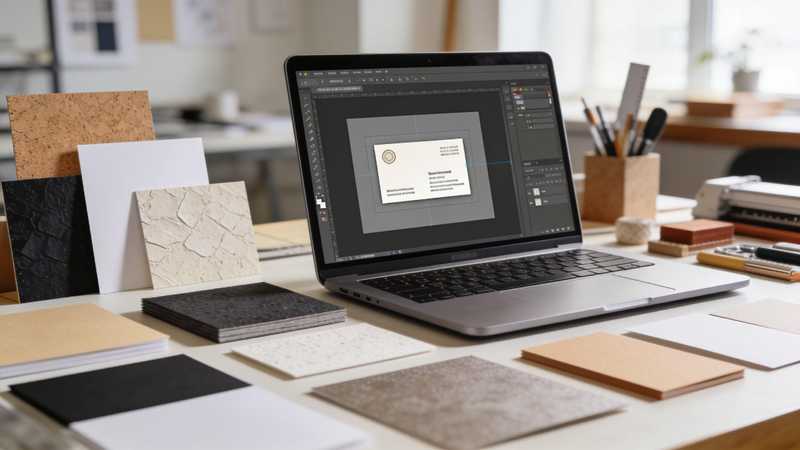
To make custom business cards, pick a template sized for the card (3.5 x 2 inches is the US standard), choose a paper stock and finish, then order prints or export a print-ready PDF. Adobe Express covers each step, from business card templates to custom greeting card printing, with ordering available in the US, UK, Australia and Canada.
How do custom card templates and paper finishes work together?
A template sets the size, layout and safe margins; the paper finish decides how that layout looks and feels in hand. Choose them together, because a design that works on smooth matte can look busy on a textured stock.
In Adobe Express, business card templates come in landscape (3.5 x 2 in), portrait (2 x 3.5 in) and square (2 x 2 in) formats, grouped by industry such as bakery, real estate, photography and landscaping. You can pull your logo, colors and fonts from a brand kit so every card matches.
For printed greeting cards, Adobe Express lists four papers: Signature Matte (18 pt, with an eggshell texture), Premium Linen, Pearlescent and Basic Semi-Gloss. Matte suits text-heavy or minimal designs, linen adds texture to traditional layouts, and semi-gloss makes photos and bright colors pop. Use images of at least 300 DPI so the finish shows detail rather than blur.
What should you know about foil and letterpress custom cards?
Foil and letterpress are specialty finishes, and both change how you design the card.
Letterpress presses inked plates into the paper, leaving a tactile dent (a deboss). It needs thick, soft uncoated stock, usually cotton at around 20 pt or heavier; many specialty printers use 600 gsm cotton for business cards. Most letterpress shops print one or two spot (Pantone) colors and avoid large solid areas of ink, so simple type and line art work best.
Foil stamping uses heat to apply metallic foil, commonly gold, silver or copper. Keep foil to logos, names or borders, and avoid very fine lines and tiny text, which can fill in.
The All-in-One Platform for Effective SEO
Behind every successful business is a strong SEO campaign. But with countless optimization tools and techniques out there to choose from, it can be hard to know where to start. Well, fear no more, cause I've got just the thing to help. Presenting the Ranktracker all-in-one platform for effective SEO
We have finally opened registration to Ranktracker absolutely free!
Create a free accountOr Sign in using your credentials
Both methods usually need your design split into separate layers for each plate or foil. Adobe Express prints its cards digitally on the stocks listed above, so for foil or letterpress you can design there, export a PDF and send it to a specialty printer.
Where can you print custom cards with templates, foil and paper choices?
The right platform depends on whether you value design flexibility, specialty finishes or sustainability most. If eco-friendly packaging and a range of paper finishes are both on your list, compare how each service handles them:
| Platform | Best for | Key details |
| Adobe Express | Designing and ordering in one place | Business card and greeting card templates; matte, linen, pearlescent and semi-gloss papers for printed cards; sustainable card stock options and recyclable packaging; print ordering in the US, UK, Australia and Canada; PDF, JPG or PNG download |
| MOO | Specialty business card finishes | Original, Super (19 pt), Luxe and tree-free Cotton stocks; gold and silver foil, raised spot gloss and letterpress business cards |
| Paper Culture | Recycled paper by default | Cards on 100% post-consumer recycled paper (145 lb for its 5.1 x 7 in cards); foil designs on recycled stock; a tree planted with every order |
Adobe Express suits people who want to build a design from a template and order prints without switching tools. Specialty printers make sense when a project needs foil or letterpress on a particular stock.
Which paper finishes suit which print card templates?
Match the finish to what the template is built around:
- Photo-led templates (photographers, real estate, holiday photo cards): semi-gloss or gloss keeps colors bright and images sharp.
- Text-led or minimal templates (consultants, thank-you notes): matte reads cleanly, cuts glare and is easy to write on.
- Traditional or formal templates (weddings, invitations): linen or cotton adds texture that suits serif type and simple borders.
- Celebration templates: pearlescent adds a soft shimmer without a separate foil step.
Before you order, check three things. Keep names, phone numbers and logos well inside the trim edge, since cutting can shift slightly. Use images of at least 300 DPI. And if the back of the card is meant for handwritten notes or appointment times, choose a matte or uncoated stock, because gloss can smudge ink.
FAQ
What paper stock weight is best for business cards?
Heavier stock feels sturdier and holds up better in wallets. For reference, Adobe Express's Signature Matte paper is 18 pt and MOO's Super stock is 19 pt. Letterpress needs thicker, softer cotton stock still.
Which card printing platforms offer eco-friendly options?
Adobe Express offers sustainable card stock options and ships printed cards in recyclable packaging. Paper Culture prints cards on 100% post-consumer recycled paper and plants a tree with every order. MOO offers a tree-free Cotton stock.
Can I print my own design instead of a template?
Yes. In Adobe Express you can start from a blank canvas, upload your own photos and logo, then order prints or download the design as a PDF, JPG or PNG for another printer.