
Intro
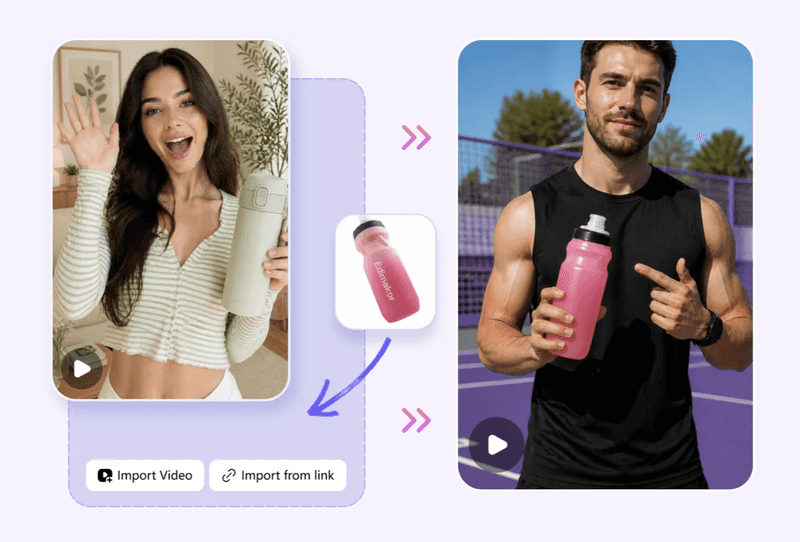
When marketers work on the same video campaign, they often need different versions for different channels and audiences. For example, the same campaign may require a short social media clip, a YouTube ad, and a longer version for a product page.
Digital Marketing Video Production can be costly if professional equipment, editing, actors or studio space is required. AI video marketing software can streamline several aspects of video production, enabling marketing teams to produce digital videos without the expense and complexity of a comprehensive production studio for every video project.
This guide will take you through all the steps, from planning your marketing video creation to picking the right way to make your video, and then to the right AI video software, and finally to create professional product videos using Edimakor.
Why Is Digital Marketing Video Production Important?
Video is an integral component in online advertising. A marketing video that is engaging can introduce your product, let people know what you are offering, and tell them a reason to continue watching and engaging with your product.
Video Captures Attention Faster
Since video can depict anything from motion to person/objects or product demonstrations in under 15 seconds, it comes as no surprise that this is one advertising form that would be widely welcomed.
Video Makes Products Easier to Understand
Some products are difficult to explain with a photo and a few lines of copy. Video gives marketers room to show how the product works.
It can demonstrate:
- Product features
- How the product works
- Main benefits
- Different use cases
- Before and after results
This is especially useful for video production for products, where seeing the product in action can help a potential customer understand what they are actually buying.
Video Can Strengthen Brand Communication
The way a video looks and sounds can shape how people see a brand. Marketers can use it to explain their story, present products clearly, build awareness, and create trust.
One Video Can Be Repurposed Across Multiple Marketing Channels
A finished video does not have to stay on one platform. With a few changes to its length, format, or opening, the same core footage can serve several marketing purposes.
For example, one video can be adapted for:
- Facebook Ads
- Instagram Reels
- TikTok
- YouTube Shorts
- YouTube Ads
- Landing pages
- Product pages
- Email marketing
This create-once, distribute-across-multiple-channels approach can reduce the amount of production work needed for each campaign.
How to Build a Digital Marketing Video Strategy
Instead of going out and hiring an editor, thinking about what you want to say and scripting yourself, figure out what it is that you want the video to achieve and what audience you're targeting the video for.
Define Your Marketing Goal
Your marketing goal should determine the type of video you create, the message you deliver, and the action you want viewers to take.
| Marketing Goal | Recommended Video Type |
| Brand awareness | Brand video |
| Product promotion | Product video |
| Lead generation | Explainer or demo video |
| Sales conversion | Product ad or UGC ad |
| Retargeting | Testimonial or offer video |
| App promotion | App demo or tutorial |
Identify Your Target Audience
A video made for new customers will look different from one aimed at people who already know your brand. Consider: Age, location, Interests, Pain points, buying intent, Preferred platforms, and so on.
Choose the Right Video Format
The format should fit the platform where people will watch it.
- 9:16: TikTok, Instagram Reels, and YouTube Shorts
- 1:1: Social media feeds
- 16:9: YouTube and websites
- Short-form video: Performance advertising
- Long-form video: Product education
Using the right dimensions from the start saves you from having to rebuild the video later.
Create a Strong Video Hook
People can scroll past an ad in seconds, so the opening needs to give them a reason to stay. You can start by:
- Asking a question
- Pointing out a common problem
- Showing the result first
- Making a surprising statement
- Showing the product immediately
Keep the opening focused. The viewer should understand the point quickly.
Build a Clear Advertising Structure
A simple structure keeps the message easy to follow: Hook → Problem → Solution → Product Benefits → Social Proof → CTA.This gives the video a logical flow without trying to say everything at once.
How to Create Advertising Videos: 3 Main Methods
After you've established what goals the video must fulfill, now you have to decide how you want to create it.
Method 1: Hire a Professional Video Production Service
A professional team handles filming, direction, lighting, editing, and other production work.
The All-in-One Platform for Effective SEO
Behind every successful business is a strong SEO campaign. But with countless optimization tools and techniques out there to choose from, it can be hard to know where to start. Well, fear no more, cause I've got just the thing to help. Presenting the Ranktracker all-in-one platform for effective SEO
We have finally opened registration to Ranktracker absolutely free!
Create a free accountOr Sign in using your credentials
Advantages:
- Professional production quality
- Experienced videographers
- Professional actors or models
- Custom creative direction
- Advanced filming equipment
Disadvantages:
- Higher production costs
- Longer production cycles
- More communication
- Harder to produce many ad versions quickly
Best for: Campaigns for a brand, significant product launches, TV ads and more expensive advertisements.
It's perfect for product video production where this level of production quality feels appropriate to your campaign needs.
Method 2: Build an In-House Video Production Team
An in-house team gives you more control over the production process. Your team can create videos regularly without relying on an outside production company.
Advantages:
- More control
- Faster communication
- Consistent brand style
- Easier long-term production
Challenges:
- Equipment costs
- Hiring costs
- Editing workload
- Need for production skills
- Harder to scale quickly
Best for: Larger companies and marketing teams that produce video content throughout the year.
Method 3: Use Video Marketing Software and AI Video Tools
Video software gives marketers another option when they need content quickly or cannot justify a full production setup.
These tools can help with:
- Video editing
- Script creation
- Voiceovers
- Subtitle generation
- Templates
- Visual effects
- Background removal
- Video resizing
- Social media content
This approach can be useful when a campaign needs several versions of an ad or frequent product videos.
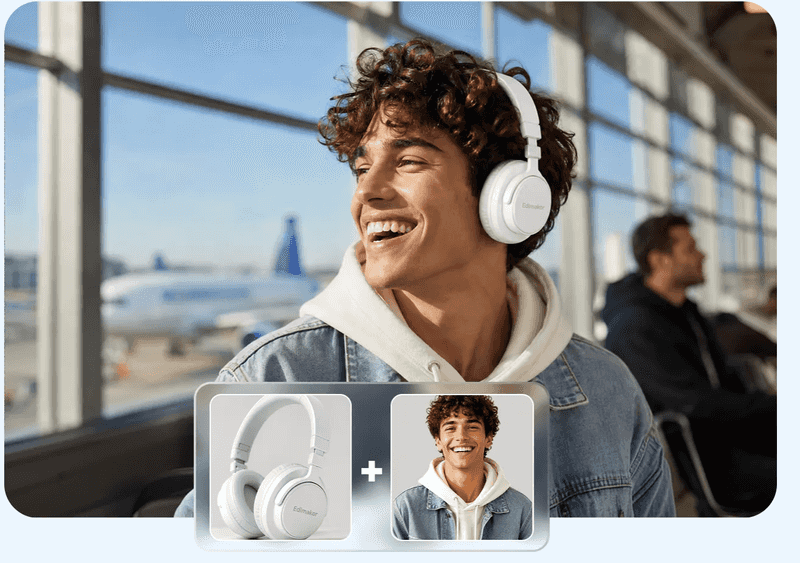
Why AI Video Marketing Software Is Essential for Modern Advertising
AI video tools streamline production, cut costs, and simplify multi-version ad creation.
Faster Production
- Traditional: Script → Filming → Editing → Review → Revision (Takes days/weeks)
- AI-Assisted: Concept → AI Generation → Final Edit (Takes hours)
Cost Reduction
- Cuts fees for studio space, actors, equipment, and large crews on simple ads.
- Complements—rather than replaces—professional teams for complex campaigns.
Rapid Creative Testing: Quickly generate variations by swapping key elements:
- Hooks, Scripts, & CTAs
- Visuals & Aspect Ratios
- Target Audiences
Consistent Quality & Built-in Features: Maintains brand standards using automated tools (human review still required):
- AI voiceovers & auto-captions
- Background removal
- Dynamic brand templates & effects
Best AI Tool for Digital Marketing Video Production: Edimakor
Marketers often need more than a basic video editor. They may need to turn product images into ads, test different versions, add narration, create captions, and prepare videos for several platforms. Edimakor AI Ads Generator brings many of these tasks together in one streamlined workflow, making it easier to create and adapt marketing videos efficiently.
What Is Edimakor?
Edimakor is a video editing and creation tool built for both beginners and experienced users. It combines regular editing features with AI-assisted tools for creating marketing videos, product videos, and social media content.
Key Edimakor Features for Advertising Video Production
AI Video Creation
Edimakor's AI Ads Generator turns a product or campaign idea into an advertising video. It can also create different versions from an existing ad or reference video, which is useful when testing different creatives.
AI Voiceover
Voiceovers can add value to product videos, explainer videos, and demos by helping communicate key information clearly while keeping viewers engaged. With support for text-to-speech with varying voices and languages, Edimakor can be yet another means for marketers to get the voiceovers for their videos.
Auto Captions
Captions enhance the viewing experience of your short videos, particularly for those watching without any sound. Edimakor automatically generates these captions in just a few clicks, sparing marketers the time needed to type them.
Templates and Effects
Templates, transitions, effects, and other editing tools help marketers put together a finished video without building every element from the beginning.
Background Removal and AI Editing
Background removal is also useful for product video production, particularly when you want the product to remain the main focus. Edimakor also provides editing tools for adjusting and refining the finished video.
Resize Videos for Different Platforms
Edimakor helps prepare videos for different platforms and aspect ratios, including 9:16,16:9,1:1, and so on. This means marketers can adapt one campaign for several channels instead of producing every version separately.

How to Create a Digital Marketing Video with Edimakor
Once the campaign idea and product assets are ready, you can move through the production process in a few basic steps.
1. Start With Your Ad Idea
Open the Edimakor AI Ads Generator and start with the product, campaign idea, or reference material you want to use. The tool can work from a URL or an existing reference video.
2. Finish the video settings
Set the video resolution, aspect ratio, and audio according to your requirements.
3. Create the Script and Visuals
Add the information you want the video to communicate. Edimakor can help build the script and generate the initial video structure with visuals, narration, and subtitles.
4. Edit the Video
Go through the generated video and change anything that does not fit the campaign. You can adjust the text, visuals, voiceover, timing, and other elements before publishing.
5. Export and Publish
See how your final video looks on-screen before exporting. With Edimakor’s multi-platform export support, reformatting your campaign for different social channels takes just a few clicks.
Tips for Creating High-Converting Advertising Videos
A few simple adjustments can make an ad video much easier to watch and understand, ensuring your message gets across quickly so your viewers understand their benefit and are inspired to take action. Take a look:
Keep Your Hook Short and Clear
Start with the main point. A simple question, the main problem your product solves, the result it achieves, or a powerful statement can all give people a reason to stick around.
Show the Product Early
Your viewers don’t want to be kept waiting for the payoff; what are you selling? Bring the product into frame early on and make it do its job as much as possible.
Focus on Benefits, Not Just Features
Features of the product itself don’t mean much unless the viewer can relate them to how they themselves will benefit. How will it make their lives better?
Add Captions
Viewers may not always watch videos with the sound on, so captions ensure they can still follow your message. They are especially important for social media videos, where people often watch content in silent or low-volume environments.
Use a Clear CTA
Give viewers one simple next step. Tell them to shop, sign up, learn more, download, or take another action that fits the campaign.
Create Multiple Versions for A/B Testing
Experiment with your headlines, your messaging, your visuals, or the call to action to see what performs the best. Multiple versions will allow for A/B testing and optimising for performance.
Adapt Videos to Different Platforms
Videos can and may need to have different aspect ratios or lengths. Create specific versions for each social channel they are intended for, rather than sticking to one format for all of them.
Keep Your Brand Consistent
Use familiar colours, fonts, logos, and messaging across your videos. Consistency makes the content easier to recognise.

