
Intro
Expired domains have grown into their own market inside SEO, and the competition gets fiercer every year. Some people grab them for the backlink profile, some rebuild old sites, some are just hunting for a short, brandable name for a new project. There are plenty of domains. Good ones are rare.
And that "rare" is the whole problem. Every domain has to be vetted, and doing it by hand is next to impossible.
You know the drill: open a couple of auctions, export the lists, run the metrics in one tool, check the history in the Wayback Machine, pull the backlinks in another, then go back to the auction to make sure the price is still current. For one domain, fine. For a hundred, the day's over and you're still filtering.
Karma.Domains, built for finding expired domains, takes that boring part off your plate. It's an aggregator for searching and analyzing dropped, auction, backorder, and buy-now domains, bundled with SEO metrics, Wayback Machine history, categories, and its own quality scores.
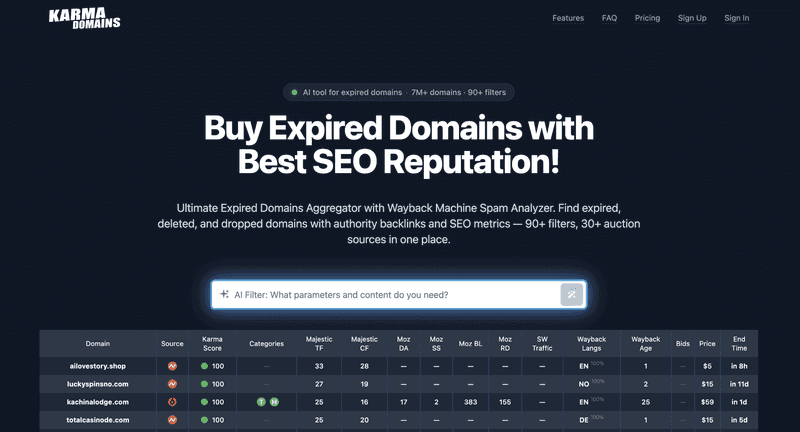
You can search it a few different ways:
- Filter table — the classic mode for people who like control.
- AI search — a plain sentence instead of dozens of fields.
- MCP — the same queries right inside Cursor, Claude, and other AI assistants.
- Public API — for agencies and teams that need automation.
The idea is simple. Describe the domain you want in plain words, get a short list of candidates, and see the history, metrics, auctions, and risks in one report.
Why an SEO needs expired domains
An aged domain hands a new project something a fresh registration just doesn't have — history, old mentions, backlinks, sometimes leftover traffic. But it's no magic bullet, and it sure isn't a guarantee of growth.
The All-in-One Platform for Effective SEO
Behind every successful business is a strong SEO campaign. But with countless optimization tools and techniques out there to choose from, it can be hard to know where to start. Well, fear no more, cause I've got just the thing to help. Presenting the Ranktracker all-in-one platform for effective SEO
We have finally opened registration to Ranktracker absolutely free!
Create a free accountOr Sign in using your credentials
A domain with pretty numbers can easily turn out to be a former casino, a doorway page, or a piece of a spam network. I've seen it happen more than once.
So a proper check stopped being about DA, DR, and link counts a long time ago. What matters is what the site used to be — did the niche shift, were there redirects, 403s, parking pages, sudden language jumps, stretches of flat-out spam. And this is exactly where manual analysis gets expensive. The Wayback Machine helps, but scrolling through years of snapshots for every single domain is a questionable way to spend your afternoon.
Karma.Domains shortens that path by taking the grunt work off your hands.
What Karma.Domains is
The service pulls domains from a range of sources and builds a report on each one. The database holds auction lots, already-expired domains, backorders, and fixed-price Buy It Now (BIN) domains. For each domain you get SEO metrics, traffic, Wayback Machine history, categories, auction data, and its own quality scores.
The scale is no joke. The service adds 400,000+ new domains every day and pulls data from 30+ sources — auctions, drop feeds, backorders, and Buy Now marketplaces. Plus 90-plus filters to search through it all.
Why does that matter in practice? A good domain can surface anywhere — on GoDaddy Auctions, on the Namecheap Market, in a buy-now list, or already in the expired pool. Watch one source and you lose part of the field. Simply because those names slipped past you.
Every domain type in one feed
There are separate sections for different scenarios:
- Auctions — domains with live or recently closed bidding.
- Expired — domains available for open registration, per the service's data.
- Backorder — domains you can try to grab before they drop.
- Buy Now — fixed-price domains on marketplaces.
And there's a combined "All domains" section. It's handy when you care about the characteristics first and the way you buy second. Say, aged .com domains in the fintech niche, English history, no redirects, a minimum Moz DA. Then you look at where the domain is actually available: auction, buy-now, backorder, or open registration.
To me, that's how the real task is framed. Niche and history quality first. How you buy it — later.
Natural-language search
This is one of the things that stands out most in the service. Instead of opening dozens of filters by hand, you just type a sentence:
The All-in-One Platform for Effective SEO
Behind every successful business is a strong SEO campaign. But with countless optimization tools and techniques out there to choose from, it can be hard to know where to start. Well, fear no more, cause I've got just the thing to help. Presenting the Ranktracker all-in-one platform for effective SEO
We have finally opened registration to Ranktracker absolutely free!
Create a free accountOr Sign in using your credentials
Find dropped .com domains for a B2B SaaS blog: DA 25+, KarmaScore above 60, English history in Wayback, no digits in the name.
The AI parses the query and assembles the filters itself. Topic, language, traffic country, name length, TLD, domain type, auction venue, price, auction end date, quality metrics — it understands all of it when you ask for it. And with 90+ filters in the service, setting them by hand can take longer than reading the results.
And it's not "chat for the sake of chat." What you get back is the regular Karma.Domains feed — the same reports, columns, and filters. You can open the panel, check which conditions were applied, and tweak them by hand.
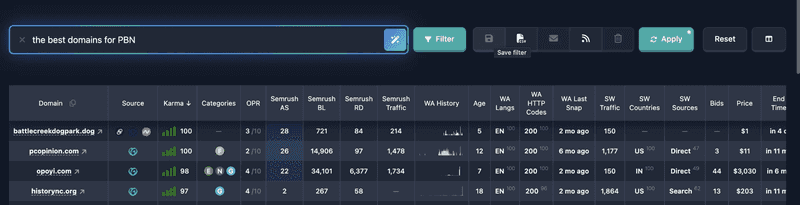
A good filter is worth saving. From there, subscribe to new domains that match it: a daily email or an RSS feed that updates in near real time. That kills the eternal pain with drops and auctions — you don't sit in the table all day, you just get the fresh matches that fit your criteria. And if you need it, you export the selection to CSV.
MCP: search domains straight from your AI assistant
The same logic runs through MCP. Karma.Domains connects to Cursor, Claude, and other clients that support external tools. Once it's hooked up, the assistant sees the service's database and answers right in your working chat.
Sample query:
Show me GoDaddy auctions ending in the next 3 days: restaurants or pizza, price under $500, Trust Flow above 15.
Back comes a short list of domains, the number of matches, and links to the full reports. From there you can ask for the next page, open a specific domain, toss a candidate into favorites, or check whether it's free to register.
For teams, the appeal isn't only speed. A manager describes the task in plain words, gets a shortlist, and sends colleagues the links to the reports. No CSVs, no filter screenshots, no long explanations of why one domain made the cut and another didn't.
The Wayback Machine — the backbone of vetting
Link metrics are useful, but they tell a domain's story poorly. A high DR comfortably survives an owner change, a PBN phase, and years of parking. That's why Karma.Domains leans so heavily on the Wayback Machine.
The service breaks down the archived snapshots — content, language, titles, response codes, redirects, errors, topic shifts. And it answers the questions people usually dig into the archive by hand to settle:
- Was the domain a real site — or mostly a parking page?
- Did the topic flip hard — say, a medical blog turning into a casino?
- Was there a long stretch of redirects to other domains?
- Do you see a lot of 403s — a sign the site was blocked from being archived?
- What language was the main content in?
- How steadily did the site live over time?
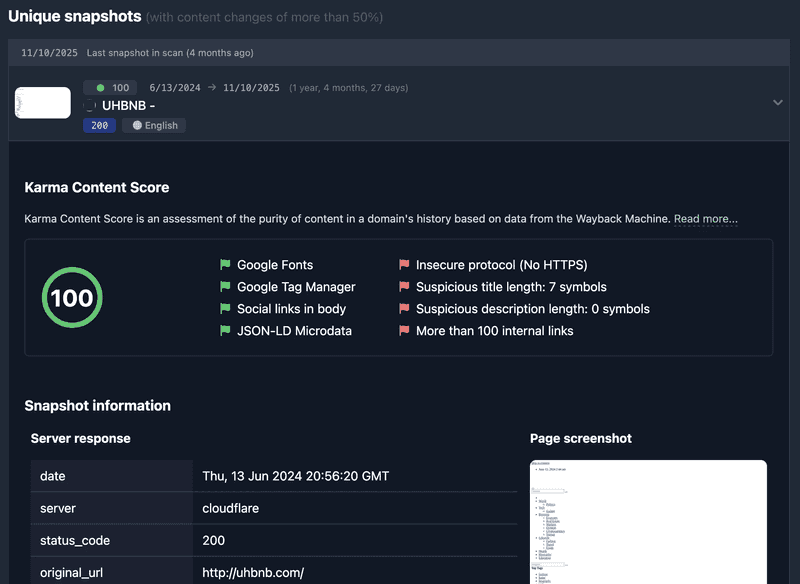
For SEO, that's often more important than a pretty number in a single column. A domain with modest links but a clean, readable history is safer than a lot with a high DR and a murky past.
AI history summaries and domain categories
One thing worth calling out on its own — Karma.Domains writes an AI Summary for the domain. The AI reads the Wayback Machine snapshot history and puts together a short, period-by-period recap. For example: from 2018 to 2020 it was an English-language events blog, in 2022 it pivoted to gadget reviews, and later it became Spanish-language IT or gaming content.
That saves you the first pass. No need to open several years of the archive and guess where the topic changed. You read the timeline first. Looks shady — you dig into Wayback deeper. Looks steady — you keep the domain on your shortlist.
The AI also assigns topical categories. And not off a single word in the name, but off the content of the history it just described in the summary. That's an important detail — a domain can have a neutral name and still have been a site about finance, sports, medicine, real estate, or gambling in a past life. The category tells you right away which niche it's closest to and whether it's worth more of your time.
The categories land in the report and work as an extra layer of navigation. For agencies that churn through hundreds of domains across different client niches, that's especially handy — the relevant histories get separated from the random junk faster.
Karma Score and Karma Metric
The service has two of its own scores, both about a domain's history.
Karma Score — content history quality on a 0 to 100 scale. It's not about link authority and it doesn't try to replace Google. The job is narrower — to look at what went on with the domain's content in the Wayback Machine. The math weighs good and bad patterns: topic stability, spam signals, abrupt changes, parking, redirects. In practice, I start screening at a threshold of 70 to 80. Domains under 50 tend to show up with red flags in their history.
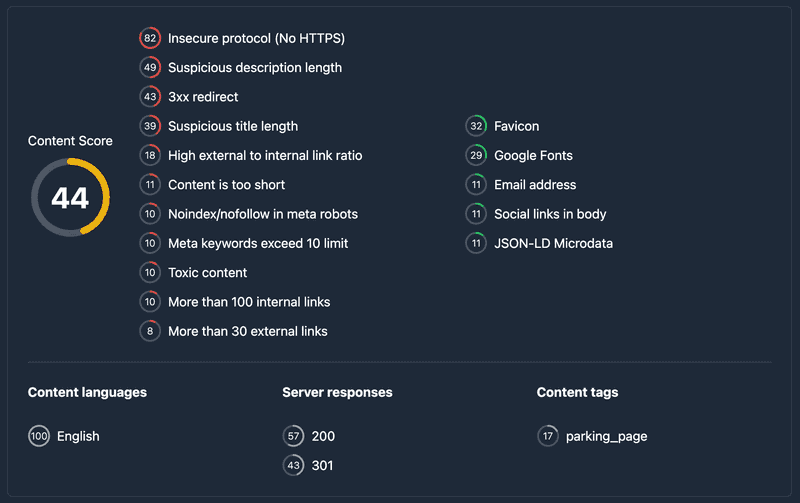
Karma Metric — the view from the other side. This one's about durability and activity over time: how long the site lived, how regularly it hit the archive, whether there were long gaps, whether interest grew or faded. This score doesn't replace Ahrefs, Moz, or Majestic, but it adds a time dimension that link metrics usually lack.
Together they quickly weed out the candidates that only look good on the surface.
Archive and content filters
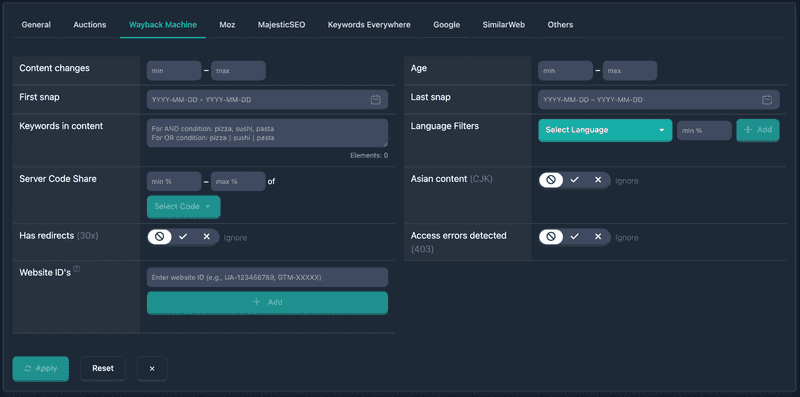
The strength of Karma.Domains isn't only in the reports. You can use the Wayback data right in your search. You can sort domains by:
- Age — based on the first snapshot in the Wayback Machine.
- Snapshot dates — first or last.
- Content changes — how many times it changed.
- Keywords — in the archived pages.
- Language — and its share across the history.
- HTTP codes — and their share.
- Redirects — present or not.
- 403 errors — present or not.
- CJK content — Chinese, Japanese, Korean.
- Analytics IDs — Google Analytics or Tag Manager, for instance.
That last one is surprisingly valuable. Find the same analytics ID across several domains and you've found other sites owned by the same person or the same network. For due diligence that's a solid signal, especially when you need to figure out whether a domain was part of some shady setup.
SEO metrics in one report
After the first cut, you still need the usual data. The Karma.Domains report gathers metrics from Ahrefs, Moz, Majestic, SimilarWeb, Keywords Everywhere, Google, and other sources — whenever the data is available.
In practice, in one place you see:
- Ahrefs — DR and UR.
- Moz — DA, Spam Score, backlinks, referring domains.
- Majestic — Trust Flow, Citation Flow, backlinks, topics.
- SimilarWeb — traffic, countries, sources.
- Keywords Everywhere — organic keywords and an estimated traffic value.
- Google — whether pages are in the index.
- Categories and blacklist signals.
- Wayback Machine data and the AI Summary.
Pricey domains are still worth double-checking in the original tools. But for a shortlist, a report like this covers most of the first-pass screening.
Auctions and marketplaces: GoDaddy, Namecheap, and the rest
The service pulls data from a long list of venues — GoDaddy, NameJet, DropCatch, Dynadot, GNAME, Namecheap, Sedo, Sav.com, and others. It's past 30 venues and sources by now.
Let me touch on two popular venues that feed Karma.Domains.
GoDaddy matters to an SEO because of the sheer volume of auction lots. On GoDaddy Auctions you'll run into domains with live links and history that hasn't gone cold yet — but it's also where it's easy to get carried away bidding and overpay. In Karma.Domains, GoDaddy lots are pre-filtered by price, bid count, end time, metrics, and Wayback history.
Namecheap is a different scenario. Some of the domains are picked up as buy-now or marketplace purchases, without the classic bidding war. In the service, those options sit in the same overall picture alongside auctions and expired names. Handy when the goal isn't "buy it specifically on the Namecheap Marketplace," but to find a domain with the right history and a sensible price.
The service obviously doesn't replace the venues themselves. Before you bid on GoDaddy or buy through Namecheap, go to the source and check the current price, end time, rules, and whether the lot is still available. Auction data refreshes regularly, but the domain market moves faster.
Public API for agencies and automation
Agencies and SEO teams need repeatability. When you have to vet hundreds or thousands of domains a day, the manual interface stops being your main tool. That's what the expired domains API is for.
The API serves the same data — report search, full reports with SEO metrics, favorites, domain availability checks, Karma Metric, profile, and limits. The format is JSON over HTTPS. Search is available across the auctions, expired, backorder, and buy-now databases, plus a combined search across all types.
Common scenarios:
- Nightly pipeline — pulls domains by a saved filter set.
- CRM — syncs favorites and check statuses.
- Internal dashboard — shows SEO scores and Wayback signals.
- Script check — whether a domain has dropped before you register it.
- MCP plus API — quick ad-hoc queries in chat, steady automation over the API.
The API and MCP run on a single key — the Pro plan and up. The limits are shared too, so larger teams should plan their batches instead of turning the search into an endless scrape of the database.
What it looks like in practice
Let's put it all together. Say you need a domain for an English-language B2B SaaS blog. The old way — expired lists, then GoDaddy, then Namecheap separately, a run through the SEO tools, and finally Wayback by hand. In Karma.Domains it's three steps:
- Query. You type an AI prompt like "dropped and auction .com domains for B2B SaaS, English content, age 5+ years, Karma Score above 60, no redirects, DA 25+" — and get a feed from across the sources.
- Screening. You open the 10-20 best reports and skim the AI Summary, categories, Karma Score and Karma Metric, languages, response codes, links. Domains with a hard topic flip or weird redirects go to the side; the rest go into favorites.
- Buying. For the finalists, you check where the domain is available — auction, buy-now, or open registration — and close the deal at the registrar or on the venue.
The difference from the old process is simple. You only touch the last few finalists by hand, not the whole feed.
By the way, you can add domains to favorites, and even leave notes and tags for quick lookup. That's especially handy when you're building short lists and long lists for a specific task.
Who it's for
The service is most useful to people who work with domains regularly:
- SEOs — for rebuilds, 301s, or standalone projects.
- Link builders — to size up history and topic fast.
- Domain investors — to watch auctions and buy-now offers.
- Agencies — to bake domain search into the workflow and reporting.
- Technical teams — to work through the API or MCP.
Need to check one domain once a year? Manual Wayback and a couple of SEO tools will do. But if domains pass through your hands every week — the time savings add up fast.
Bottom line
Karma.Domains isn't interesting because it shows you one more table of drops. There are plenty of those tables. The strength is elsewhere — natural-language search, MCP for AI assistants, an API for agencies, and deep work with Wayback Machine history.
The AI Summary and the categories are especially good. They turn an archived history into a short, readable recap — what the site was, when the content changed, what language it ran in, what topic it belongs to. It doesn't do away with manual checking, but it sharply cuts the number of domains you have to dig through from scratch.
The All-in-One Platform for Effective SEO
Behind every successful business is a strong SEO campaign. But with countless optimization tools and techniques out there to choose from, it can be hard to know where to start. Well, fear no more, cause I've got just the thing to help. Presenting the Ranktracker all-in-one platform for effective SEO
We have finally opened registration to Ranktracker absolutely free!
Create a free accountOr Sign in using your credentials
For a market where GoDaddy, GNAME, Sedo, Namecheap, DropCatch, and other venues spit out a constant stream of lots, this approach just makes sense. There are far too many domains to eyeball one by one. Let the system collect, filter, and explain the candidates — and keep the final call for yourself.
Competition for expired domains ramps up every year. So any time you save on searching and weeding out the junk is real money saved.
And the pricing deserves its own mention. The SEO tools market has long settled into pricey subscriptions and harsh limits. Finding a service under $30-40 a month with a decent feature set is genuinely hard. Karma.Domains offers a full unlimited plan at $27.99 a month, or a credit system starting at $14.99 with credits that never expire. I honestly haven't seen that anywhere else.
I'd recommend the service without hesitation — both to solo SEOs hunting expired domains for their own projects, and to agencies that need to quickly sift domains for their clients out of millions of options across dozens of auctions and venues.

