
Intro
High-quality eBay product photos build trust, boost clicks, and increase sales. Using AI tools like Removal.AI helps sellers create clean, consistent, and professional images that highlight product details, maintain compliance, and stand out in a crowded marketplace.
| TABLE OF CONTENTS |
|
How to Make Your eBay Product Photos Stand Out in 2026 Common Product Photo Mistakes That Hurt Sales 1. Using Distracting or Busy Backgrounds 2. Uploading Too Many Repetitive Shots 3. Inconsistent Lighting or Color Tones 4. Mixing Stock Images With Actual Product Photos 5. Forgetting to Optimize the Main Listing Image Why Clean Backgrounds Drive More Clicks How to Edit eBay Product Photos Like a Pro Using Removal.AI 1. Instantly Remove or Replace Backgrounds 2. Batch-Edit Multiple Listings Consistently Step 4: Export Marketplace-Ready Files eBay Photo Requirements You Should Follow Pro Tips for Creating Scroll-Stopping Product Photos Final Thoughts: AI-Powered Photos Sell Better |
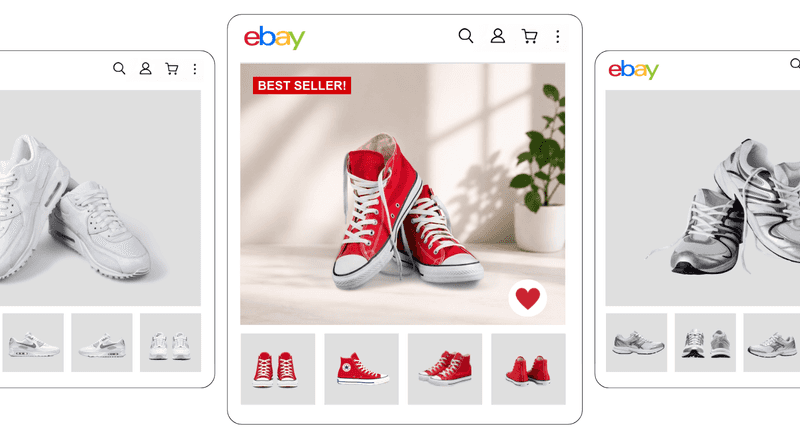
How to Make Your eBay Product Photos Stand Out in 2026
We’ve all been there, snapping dozens of product photos, only to realize later that every single one looks like it was taken in a dimly lit basement. On eBay, that’s a dealbreaker. Your photos are the handshake, smile, and sales pitch all rolled into one. They tell buyers, “You can trust this product and this seller.” The good news? Tools like AI Photo Editors make it easy to turn those “meh” shots into eye-catching images that actually convert.
Think about it: shoppers can’t touch, feel, or try your products online, so your photos have to work double time to earn their trust. Crisp lighting, consistent angles, and a white background help customers focus on what matters: the product itself. Good visuals convey reliability and professionalism, which instantly reduces buyer hesitation.
Even better, eBay’s algorithm loves clear, compliant images. Listings that adhere to eBay image requirements tend to rank higher in search results, resulting in increased visibility and clicks. In other words, better photos don’t just look good — they perform.
Common Product Photo Mistakes That Hurt Sales
According to eBay’s research, listings with better photo quality are 4.5% more likely to sell. It’s a small number that makes a big difference in the competitive world of online selling. Yet, despite knowing this, many sellers still commit the same eBay photo mistakes that quietly kill conversions. The good news? Most of these errors are easy to fix, especially now that AI Photo Editors can polish your images to professional standards in just a few clicks.
Before you upload your next batch of product shots, here are some common pitfalls to watch out for:
1. Using Distracting or Busy Backgrounds
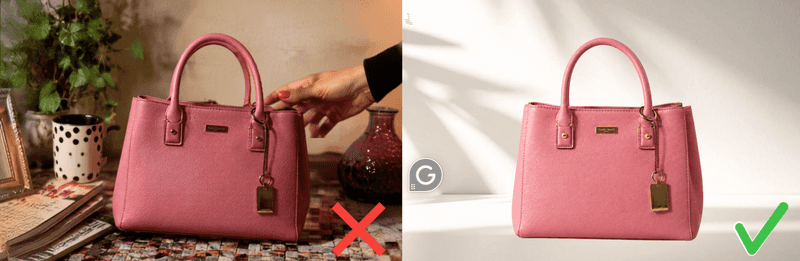
Cluttered backgrounds are the fastest way to lose a potential buyer’s attention. A messy table, patterned floor, or visible hand can instantly make your product look less professional. Instead, aim for clean, neutral tones or use an AI background remover to achieve that crisp eBay white background eBay’s algorithm loves. This helps the product stand out and gives your listing that polished, trustworthy vibe buyers respond to.
2. Uploading Too Many Repetitive Shots
More isn’t always better. Flooding your listing with nearly identical angles can overwhelm buyers and cause them to lose interest. The trick is to include a variety of useful perspectives — front, back, close-up, and scale. Tools like a bulk background remover or an eCommerce photo editing tool can help you batch-edit images efficiently while maintaining consistency across your gallery.
3. Inconsistent Lighting or Color Tones
Ever notice how some listings look mismatched, like each photo came from a different seller? Uneven lighting or color imbalance can make your product appear unreliable. Using AI Photo Editors can help even out tones, correct shadows, and bring uniformity to your shots, while giving your storefront a cohesive and professional look.
4. Mixing Stock Images With Actual Product Photos
It might seem harmless to include a stock photo “for reference,” but buyers catch on quickly, and nothing kills trust faster. Stick to your own, authentic visuals. Clean them up using an AI photo editor for eCommerce to ensure they remain sharp, realistic, and accurate representations of the items you’re selling.
5. Forgetting to Optimize the Main Listing Image
Your main image is your click magnet. If it doesn’t pop, no one’s stopping to see the rest. Follow eBay image requirements and product photo compliance guidelines by ensuring your hero photo has proper framing, lighting, and background. Even better, enhance it with AI image editing for sellers for a professional edge that captures attention instantly.
Minor tweaks can make a massive difference in conversion. By eliminating these common eBay photo mistakes, you not only build buyer confidence but also strengthen your brand image. Remember — every click starts with a picture, so make every pixel count.
Why Clean Backgrounds Drive More Clicks
A cluttered photo can make even the best product look unappealing, while a clean, distraction-free image instantly draws the eye. That’s the psychology behind why white backgrounds and minimal visuals consistently outperform those with busy visuals. On eBay, where buyers scroll quickly, your photo needs to communicate quality and trust in a single glance, and tools like AI Photo Editors make it easy to achieve that professional polish.
The All-in-One Platform for Effective SEO
Behind every successful business is a strong SEO campaign. But with countless optimization tools and techniques out there to choose from, it can be hard to know where to start. Well, fear no more, cause I've got just the thing to help. Presenting the Ranktracker all-in-one platform for effective SEO
We have finally opened registration to Ranktracker absolutely free!
Create a free accountOr Sign in using your credentials
When your product sits against a white background, shoppers focus entirely on the item itself. It signals professionalism, boosts buyer confidence, and aligns with eBay's image requirements that prioritize clarity. Clean visuals also load faster and look sharper across devices, making your listing more appealing and click-worthy compared to cluttered or inconsistent images.
Minimalist, distraction-free photos aren’t just about aesthetics. They drive results. Using a white background and leveraging an AI background remover ensures your product stands out front and center. By presenting a clean, consistent image, you capture attention, build trust, and ultimately increase conversions with listings that convey a professional and inviting feel.
How to Edit eBay Product Photos Like a Pro Using Removal.AI
1. Instantly Remove or Replace Backgrounds
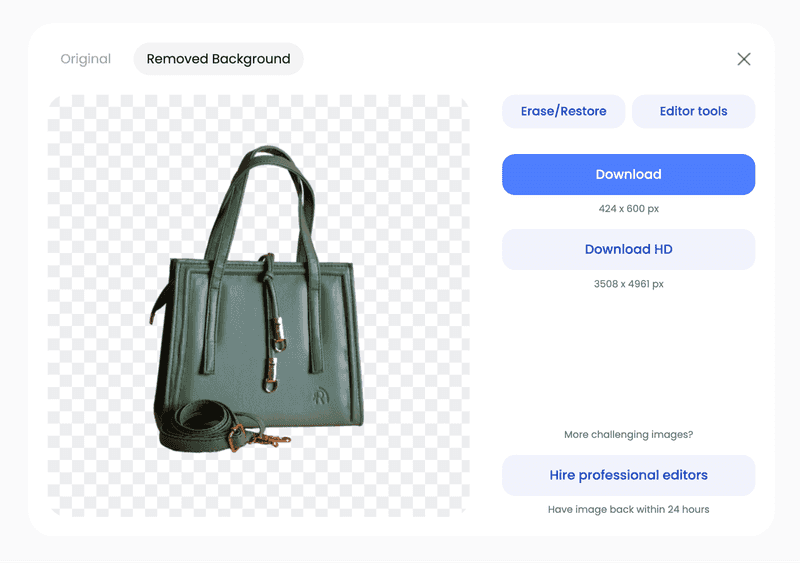
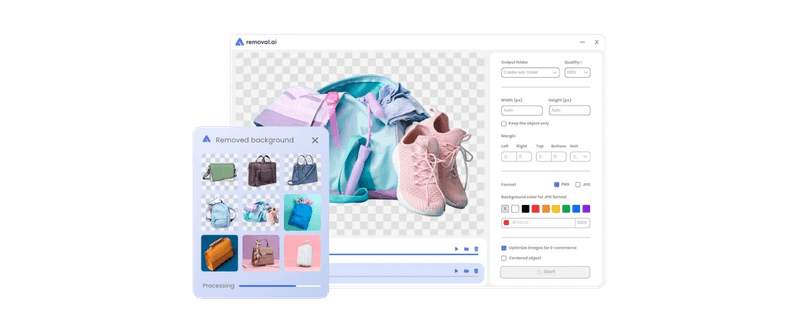
We’ve all snapped a product photo that looks like it was taken during a small earthquake—tilted, cluttered, and… honestly, a little sad. That’s where Removal.AI comes in to save the day. It quickly clears messy backgrounds and replaces them with clean, distraction-free visuals, giving your listings a professional, scroll-stopping look. You can choose a crisp neutral backdrop or a transparent background for more creative options. Batch processing makes editing multiple items a breeze, and the polished images help your products stand out, build buyer trust, and meet eBay image requirements, all without hours of tedious editing.
2. Batch-Edit Multiple Listings Consistently
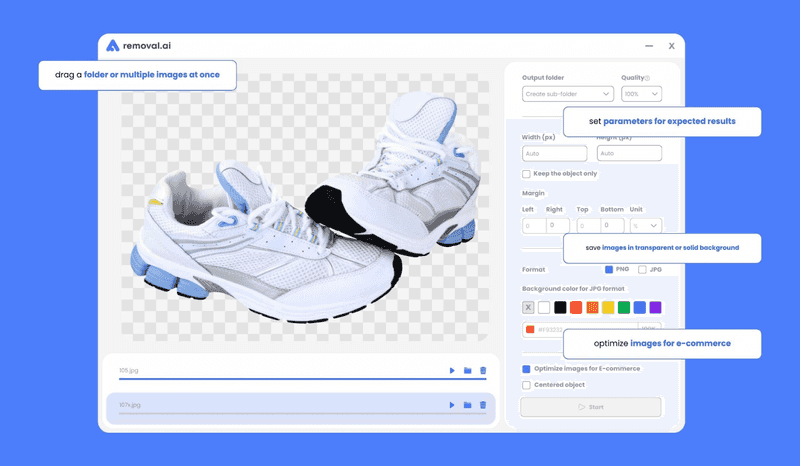
Keeping your eBay listings visually consistent is easier than ever with Removal.AI. You can remove bg from multiple images at once, apply the same enhancements, and ensure all your products share a cohesive, professional look. Batch editing saves time, reduces errors, and helps your store maintain a polished brand identity. Consistent lighting, backgrounds, and colors not only make your listings more appealing but also build buyer trust, increase clicks, and improve overall performance across your entire eBay catalog.
Step 4: Export Marketplace-Ready Files
Once your images are polished, Removal.AI lets you export them in eBay-approved dimensions and formats, ready for instant upload. This ensures your listings meet eBay image requirements without any last-minute resizing or cropping. With consistent, professional files, your products stand out, look trustworthy, and maintain a cohesive brand presence across your store. Streamlining this final step saves time and keeps your workflow efficient, allowing you to focus on selling instead of dealing with file formats and image sizes.
eBay Photo Requirements You Should Follow
eBay has over 18.3 million seller accounts, which means competition is fierce and every listing needs to stand out from the crowd. One of the easiest ways to get noticed is with high-quality, compliant photos. Using a background remover can help create clean, professional images that attract buyers and maintain consistency across your store listings.
With that in mind, here are three (3) more useful tips:
-
Minimum dimensions, format, and aspect ratioImages should be at least 500 pixels on the longest side, with 1,600 pixels or more recommended for zoom functionality. Accepted formats include JPEG, PNG, TIFF, and BMP. A 1:1 (square) aspect ratio ensures your product displays correctly across devices.
-
Avoid watermarks, logos, or text overlaysYour images should be clean and free of any text, logos, or watermarks that distract from the product. Clear visuals help buyers focus on the item itself and convey a sense of professionalism. This simple step increases trust and encourages more clicks on your listing.
-
Keep the product centered and clearly visible
Position your product prominently in the frame so it’s evident from all angles. Centered, well-framed images make it easier for buyers to assess the item. Consistent, focused photos enhance the overall look of your listing and improve shopper confidence.
The All-in-One Platform for Effective SEO
Behind every successful business is a strong SEO campaign. But with countless optimization tools and techniques out there to choose from, it can be hard to know where to start. Well, fear no more, cause I've got just the thing to help. Presenting the Ranktracker all-in-one platform for effective SEO
We have finally opened registration to Ranktracker absolutely free!
Create a free accountOr Sign in using your credentials
Following these guidelines ensures your listings look professional, capture attention, and increase buyer trust. Clean, compliant photos help shoppers focus on your products, boosting your chances of a sale and giving your store a competitive edge.
The All-in-One Platform for Effective SEO
Behind every successful business is a strong SEO campaign. But with countless optimization tools and techniques out there to choose from, it can be hard to know where to start. Well, fear no more, cause I've got just the thing to help. Presenting the Ranktracker all-in-one platform for effective SEO
We have finally opened registration to Ranktracker absolutely free!
Create a free accountOr Sign in using your credentials

Pro Tips for Creating Scroll-Stopping Product Photos
Even minor improvements in your product photos can make a big difference in eBay sales. Clear, professional images capture attention, build trust, and help your listings stand out in a crowded marketplace. To ensure your photos perform at their best, here are some practical tips to enhance your eBay visuals:
- Use natural light or soft-box lighting
Lighting is everything. Natural light or soft-box lighting highlights textures, colors, and packaging, making your items look vibrant and appealing. Proper lighting also reduces harsh shadows, helping create clean product photography and following product photo background tips.
- Focus on product details that matter (texture, color, packaging)
Highlight what makes your product unique, whether it’s texture, color, or packaging design. For example, if you’re selling a hand-knitted scarf, show a close-up of the stitch pattern and the richness of the yarn color. Clear, detailed shots like this show buyers exactly what they’re getting, which increases trust in your listing. This approach aligns with product photo tips for eBay and essential product photography tips.
- Maintain the same angles across listings for consistency
Consistency matters. For example, if you photograph a set of ceramic mugs, take all images from the same angles — front, side, and top-down — for every listing. Using the same angles across all your listings gives your store a cohesive, professional look. It also improves eBay photo optimization and strengthens overall eCommerce product photography.
By following these tips, your listings will not only look polished but also feel professional and trustworthy to potential buyers. Investing a little extra effort in your photos can boost clicks, increase conversions, and help your store stand out among the millions of sellers on eBay.
Final Thoughts: AI-Powered Photos Sell Better
Professional-looking product photos do more than catch the eye — they inspire trust. Crisp, well-lit images signal quality, reliability, and attention to detail, encouraging shoppers to click “Buy Now” instead of scrolling past. In a marketplace as crowded as eBay, where first impressions happen in an instant, your visuals can be the difference between a sale and a missed opportunity.
Removal.AI empowers small businesses to compete with professional studios by turning everyday photos into polished, high-quality listings. From instantly removing backgrounds to enhancing lighting and shadows, AI-powered editing makes every image look consistent and professional. Batch processing ensures uniformity across multiple listings, saving time while keeping your store’s visual identity cohesive.
When your product photos shine with clarity, texture, and color, they do more than display an item — they tell a story. Each polished image conveys professionalism, builds buyer confidence, and invites shoppers into your shop. With AI-powered tools like Removal.AI, even small sellers can transform listings into visual experiences, turning casual scrollers into loyal customers and everyday items into irresistible purchases.

