
Intro
Somewhere in your agency stack there's one tool that needs to see the internet from a place you're not in. Maybe it's an ad preview session for a client in Madrid, or a rank checker that needs Toronto results. The obvious fix, flipping the whole machine onto a VPN or system-wide proxy, drags everything else along for the ride. Your email and your client dashboards suddenly report from the wrong country, and half your logged-in sessions throw security prompts you now have to click through. The whole day moves abroad because one five-minute check needed it. There's a cleaner way. You can route one app through a proxy and leave everything else on the computer exactly as it is. This guide covers how per-application routing works, which method fits which tool, and how to set up a region-specific task without disrupting anyone else on the team.
Why proxying the whole machine backfires for agencies
Agencies run on logged-in sessions. Ad platforms, analytics accounts, client CRMs, your own billing tools. When the entire machine jumps to a Lisbon IP because one tool needed it, every session notices. Google asks you to confirm it's really you, and a client's ad account flags the login. Multiply that across a team of ten and a routine region check turns into an afternoon of account recovery.
The data side is just as messy. With the browser exiting through another country, every dashboard renders localized results you didn't ask for. Currency displays shift and geo reports skew, and someone pastes the wrong numbers into a client deck. Whole-machine routing solves one problem and creates six new ones.
What per-application routing means
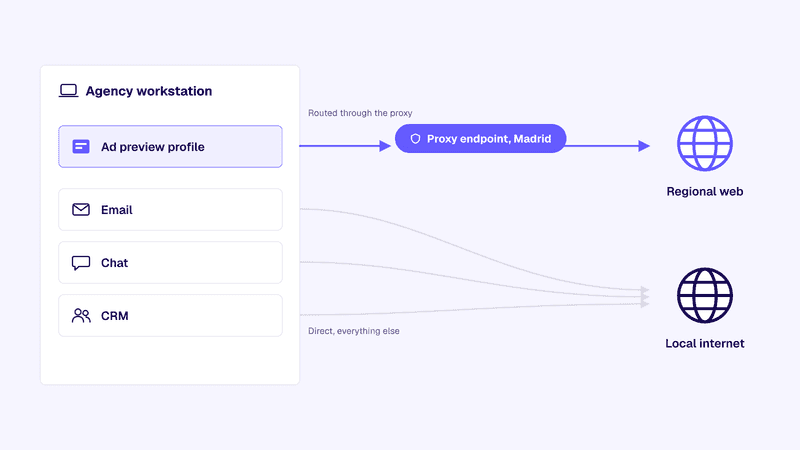
Per-application routing splits traffic at the app level instead of the machine level. One program, say a research browser profile, sends its connections through a proxy endpoint in the target region while everything else uses your normal connection. Think of it as a proxy for specific software rather than a blanket over the whole operating system.
The split can live inside the app itself, in a routing rule that catches the app's process, or in an isolated profile with its own connection settings. The diagram below shows the result: one routed path for the tool that needs it, one direct path for everything else.
Source: Anonymous Proxies (original graphic)
Tools and methods that route a single app
In-app proxy settings
The easiest case: plenty of schedulers and SEO tools ship with a proxy field in their settings. Paste in a host, port, username, and password, and only that tool's requests travel through the endpoint. If you're auditing your stack, start with the marketing automation tools you already pay for; a surprising number support this natively.
Per-app routing rules
When a tool has no proxy field, a routing client fills the gap. Software like Proxifier or ProxyCap applies rules by process name: catch the rank checker's process, send it through endpoint A, leave everything else untouched. That covers desktop tools never built with proxies in mind.
Isolated browser profiles
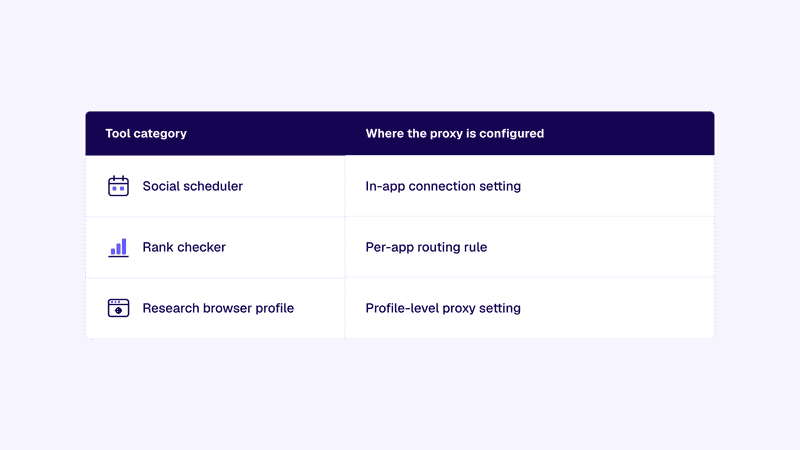
For research and preview work, a separate browser profile with its own proxy setting is the tidiest container. A Chrome profile with a proxy extension, or an anti-detect browser with per-profile connections, keeps the regional session in one window while your main browser stays local. Here's how common tool categories line up with their configuration point.
The All-in-One Platform for Effective SEO
Behind every successful business is a strong SEO campaign. But with countless optimization tools and techniques out there to choose from, it can be hard to know where to start. Well, fear no more, cause I've got just the thing to help. Presenting the Ranktracker all-in-one platform for effective SEO
We have finally opened registration to Ranktracker absolutely free!
Create a free accountOr Sign in using your credentials
Source: Anonymous Proxies (original graphic)
Setting up a region-specific tool step by step
Say your client runs a campaign aimed at Madrid, and part of your monthly QA is spot-checking regional ad placements to confirm the right creatives actually run there. The check has to browse from the campaign's target region while your inbox and the rest of your client work stay put.
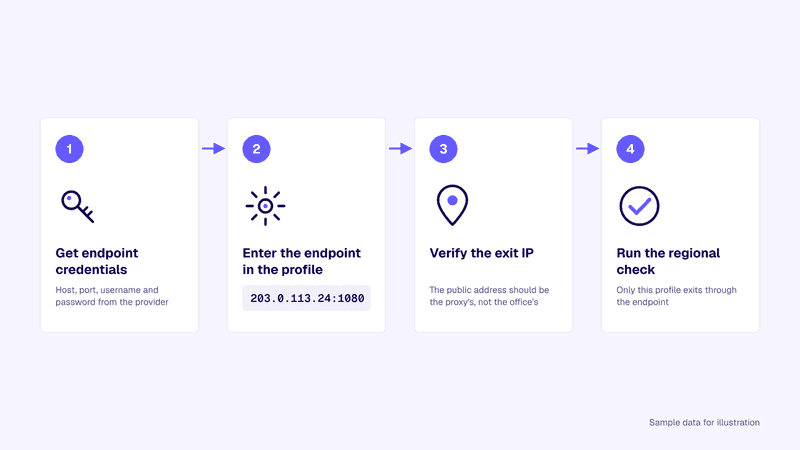
- Get the endpoint. Your provider hands you a host, port, and login for an IP in the target city or country. For repeatable setups, teams often assign each tool a fixed endpoint from a provider like Anonymous Proxies.
- Configure the container. Create a fresh browser profile and enter the endpoint in its proxy settings. For desktop software, add a routing rule for its process name instead.
- Verify before you trust it. Load an IP-check page inside the new profile and confirm the location matches the campaign target. Check your main browser too; it should still show your local IP.
- Run the task. Load the placements and capture what you need, then close the profile. Nothing else on the machine ever left home.
The sequence below shows the same four steps at a glance.
Source: Anonymous Proxies (original graphic)
Keeping team workflows uninterrupted
Per-app routing only stays clean if the team knows what's routed where. Keep a shared note listing each tool, its endpoint, and its exit region, and store credentials in your password manager rather than a chat thread. Name profiles clearly, something like "Client ES ad check", so nobody borrows a regional profile for normal browsing.
Two habits prevent most incidents. Comms and project tools never get routed, since keeping them direct means those logins stay stable. And retest after updates, because an update can reset connection settings without telling you. Vendors keep adding native proxy fields too, one of the practical shifts in recent marketing automation trends, so expect fewer external routing rules over time.
When to use a dedicated IP per tool
Shared or rotating access is fine for one-off checks. The moment a tool logs into anything, consistency matters. Platforms watch for accounts that hop between countries, and a scheduler arriving from a new IP every day looks exactly like what their fraud systems flag.
That's the case for sending a single tool's traffic through its own IP: the tool builds a stable footprint in its target region, and its traffic never mixes with anything else you run. A SOCKS5 endpoint is the usual pick because it carries whatever protocol the app speaks and pairs well with process-level routing rules.
Dedicated IPs earn their keep on anything long running. If your rank tracker watches local SERPs for a client month after month, one consistent endpoint in that market keeps the data comparable over time. Spread the cost across the retainer and it's a rounding error next to a flagged ad account.
FAQ
Does routing one app slow everything else down?
No. Only the routed app's traffic takes the longer path. Everything else keeps your direct connection at full speed.
Can two tools exit from two different regions at once?
Yes, and that's half the point of a per-app proxy setup. Give the ad preview profile a Madrid endpoint and the rank checker a Toronto one, and both run side by side on the same machine.
What if a tool has no proxy settings at all?
Route it from the outside. A rules-based client can catch the app by its process name, or the tool can live in a virtual machine with its own connection.
Running region-specific tools the clean way
Routing the whole computer to serve one tool trades a small problem for several bigger ones; per-application routing removes that trade. Match each tool to its natural configuration point, whether that's a built-in field, a process rule, or an isolated profile, then verify the exit IP before you trust it. Keep a shared record of what routes where, and give anything long running its own dedicated endpoint so sessions stay stable. Do that and the regional work runs in its own lane, and nobody else on the team even notices it happened.

