
Intro
You're forty minutes into a technical audit. Filters set, crawl half finished. Then the tool throws you back to the login screen and every unsaved setting is gone. Your password still works and nothing crashed, so the logout feels random. It rarely is. Most platforms ended that session on purpose because your requests suddenly arrived from a new IP address. Maybe wifi handed off to mobile data, or maybe your ISP reassigned your connection overnight. Either way, the tool treated the change as a possible account takeover and cut the session to protect you. That's cold comfort when an afternoon of setup just evaporated. The fix isn't a support ticket or a different browser. It's understanding why tools distrust a moving address, then giving them the one thing they want: a steady, predictable identity that lasts as long as the task does.
Why a changing IP ends your session
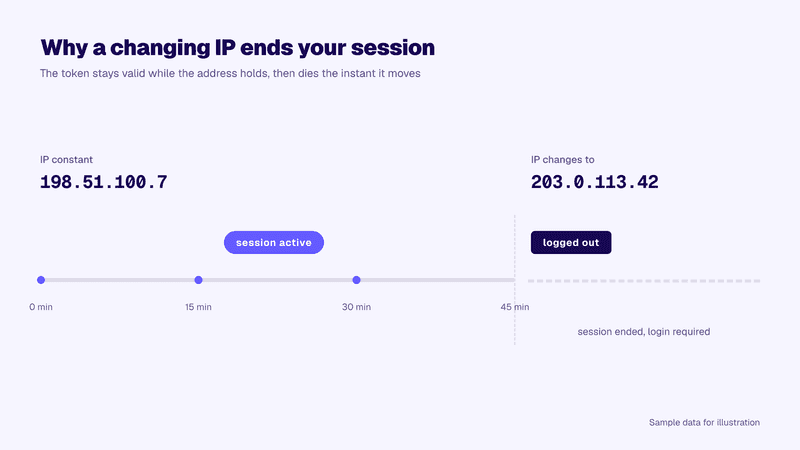
When you sign in, the tool issues a session token, a small credential your browser attaches to every request so you don't retype your password. Tokens get stolen, though, and a stolen token works without the password. So platforms watch the context around each one, and the source IP is the loudest signal available. If a token created on one address suddenly shows up on another, the platform can't tell your laptop switching networks from a hijacked cookie replayed somewhere else. Ending the session is the safe call, so that's the call it makes.
That's why getting logged out when IP changes is deliberate. The trigger list is longer than most people expect: a phone flipping between wifi and 5G, VPN reconnects, office failover lines, rotating proxies swapping exits every few minutes, even a routine ISP lease renewal.
The timeline below shows the mechanics: the token stays valid while the address holds, then dies the instant it moves.
Source: Anonymous Proxies (original graphic)
Where this hurts marketing work most
A moving address costs you seconds on a quick lookup and hours on long, stateful work. Three jobs take the worst of it.
Long audits and crawls
Site audits hold unsaved state everywhere: crawl scope, filters, comparison views, half-annotated issues. A mid-crawl logout can invalidate the whole run, and on a large site that's an afternoon. Deep keyword research suffers the same way, since layered filters rarely get saved before you're done.
Multi-account client work
Agencies and brands with regional profiles run several legitimate logins side by side, one per client or market. Tools bind each login to its network context, so when a shared office connection shifts addresses, every seat drops at once and some accounts get pushed into extra verification. For steady sessions, teams often assign each seat a fixed ISP address from a provider such as Anonymous Proxies. Each login then keeps its own coherent history, exactly what the checks reward.
Always-on dashboards
Reporting screens are meant to stay open. If your team keeps a Rank Tracker dashboard on a wall display, an address change turns it into a login prompt right when someone glances up. The data keeps collecting, but the visibility you wanted is gone until someone signs back in. Careful accurate rank tracking work only pays off while the session showing the numbers stays alive.
How a fixed IP preserves a session
The logic runs both ways. If a moving address looks like hijacking, a constant one looks like the same person working through a long task, because that's what it is. The token gets issued, every request after it arrives from the address the platform expects, and the session runs until you log out or it expires on schedule.
That's all a stable IP for SEO tools buys you: consistency. Plenty of people search "keep session alive proxy" after losing an afternoon, and the honest answer is that no proxy keeps a session alive on its own. A fixed address stops handing the tool a reason to end one. The address being identical at minute 90 and minute 1 matters more than its speed or its city.
Setting up a stable identity for long tasks
Start with the address itself. What you want is an ISP-assigned IP that stays fixed through a long session, so the identity behind your login never shifts mid-task. Datacenter ranges hold still too, but ISP addresses carry residential-grade reputation, which keeps stricter platforms comfortable.
The All-in-One Platform for Effective SEO
Behind every successful business is a strong SEO campaign. But with countless optimization tools and techniques out there to choose from, it can be hard to know where to start. Well, fear no more, cause I've got just the thing to help. Presenting the Ranktracker all-in-one platform for effective SEO
We have finally opened registration to Ranktracker absolutely free!
Create a free accountOr Sign in using your credentials
From there, make the setup boring and repeatable:
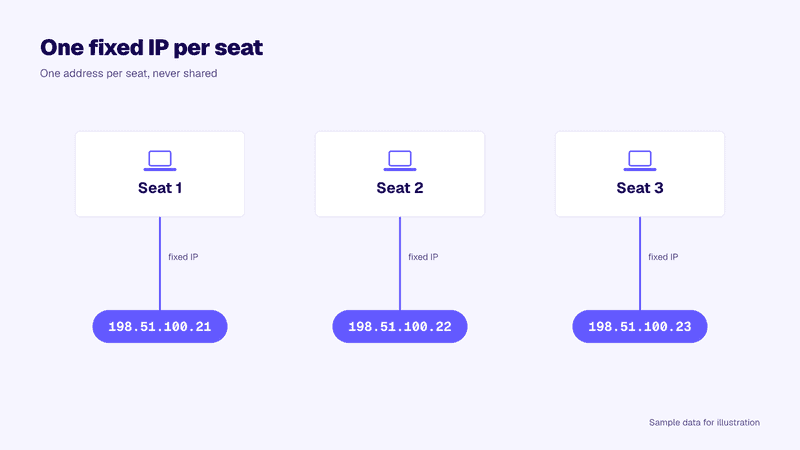
- Give every seat its own address. One fixed IP per teammate or client login, never shared, since shared addresses blur account histories.
- Route at the profile level. Bind the address to a browser profile or a specific app, so work tools use the fixed IP while everything else rides your normal connection.
- Hold it for the whole task. Swapping addresses halfway recreates the exact problem you started with.
- Match the address to the account. A profile that normally operates from Germany should keep a German address, with the timezone to match.
The diagram below shows the shape of it: three seats, each tied to its own address.
Source: Anonymous Proxies (original graphic)
When a rotating pool is still the right call
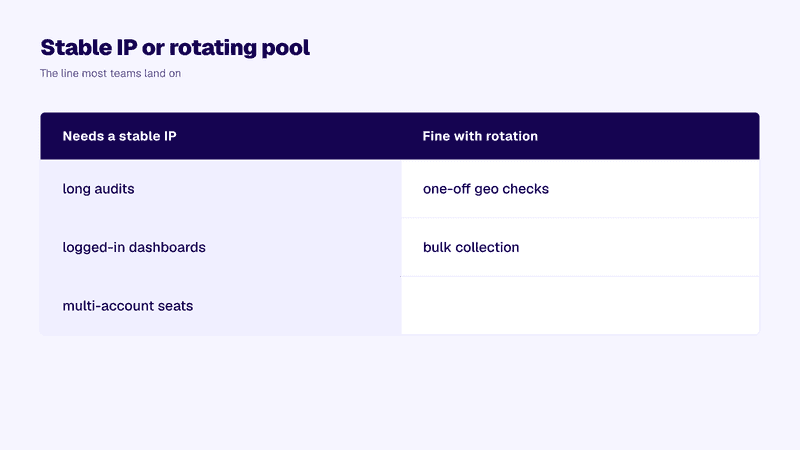
Not every job holds a session. Checking how a SERP renders in ten cities or verifying an ad across regions means firing single-shot requests with no login behind them, and that work needs many addresses rather than one. It's what rotation was built for, so keep a rotating pool for one-off geo checks and bulk collection while your logged-in seats stay on fixed addresses. The same split runs through multi-location rank tracking: position checks fan out across regions while your own reporting session stays put.
The table below draws the line most teams land on.
Source: Anonymous Proxies (original graphic)
FAQ
Why does my password still work after the logout?
Because nothing happened to your credentials. The platform invalidated one session token it stopped trusting, and signing in again issues a fresh token bound to your current address.
Will a VPN stop the logouts?
Only if you pin one server and it hands you the same exit address every time, which consumer VPNs rarely guarantee. Reconnects and server hops move your address, and that movement is the exact trigger you're trying to remove.
Do I need a separate fixed IP for every account?
For multi-account work, yes. One address per seat keeps each login's history coherent and stops one seat's activity from bleeding into another's. A single personal login only needs one fixed address.
Keeping long research sessions alive
Mid-task logouts are deliberate security responses, and they trace back to one variable you control. Give stateful work a single fixed address and the checks that used to end your sessions stop firing. Keep rotation for the stateless jobs that never sign in, so each side of your setup runs on the pattern it was designed for. Assign one address per seat and hold it for the length of the task, matched to where the account normally operates. Do that and sessions end when you log out, not when your network twitches.

