
Intro
Picture a reader who lands on your best article. They skim the first line, scroll halfway, then leave. Eight seconds, gone. Google reads that short visit as a weak signal. Multiply it across thousands of sessions and your rankings feel the drag.
Now picture the same reader pressing play instead. They listen while they cook, commute, or walk the dog. The visit lasts four minutes, not eight seconds. The next day they come back for another piece.
That gap is what this post is about. Audio versions of articles lift the engagement signals that Google now weighs more heavily in 2026. Publishers like Aftenposten, Bloomberg, and the Irish Times already use them to hold readers longer. We will look at what the data shows, why it works, and how to add audio without slowing your pages down.
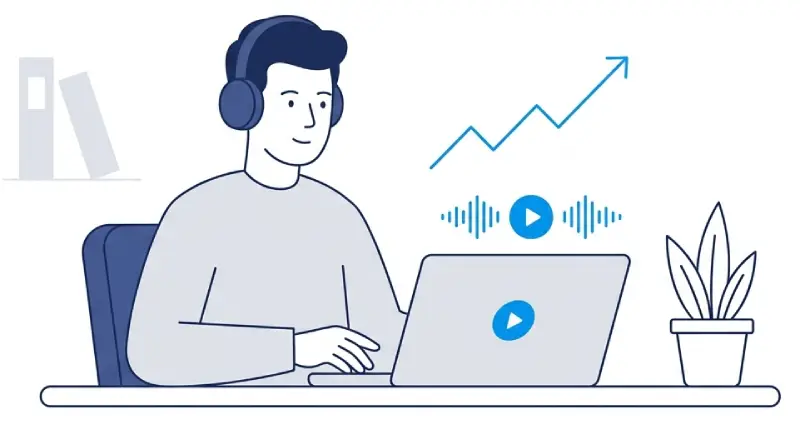
Audio gives skim-readers a way to stay on the page. Source: TTSWP.
Why engagement signals carry more weight in 2026
Search engines do not rank pages on keywords alone. They watch how long people stay and whether they come back.
First Page Sage puts searcher engagement at about 12% of Google's algorithm in early 2025, up from 11% the year before. That keeps it among the core ranking factors, next to content quality, backlinks, and trust.
The All-in-One Platform for Effective SEO
Behind every successful business is a strong SEO campaign. But with countless optimization tools and techniques out there to choose from, it can be hard to know where to start. Well, fear no more, cause I've got just the thing to help. Presenting the Ranktracker all-in-one platform for effective SEO
We have finally opened registration to Ranktracker absolutely free!
Create a free accountOr Sign in using your credentials
The December 2025 Core Update again pushed Google toward satisfying, user-first content. Analysts who tracked the rollout pointed to engagement signals, including Google's Navboost system, as a driver of the shifts. Time on page, scroll depth, return visits, and pogo-sticking all shape how a page performs. Reviews of the update flagged user satisfaction as the clearest predictor of which pages gained or lost positions.
GA4 calls a session engaged when it lasts at least 10 seconds, has two or more page views, or fires a key event. Anything shorter counts as a bounce. Most blog content sits at 70 to 90% bounce rates. So the average article fails the 10-second test for most visitors. Audio changes that math in a way you can measure.
What the publisher data shows
Publishers have tested audio versions of articles for years. Most run them through text-to-speech narration. The pattern holds across studies. When users press play, they stay longer, read more pages, and come back more often.
The numbers below come from publisher case studies and analytics reports.
| Publisher / Source | Engagement metric | Result |
|---|---|---|
| BeyondWords | Time on site per session | 322 sec vs 30 sec, about 10x higher |
| BeyondWords | Pages per session | 1.39 vs 1.17, up 19% |
| BeyondWords | Multi-session engagement | Listeners 32% more likely |
| Play.ht | Bounce rate | 280% lower for listeners |
| Schibsted / Aftenposten | Audio completion rate | 58% finish the article |
| Bloomberg | Stories per session in app | 6 stories on average |
Sources: BeyondWords and Play.ht publisher data, Schibsted via INMA, and Bloomberg via Digiday.
A few of these deserve context. Schibsted runs audio at Aftenposten, Norway's largest newspaper. The paper passed 160,000 paying subscribers, and audio plays a part in that retention. Their team built a custom AI voice cloned from their main podcast host to keep the sound consistent across articles and shows.
The Irish Times uses audio to cut churn tied to what publishers call the unread guilt factor. Readers who run out of time on a written story still finish it by ear. A Northwestern University study found that frequency of consumption is the strongest predictor of subscriber retention in digital news. Audio drives frequency because it fits the gaps in a reader's day. Commutes, walks, kitchen time, and gym sessions all become reading time.
The mechanism is simple. When a user presses play, the browser tab stays open for the length of the audio. The user might switch tabs, step away, or keep reading. Each of those counts as an active session in analytics tools.
How audio extends dwell time and reduces pogo-sticking
Dwell time is the gap between a click from search results and a return to those results. Google has never confirmed dwell time as a direct ranking factor. It tracks closely with content quality and user satisfaction, which Google does measure.
The All-in-One Platform for Effective SEO
Behind every successful business is a strong SEO campaign. But with countless optimization tools and techniques out there to choose from, it can be hard to know where to start. Well, fear no more, cause I've got just the thing to help. Presenting the Ranktracker all-in-one platform for effective SEO
We have finally opened registration to Ranktracker absolutely free!
Create a free accountOr Sign in using your credentials
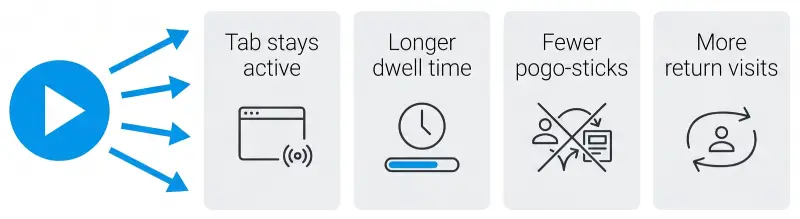
What happens after a user presses play. Source: TTSWP.
Audio raises dwell time in three ways.
The average article takes 4 to 12 minutes to hear. A user who presses play commits 10 to 30 times more time than the average skim reader.
Audio keeps the tab active even when the user looks away. That adds time the session would lose.
Listeners rarely jump back to search results. They committed to the content in a different mode, so they stay.
Pogo-sticking is a well-known negative signal. A user clicks a result, bounces back to the search page fast, then clicks another. Google reads that as failed intent. Audio listeners almost never do this. Pressing play is a strong intent signal on its own.
This matters most on long articles. Text-only readers often skim, give up, and return to search for a shorter source. A text-to-speech version gives that share of traffic a way to stay.
Audio as an accessibility lever, and what that means for SEO
The European Accessibility Act took effect on 28 June 2025 for new consumer products and services in the EU. WCAG 2.2 is the standard most regulators point to. The 2025 WebAIM Million study found WCAG failures on 94.8% of home pages. Most sites still carry both legal risk and a competitive gap.
Audio is not a full accessibility fix. It does not replace alt text, semantic HTML, keyboard navigation, or color contrast. It does make written content reachable for readers with dyslexia, low vision, attention difficulties, or tired eyes. About 16% of the world's population, more than 1 billion people, live with some form of disability. That group is a real share of every site's audience.
The SEO effect is indirect but real. TheeDigital found that WCAG-compliant sites earn 23% more organic traffic and rank for 27% more keywords than non-compliant peers. Accessibility is not a direct ranking factor. Accessible sites tend to have cleaner structure, faster pages, better text alternatives, and stronger engagement. Audio belongs in that toolkit because it widens the group of people who can finish the content.
For sites in EU markets, audio also lowers legal exposure under the EAA. That is a business reason to add it sooner, next to the SEO case.
Multimodal content and AI search visibility
AI Overviews and answer engines changed how content gets cited. Pages that show up inside AI Overviews and ChatGPT answers share a few traits. Clear headings, schema markup, factual detail, and multimodal elements all raise citation rates.
Wellows found that pages combining text, images, video, and structured data were picked 156% more often than text-only pages. Full multimodal coverage paired with schema pushed the lift to 317%. AI Overviews keep spreading too. By early 2026 they showed on close to half of Google searches, and they appear most on long-tail, high-intent queries.
Audio counts as a multimodal signal. It does not replace transcripts or schema. It adds another content format to the page. For AI systems, that breadth points to depth and user-first design. For people, it widens the share of visitors who can take in the content their way.
You can check how often AI Overviews appear for your target queries with a tool like the SERP Checker. That tells you which pages have the most to gain from richer formats.
The takeaway is plain. Audio sits next to FAQ schema, structured headings, and clean technical SEO. It does not replace any of them. It adds a layer that compounds with the rest.
Adding audio without hurting Core Web Vitals
Core Web Vitals measure loading, interactivity, and visual stability. Audio can hurt all three when added badly. Heavy third-party players, autoplay scripts, and large preloaded files cause most of the damage.
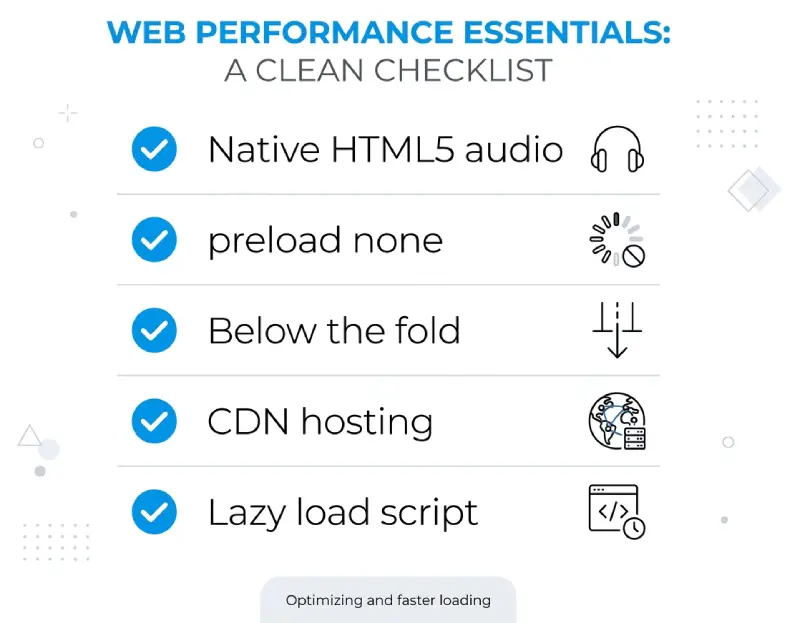
A clean setup that protects your Core Web Vitals. Source: TTSWP.
A clean setup follows a few rules.
Use native HTML5 audio elements where you can. They are light and well supported by browsers and crawlers.
Set preload to none or metadata. The audio file should not download until the user presses play. That protects Largest Contentful Paint and saves mobile bandwidth.
Place the player below the fold or inside a collapsible block. It should not fight the main content for paint resources.
Reserve fixed dimensions for the player. That stops Cumulative Layout Shift when it renders.
Skip autoplay. It rarely matches intent and triggers Total Blocking Time issues on mobile.
Lazy load the player when it uses JavaScript controls. Native HTML5 audio with the controls attribute supports lazy loading on its own.
Most WordPress sites add audio through a text-to-speech plugin that handles narration, hosting, and playback. The brand matters less than the build. A plugin that streams from a CDN, defers scripts, and uses native audio tags will protect your scores. One that drops a heavy iframe player above the fold will not. Text-to-speech plugins for WordPress like TTSWP turn existing articles into narration and store the audio on a CDN, which fits current performance guidance.
After you add a player, run a quick Web Audit to confirm it did not drag down your scores. For non-WordPress sites, the same rules apply. Host the file on a CDN. Keep the player light. Defer the script until needed.
How to measure the impact in GA4 and Search Console
Audio only earns its place if you can prove it changed engagement. Three steps make the change visible.
Start with event tracking. Add GA4 events for audio play, plus 25%, 50%, and 75% completion. That builds a listener cohort you can compare against non-listeners. Line up engaged sessions, average engagement time, and pages per session across the same articles.
Move to page-level tracking. Watch engagement rate, average engagement time, and scroll depth for pages with audio against pages without. Run a controlled test where you can. Add audio to half of new articles over a quarter, then compare the two groups.
Finish with Search Console. Audio does not move impressions or clicks on its own. Pages with stronger engagement often see CTR climb over 60 to 90 days as Google adjusts how it shows them. Track CTR by query category for audio pages. Pair that with a Rank Tracker so you can watch position changes on those same pages over time.
The All-in-One Platform for Effective SEO
Behind every successful business is a strong SEO campaign. But with countless optimization tools and techniques out there to choose from, it can be hard to know where to start. Well, fear no more, cause I've got just the thing to help. Presenting the Ranktracker all-in-one platform for effective SEO
We have finally opened registration to Ranktracker absolutely free!
Create a free accountOr Sign in using your credentials
One dashboard view answers most questions. Engaged sessions, average engagement time, pages per session, and bounce rate, all split by listener versus non-listener. That single view tells a content team whether audio is paying off.
What this means in practice
Audio versions of articles are not a vanity feature. Publisher data shows they extend dwell time by an order of magnitude. They cut bounce rate by a measurable margin. They lift return visits and engaged sessions for both new and returning users. Each signal feeds the engagement metrics that have grown more important across Google's recent core updates.
The case gets stronger with two other forces. Accessibility rules are tightening, and WCAG-compliant sites already show better organic numbers. AI search prefers multimodal content, and audio counts as a credible signal next to images, video, and structured data.
The risk to manage is the build. Heavy players, autoplay, and preloaded files hurt Core Web Vitals and cancel the engagement gains. A clean native HTML5 setup with CDN hosting and lazy loading avoids that.
For most sites, the right test is small. Add narration to ten to twenty cornerstone articles. Track engagement for 60 to 90 days. Let the data decide whether to roll it out site-wide. The publisher numbers suggest most sites will see a lift. The size depends on your audience, your topics, and how visible the player is on the page.

