Intro
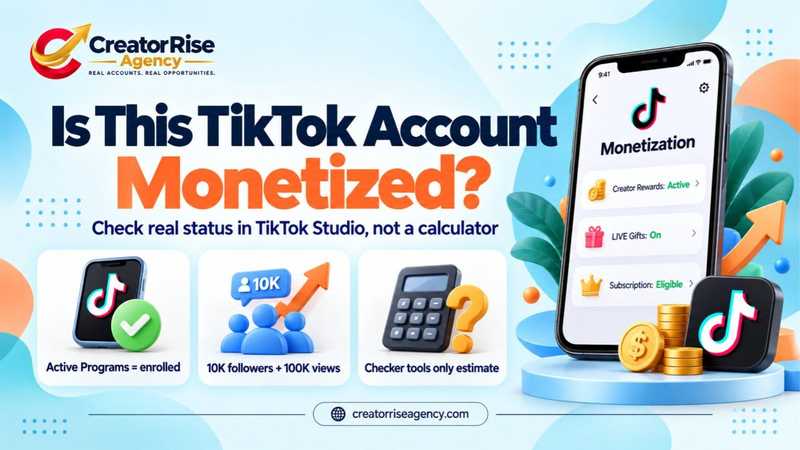
Most TikTok monetization checker sites can't tell you whether an account is monetized. What they do is take public follower and view counts, plug in a pay rate they've guessed, and hand back an earnings figure. A checker, in the sense this guide uses, is any tool or method for answering one thing: is this account getting paid through TikTok's own programs? The answer you actually want is on one screen, the Monetization page in TikTok Studio. There's a list on it called Active Programs. Only the account owner can see it.
Checking your own account takes a couple of minutes. Checking someone else's is where it gets tricky, whether you're a brand vetting a creator, an agency about to sign one, or a buyer looking at accounts from a seller such as Creator Rise Agency. You can't log in. You have to get the owner to show you that screen, and in the meantime work out which public clues are worth anything.
And mind the wording. Eligible means an account clears TikTok's entry rules. Enrolled means TikTok said yes and payouts are on. People swap the two all the time, which is why careful listings of Creator Rewards enrolled accounts spell out the program and its status rather than lean on "monetized".
What follows: the official in-app check, the 2026 requirements straight from TikTok's pages, an honest look at outside tools, and a checklist for accounts that aren't yours.
The short answer
Your own account: profile, then TikTok Studio, then Monetization. Anything listed under Active Programs, you're enrolled in. Programs for you shows what you could join next. For someone else's account, start with what's public (Gifts during a LIVE, a Subscribe option, a Shop tab) and then ask the owner for a screen recording of their Monetization page with the username in shot. No outside tool can read that page for you.
What "monetized" means on TikTok
A monetized TikTok account is one that TikTok has accepted into at least one of its payment programs. There is no single "monetized" badge. Each program has its own entry rules, so an account can be in one program and missing from another. TikTok keeps all of them in the Creator Monetization Center, which its Creator Academy describes as a "one-stop hub to monetize on TikTok".
| Program | What it pays for | Can the public see it?
|
| Creator Rewards Program | Original videos over one minute, paid on qualified views | No. Only the owner sees it in TikTok Studio |
| LIVE Gifts | Virtual Gifts sent during a LIVE, collected as Diamonds | Yes, while the account is LIVE and Gifts are turned on |
| Subscription | Monthly fan subscriptions for badges, perks and subscriber-only videos | Yes. A Subscribe option appears for viewers |
| TikTok Shop affiliate | Commission on products tagged in videos, LIVEs and the showcase | Yes. A Shop or showcase tab appears on the profile |
| TikTok One and Creator Marketplace | Brand deals arranged through TikTok | Partly. Sponsored videos carry branded content labels |
Plenty of calculator sites still describe the Creator Fund as if it were open. TikTok discontinued it on 16 December 2023 in the United States, United Kingdom, France and Germany, as TechCrunch reported at the time, and pointed creators to the Creativity Program. That program left beta and was relaunched as the Creator Rewards Program on 18 March 2024, according to TikTok's Newsroom. Any tool, article or seller quoting Creator Fund rates is working from information that is almost three years old.
How to check your own monetization status in TikTok Studio
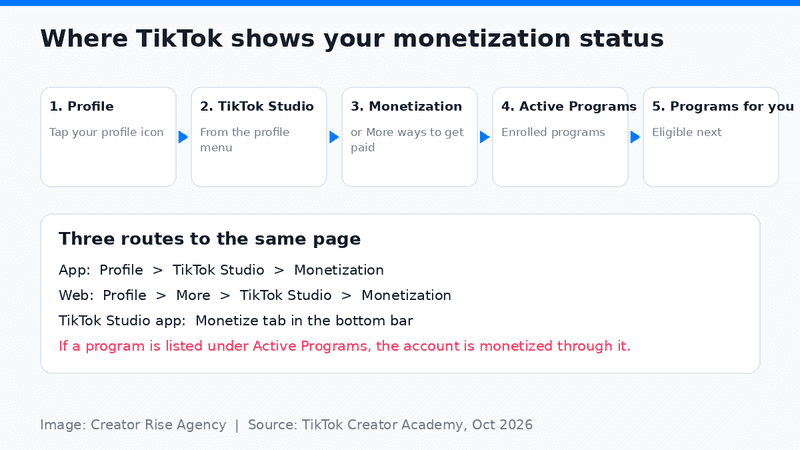
Your real enrolment and eligibility data appears in one place: the Monetization section of TikTok Studio. TikTok's Creator Academy (updated September 2026) gives three ways in:
- In the TikTok app: go to your profile, tap TikTok Studio, then select Monetization. On some accounts the label reads More ways to get paid.
- On the web: open your profile on tiktok.com, click More in the left-hand menu, click TikTok Studio, then Monetization.
- In the TikTok Studio app: open the app and tap Monetize in the bottom bar.
One myth needs clearing up first. Several short videos that rank for this search say that if you can see TikTok Studio, your account is monetized. It means no such thing. Studio is just the place TikTok puts its creator tools, editing and analytics among them. Whether you're monetized is a separate question, answered one tap further in.
The All-in-One Platform for Effective SEO
Behind every successful business is a strong SEO campaign. But with countless optimization tools and techniques out there to choose from, it can be hard to know where to start. Well, fear no more, cause I've got just the thing to help. Presenting the Ranktracker all-in-one platform for effective SEO
We have finally opened registration to Ranktracker absolutely free!
Create a free accountOr Sign in using your credentials
Once you're on that page, read three sections:
- Active Programs lists everything you are enrolled in, such as Creator Rewards, Subscription or TikTok One. If a program appears here, your account is monetized through it.
- Programs for you shows programs you are eligible for but haven't joined, based on your content and profile. If a program is missing from both lists, you don't meet its requirements yet.
- Rewards Analytics and Balance shows what you've earned, filtered over 7, 30 or 60 days, with a link to your balance and withdrawal page.
Can't see a program you expected? Two things explain most of these cases. Account status comes first. TikTok rates each account Healthy, Fair, Severe or Banned, looking back over 90 days of violations, and you'll find it in Settings and privacy. A record of recent violations keeps the money switched off. Then there's account type. Only Personal accounts qualify for the Creator Rewards Program, so a Business account won't see it in either list, however many followers it has.
Sometimes a program just says it isn't available. That can mean it hasn't reached your country yet; in TikTok's words, "program availability and eligibility vary by market, account status, and feature rollout."
TikTok monetization requirements in 2026
The figures below come from TikTok's Creator Academy and Help Center and were checked in October 2026. TikTok changes them from time to time, so the official page always has the final word.
| Program | Requirement | Source
|
| Creator Rewards Program | At least 10,000 followers and 100,000 video views in the last 30 days; 18 or older; Personal account in good standing; based in, and registered in, the US, UK, Germany, Japan, South Korea, France, Mexico or Brazil | TikTok Creator Academy, Creator Rewards Program |
| Creator Rewards: each video | Original, over one minute, at least 1,000 views on the For You feed; no Duet, Stitch or Photo Mode; not an ad or sponsored post | TikTok Creator Academy, Creator Rewards Program |
| LIVE Gifts | 18 or older (19 in South Korea), eligible to go LIVE, account in good standing, located where LIVE Gifts is available | TikTok Help Center, LIVE Gifts on TikTok |
| Going LIVE | 18 or older and 1,000 followers (TikTok notes the follower number may vary by region) | TikTok Help Center, What is TikTok LIVE? |
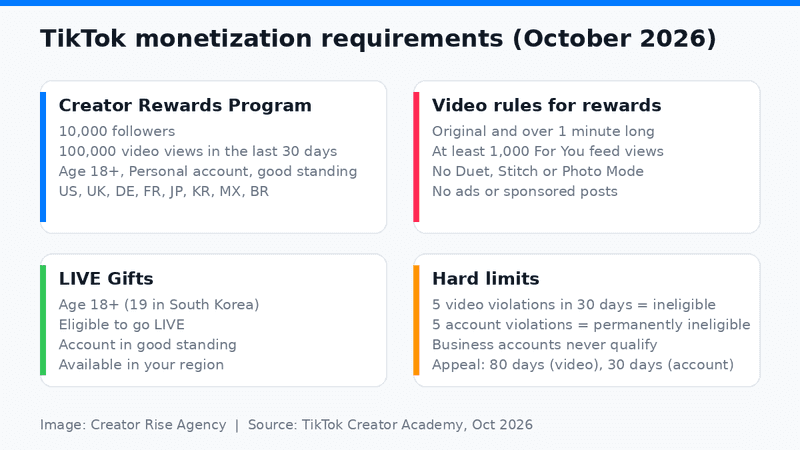
Image: Creator Rise Agency. Thresholds from TikTok Creator Academy and the TikTok Help Center.
Hitting the numbers doesn't get you into Creator Rewards on its own. You still apply from TikTok Studio, and TikTok says you'll hear back within three days. Since spring 2025 the program pays a Standard Reward plus an Additional Reward for videos TikTok judges well crafted, engaging and specialised, and it asks for videos in 1080p or higher.
Two rules catch out accounts that already have the followers. The first is that only qualified views count. A view needs at least five seconds of watch time, repeat views from one account count once, search views need 30 seconds, views marked "I'm not interested" are dropped, and the viewer must be in one of the eight program countries. The second is that violations have hard limits. Five video violations in 30 days make an account ineligible, and five account violations in total make it permanently ineligible.
How to tell if someone else's TikTok account is monetized
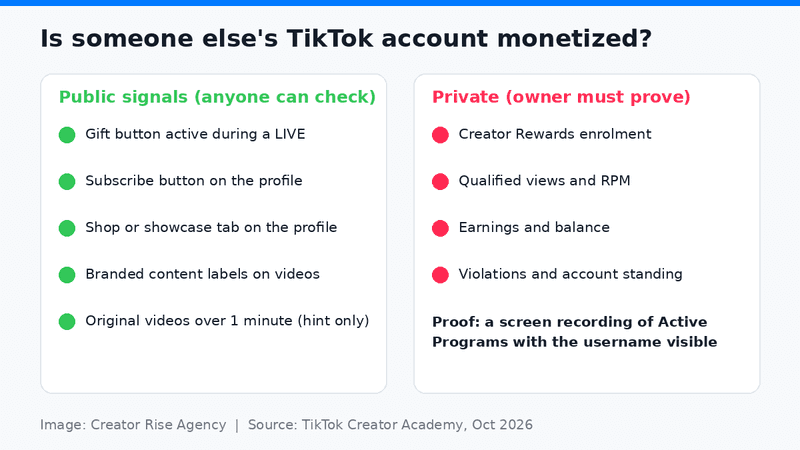
You can't open another creator's Monetization dashboard. You can check the public programs yourself and ask the owner to prove the private one. Here's what each sign tells you.
Public signals you can check from any phone
- Gifts during a LIVE. If viewers' Gifts appear on screen while the account is LIVE, LIVE Gifts is switched on. That confirms the owner is at least 18 (19 in South Korea) and the account is in good standing. Creators can turn Gifts off, so a LIVE without them proves nothing either way.
- A Subscribe option. Subscription is switched on, so fans can already pay the creator monthly.
- A Shop or showcase tab. The account is in the TikTok Shop affiliate program and can earn commission.
- Branded content labels. The creator has done paid partnerships, often through TikTok One or the Creator Marketplace.
- Video length and style. A feed of original videos over one minute fits Creator Rewards, but it's a hint, not proof.
What only the owner can prove
Creator Rewards enrolment and earnings are private. Ask for a screen recording of TikTok Studio that shows Active Programs and Rewards Analytics, with the username visible in the same recording. A cropped screenshot of a balance proves very little, because it could come from any account.
Brands and agencies run this check before a campaign, and account buyers use it to tell honest listings from inflated ones. A seller in this market should be able to show the Active Programs screen for every account before money changes hands. If they can't, or won't, treat the account as not monetized.
One rule needs stating plainly. Transferring a TikTok account falls outside TikTok's Terms of Service. Eligibility follows the person who registered the account: their country, their age, the ID check they passed to get paid. Hand the account to someone new and Creator Rewards access can go with it. So treat the check above as the minimum, not a promise. Some sellers take on part of that risk by replacing an account that gets banned or loses monetization within a set period, as long as the buyer didn't cause it. That's a replacement, not a refund. Read the terms first, and plan on doing TikTok's identity and tax verification in your own name.
Do third-party TikTok monetization checker tools work?
No. They estimate. A username checker or money calculator grabs followers, likes and video count, then multiplies by a pay rate somebody assumed. A second kind asks you to type in your own numbers and shows how far you are from each threshold. That one is handy for planning, though it can only be as right as what you feed it. The more honest tools admit all this in small print and send you back to the app.
No outside tool can see:
- whether the account is enrolled in any program at all
- qualified views, which TikTok calculates privately and which run well below raw views
- account status, violations, account type, or the owner's age and country
- actual payouts, which depend on TikTok's Standard Reward and Additional Reward calculations and on the audience's commercial value
We went through the pages ranking for this search in October 2026. Not one could show enrolment, and several still listed the Creator Fund, closed since 2023, as live. Use a calculator if you want a ballpark for an account of a certain size. Just don't mistake its output for a status.
Why an account that meets the numbers can still show "not eligible"
Reaching 10,000 followers and 100,000 views doesn't guarantee a place. TikTok's own ineligibility list for the Creator Rewards Program explains most rejections:
- Business account. Only Personal accounts qualify, so check the account type first.
- Country. The creator must be based in a program country and the account registered there. A VPN doesn't change where an account was registered.
- Age. Accounts under 18 are excluded, and TikTok verifies identity before paying out.
- Violations. Five video violations in 30 days, five account violations in total, a Creator Code of Conduct restriction, or a Government, Politician or Political Party account label.
- Content TikTok won't recommend. Unoriginal reposts, split screens, slide videos, clickbait and contact details in the profile all make content ineligible for the For You feed, and so for rewards.
- Suspicious activity. Artificial engagement or tampering with the rewards system. Bought followers can cost an account the program rather than earn it one.
If you think a decision is wrong, appeal from the notification in your Inbox. TikTok allows 30 days to appeal an account disqualification and 80 days for a single video.
A manual TikTok monetization checklist
Work through these in order. The first two only apply to your own account; the rest work for any account.
- Profile, then TikTok Studio, then Monetization: is anything listed under Active Programs?
- Programs for you: which requirements are still unmet, and by how much?
- Is the account Personal, not Business?
- Is it registered in a Creator Rewards country, and is the owner 18 or older?
- Is the account status Healthy, with no recent violations?
- During a LIVE, do Gifts appear on screen?
- Does the profile show a Subscribe option or a Shop tab?
- For someone else's account, has the owner shown a screen recording of Active Programs with the username visible?
A yes on item 1 means the account is monetized. If items 6 to 8 all come back no, treat it as not monetized until the owner shows otherwise.
Frequently asked questions
How do I check if my TikTok account is monetized?
Open your profile, tap TikTok Studio, then Monetization, and look at Active Programs. Any program listed there means your account is monetized through it. If the list is empty, Programs for you shows what you can apply for next.
Can I check if someone else's TikTok account is monetized?
Only partly. LIVE Gifts, Subscription and TikTok Shop leave public signs on the profile or during a LIVE, but Creator Rewards enrolment is private. The only reliable proof is the owner showing their Monetization dashboard with the username on screen.
Does seeing TikTok Studio mean my account is monetized?
No. TikTok Studio is the home for TikTok's creator tools, such as editing and analytics. Your monetization status is on the Monetization page inside it, under Active Programs.
Is there an official TikTok monetization checker app?
TikTok doesn't offer a separate checker app; TikTok Studio is the official place to check, in the main app, on the web or in the standalone TikTok Studio app. Third-party checker apps estimate from public numbers and can't confirm enrolment.
How much does TikTok pay per 1,000 views?
TikTok doesn't publish a fixed rate. Creator Rewards payouts combine a Standard Reward and an Additional Reward, and they depend on qualified views and on what TikTok calls Audience Commercial Value. Per-1,000-view figures that still circulate online usually date from the closed Creator Fund.
How do I check TikTok monetization on a PC?
Log in at tiktok.com, open your profile, click More in the left-hand menu, then TikTok Studio, then Monetization. The web version shows the same Active Programs and Rewards Analytics as the app.
Next step
Before you trust any outside number about your own account or anyone else's, open TikTok Studio and look at the Monetization page. If you're weighing up another creator's account, ask for the Active Programs screen first and treat everything else as an estimate.

