
Intro
A URL to video workflow is useful for a landing-page owner only if it can pass two checks. The first check is conversion: can the current public page become a short video that keeps the same promise, proof, and next step? The second check is change: when the offer, price display, or call to action changes, can you update the affected scenes without treating the old file as a brand-new production job?
TapVid turns existing page copy and available page assets into a reviewable video draft. That helps a small marketing team that already has a live landing page and needs a video that can be checked against the source. It does not watch the live URL after export, and it does not push a new price or button into an old video on its own.
If you only test the first paste-and-generate pass, you will approve a tool that fails the week the campaign offer changes.
Separate three URL to video jobs before you pick a tool
Search results mix three different deliverables. Most tools start with a URL, but they handle page changes differently.
Webpage capture records the page as scrolling footage. It preserves layout but also captures banners, widgets, and outdated offers or CTAs.
Avatar or stock summary turns page copy into a presenter-led video. It is fast for social content but may add visuals or retain outdated details.
Source-page scene video uses the URL to create editable scenes. ngram maps the URL to script and storyboard content, while TapVid maps approved copy, numbers, and assets to scenes for review and edits.
The All-in-One Platform for Effective SEO
Behind every successful business is a strong SEO campaign. But with countless optimization tools and techniques out there to choose from, it can be hard to know where to start. Well, fear no more, cause I've got just the thing to help. Presenting the Ranktracker all-in-one platform for effective SEO
We have finally opened registration to Ranktracker absolutely free!
Create a free accountOr Sign in using your credentials
Choose the workflow first. Scrolling capture suits design review, avatar videos suit social tests, and source-page scene videos suit landing pages that need easy updates.
A September 6, 2026 TapVid test found that users can paste a public URL, review scenes and source mapping, then edit one scene without rerunning the rest. Its page does not claim automatic monitoring or price syncing. This covers the public workflow only.
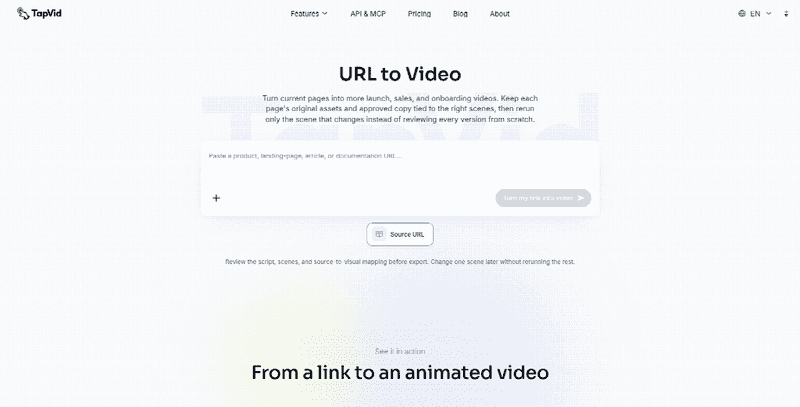
Figure: TapVid’s public URL-to-video page shows a source URL, review step, and one-scene revision. It does not show Studio generation or automatic page monitoring.
Use this as a buying filter, not a performance claim. If a vendor says videos stay fresh after site updates, treat it as regenerate-on-demand unless monitored sync is shown. ClickCast’s 2026 guide recommends regeneration after updates. Regeneration creates a new job; it does not update an existing export.
Build a page-to-scene map before the first conversion
A landing page is a scan surface; a video is a sequence. Do not feed the whole URL into a generator and hope the conversion path survives. Build a page-to-scene map first:
- Hero promise: Open with the page’s one change.
- Mechanism: Show one workflow or product behavior.
- Proof: Use approved, visible proof to reduce one doubt.
- Offer terms: Keep only current, verifiable values.
- Primary CTA: Use one action and destination.
- Navigation, footer, cookie, chat: Omit. They are page chrome.
This is a first-conversion test, not a brand film. A first-time visitor should understand the promise, see one proof, and know the next step.
If the page has multiple CTAs, pick one destination. The key question is whether this map can survive a later offer or CTA change.
The All-in-One Platform for Effective SEO
Behind every successful business is a strong SEO campaign. But with countless optimization tools and techniques out there to choose from, it can be hard to know where to start. Well, fear no more, cause I've got just the thing to help. Presenting the Ranktracker all-in-one platform for effective SEO
We have finally opened registration to Ranktracker absolutely free!
Create a free accountOr Sign in using your credentials
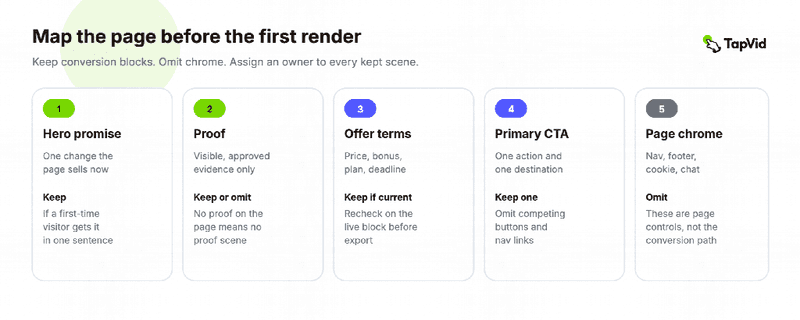
Figure: A first-conversion map gives each page block a video job and keep-or-omit rule before the URL is pasted.
Run one live page as a bounded test. Compare the draft against the map using four checks:
- Promise: Opening matches the hero promise.
- Proof: Claims use only supported, approved proof.
- Offer: Prices, plans, bonuses, and deadlines match the live page.
- CTA: Spoken and on-screen CTAs match the page’s primary destination.
If any check fails, the first conversion fails. Fix the source mapping before paid distribution.
The opening must carry the page’s actual promise. This is a production rule, not a claim that URL-derived video will increase conversions.
Treat offer and CTA changes as a separate evaluation class
The second buying question is not “can it read a URL?” but “what happens when the offer changes?”
Separate stable facts, product, workflow, and lasting proof, from mutable facts such as prices, plans, trials, CTAs, and destinations. Track each with an owner and recheck date.
If a detail cannot be confirmed, omit it. If “Start free” becomes “Book a demo,” update and recheck the offer and CTA scenes while keeping unchanged product and proof scenes. If the main promise changes, consider a Remake.
Never infer commercial details from nearby copy, old exports, or other pricing pages. The URL is source material, not permission to invent a claim.
Use an offer-change checklist before you keep or remake the video
When the page changes, do not default to “generate again from the URL.” Use a checklist that forces a scene decision.
1. Name the change. Record the old and new values. “Price changed to Contact sales” is useful; “page updated” is not.
2. Find affected scenes. Check narration, captions, cards, end slates, and thumbnails. Implied claims count too.
3. Classify the rest. If promise, mechanism, and proof still match, reuse them. If the hero promise changed, it is not a simple patch.
4. Choose one action.
- Keep: Change is not shown.
- Patch: Replace affected scenes and recheck the CTA.
- Remake: The offer change also changes positioning.
- Retire: The video cannot be updated before the new offer goes live.
5. Recheck the destination. Confirm the video’s CTA URL matches the live primary button.
6. Record the replacement. Keep the old and new file names, change date, and offer owner for version control.
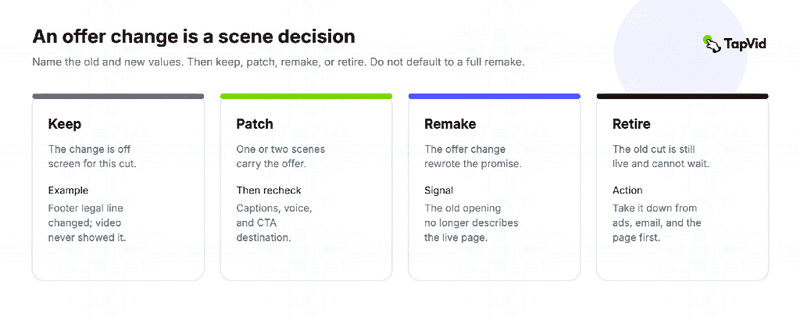
Figure: An offer or CTA change is a scene decision. A full remake can hide the rework that should be measured.
Test this during the trial: change one real offer fact and check whether you can:
- Replace one scene without rerendering others.
- Keep captions and voiceover aligned.
- Avoid changes to stable facts.
- Compare the final file with the live page.
TapVid describes scene-level revisions that keep approved parts intact. If every update requires a new URL-to-video conversion, each offer change becomes a full remake.
The FTC’s advertising substantiation policy also matters: outdated prices or CTAs are public claims without a current basis, not just creative errors.
Reject automatic monitoring and price sync unless the trial shows them
Reject automatic monitoring and price syncing unless demonstrated. Recrawling a URL does not prove either, and new prices still need approval.
The All-in-One Platform for Effective SEO
Behind every successful business is a strong SEO campaign. But with countless optimization tools and techniques out there to choose from, it can be hard to know where to start. Well, fear no more, cause I've got just the thing to help. Presenting the Ranktracker all-in-one platform for effective SEO
We have finally opened registration to Ranktracker absolutely free!
Create a free accountOr Sign in using your credentials
Judge tools by revision cost, not first-render speed:
- First conversion: Create the draft.
- Patch: Update one scene.
- Review: Verify against the page.
- Placement: Replace the old video.
Fast first renders mean little if later updates are costly.
Know when a URL To video workflow is the wrong start
URL-to-video is not ideal when the page is gated, login-protected, staging, or poorly exposed. Use approved copy and screenshots instead.
Avoid URLs for pages with multiple offers or when legal review takes longer than rendering. Use approved UI captures for product demos.
Keep the page-to-scene map and offer checklist. The key test is: can the first conversion be verified and the next offer change patched without a full remake?
Use URL-to-video when the public page is the source of truth. Test one conversion and one update before trusting monitoring or price-sync claims.
Frequently Asked Questions
What is URL to video, and when is it right?
URL to video turns a public webpage into an editable video. The useful workflow maps page content into scenes that can be updated when the offer or CTA changes.
How should I evaluate the first conversion?
Use one live page and a page-to-scene map. The draft should match the hero promise, approved proof, current offer, and primary CTA destination.
What if the offer or CTA changes?
Compare the old and new values, identify affected scenes, then choose keep, patch, remake, or retire. A CTA change is usually a patch; a changed core promise may require a remake.
Does the video update when the website changes?
Not unless the vendor demonstrates automatic monitoring and replacement. Public workflows reviewed here describe new generation or manual scene edits.
Can it sync a new price?
Treat this as unproven until demonstrated. Prices are public claims that need a current source and approval.
When should I avoid using only the URL?
Avoid it for private, incomplete, legally constrained, or multi-offer pages. Use approved copy, screenshots, or a focused one-offer brief instead.

