
Intro
Video quality can make or break a short-form post. A product clip may have the right angle, a customer video may feel natural, and an old recording may still be useful, but if the footage looks blurry, dark, or compressed, people scroll past it faster.
That is where AI video enhancers come in. They promise to sharpen footage, improve clarity, fix low-light clips, and make videos look more ready for social media, ads, websites, and presentations.
Vmake AI Video Enhancer is one of the tools built for this job. It is browser-based, simple to use, and aimed at creators, e-commerce sellers, marketers, and small businesses that need cleaner videos without learning advanced editing software.
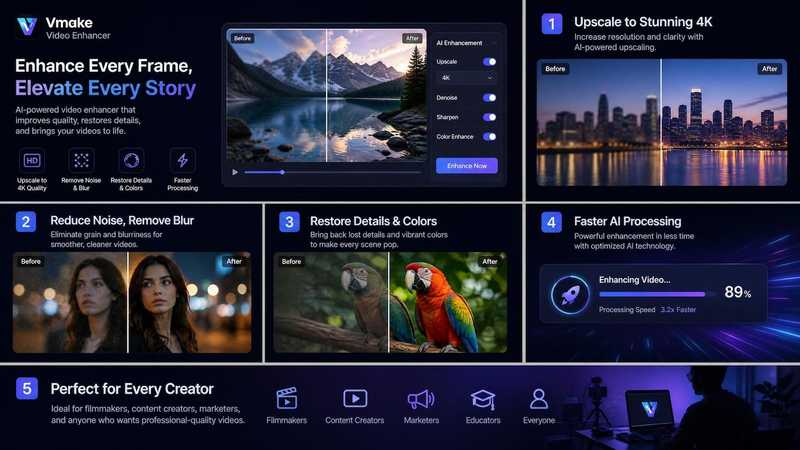
Vmake AI Video Enhancer would be worth checking out if your everyday work includes working with poor-quality product video, compressed social media video, UGC videos, AI-generated videos or with old footage where you need to have cleaner result.
Strengths include-very easy uploading flow, browser-based functionality, and video quality enhancement features that link with Vmake tools of upscaling, watermark removal, etc.
What Is Vmake?
Vmake is a video creation and editing tool driven by AI. Its primary goal is to empower creators and businesses to generate superior short-form videos. This tool is most applicable to UGC, product, social, and marketing videos.
The All-in-One Platform for Effective SEO
Behind every successful business is a strong SEO campaign. But with countless optimization tools and techniques out there to choose from, it can be hard to know where to start. Well, fear no more, cause I've got just the thing to help. Presenting the Ranktracker all-in-one platform for effective SEO
We have finally opened registration to Ranktracker absolutely free!
Create a free accountOr Sign in using your credentials
Vmake is a practical video creation studio for creators looking to quickly and seamlessly produce efficient videos. Vmake also describes itself on its own website as an all-in-one UGC video generator for small businesses and creators.
In essence, Vmake isn’t a lone video enhancer. It functions as one tool in a much larger, AI-driven video pipeline which involves video enhancement, video upscaling, watermark removal, background removal, AI video generation, product videos, and additional creator-focused features.
This review primarily evaluates Vmake AI Video Enhancer to determine if it's valuable for creators, marketers, and small business owners in 2026.
Core Features of Vmake AI Video Enhancer
One-Click Video Enhancement
The main feature is simple: upload a video and let Vmake improve the quality. The tool is designed for people who do not want to adjust technical settings manually.
This is useful if the creator just needs a basic enhancement to post online. Rather than tweaking sharpness, contrast, brightness and resolution manually, an AI can do the basic cleanup.
Vmake positions its video enhancer as a tool for improving low-resolution videos, sharpening details, smoothing motion, and making footage look clearer frame by frame.
Resolution Improvement
Vmake can also upscale the video clarity and resolution. If you work with low-resolution clips, this might be one of the most helpful functions for you.
Why this is important? Due to loss of quality by downloading, compression, being forwarded in instant messenger and be reused on other places, the initial quality a clip looks like might have been degraded. The quality of the same clip, fine enough on some specific platform, is too blurry or pixelated to be an advertisement, a website content or a product page:
The All-in-One Platform for Effective SEO
Behind every successful business is a strong SEO campaign. But with countless optimization tools and techniques out there to choose from, it can be hard to know where to start. Well, fear no more, cause I've got just the thing to help. Presenting the Ranktracker all-in-one platform for effective SEO
We have finally opened registration to Ranktracker absolutely free!
Create a free accountOr Sign in using your credentials
AI 4K+ and Upscaling Support
If users prefer higher output quality, Vmake has a set of video upscalers to help them do this. This upscaler support popular output formats like 1080P, 2K and 4K.
For a creator, they may choose to upscale videos to 4K before releasing them, archiving them or applying them into a higher standard marketing campaign.
Low-Light and Compression Improvement
Many social videos suffer from poor lighting. It can be a phone video, indoor video, old videos and screen recordings that appear dull or dark.
You can use Vmake's enhancer tool to improve the overall brightness, contrast, sharpness, and definition of the video. This tool is especially useful when editing product demo videos, talking-head videos, recorded livestream, or hasty recorded videos without full setup.
Support for AI-Generated Videos
A newer use case in 2026 is improving AI-generated video. Some AI clips can have an overly smooth or plastic look. Others may show artifacts, repeated textures, flickering edges, or slightly unnatural detail.
Vmake mentions support for improving AI-generated clips from tools such as Sora, Kling, and Seedance. For creators using AI video generators, this can be useful as a final polishing step.
Browser-Based Workflow
The fact that Vmake is online is perhaps its biggest asset-the user doesn't have to download and install desktop software to achieve simple enhancements. It is the ideal solution for small teams, creators, or marketers who would like a quick solution accessible across different devices.
For the majority of the potential users browser-based software will be satisfactory; as they're easy to open and try out and require no setup.
Hands-On Test: Upload Flow, Speed, and Output Quality
Upload Flow
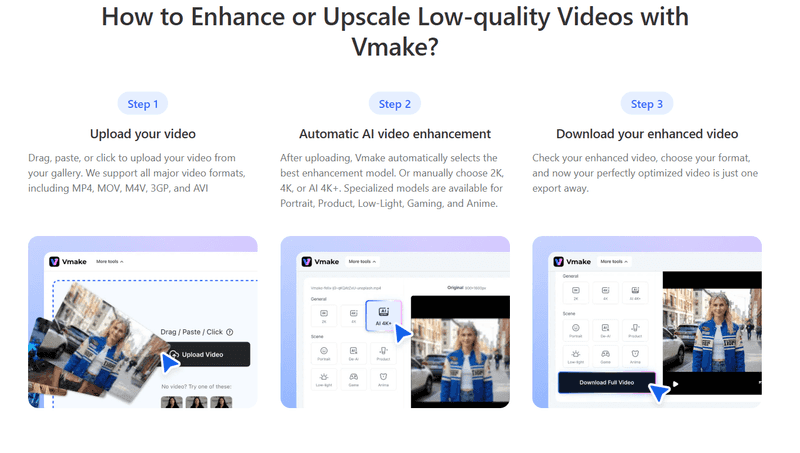
The upload process is straightforward. You open the enhancer page, upload or drag in a video, and let the tool process it. The interface is simple enough for non-editors.
This matters because many creators do not want a professional editing dashboard. They want to upload a clip, improve it, preview the result, and move on.
For a basic workflow, the steps look like this:
- Open the Vmake AI Video Enhancer page
- Upload your video
- Wait for AI processing
- Preview the enhanced result
- Download or continue editing
The process feels more like using an online utility than using heavy editing software.
Processing Speed
Processing time varies with video length, file size, resolution, server load, and enhancement options. It's much quicker to process a short social media video than a 4K file of substantial length.
In practice, Vmake works best with short clips, UGC videos, product videos, ad creatives, and social media content. Processing longer videos requires more waiting time and you should make sure to check the plan limitations beforehand.
Output Quality
The source video's quality matters a lot.
The All-in-One Platform for Effective SEO
Behind every successful business is a strong SEO campaign. But with countless optimization tools and techniques out there to choose from, it can be hard to know where to start. Well, fear no more, cause I've got just the thing to help. Presenting the Ranktracker all-in-one platform for effective SEO
We have finally opened registration to Ranktracker absolutely free!
Create a free accountOr Sign in using your credentials
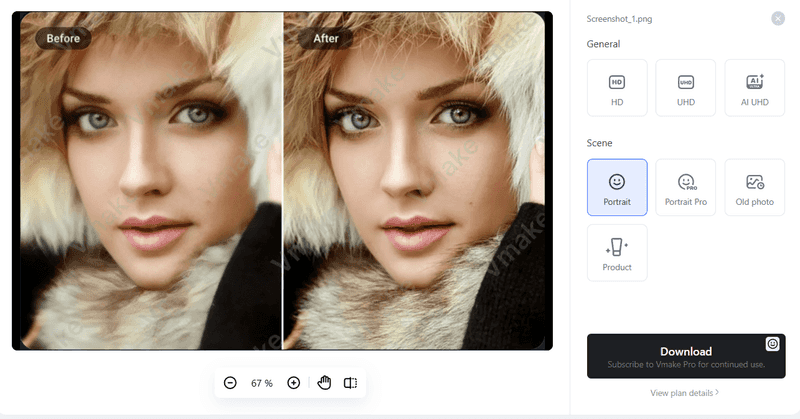
If it is a slightly blurred, compressed, dark, or low resolution clip, Vmake can enhance it to be a clearer and sharper one. It will make the product's borders seem clearer, the faces smoother and the whole video cleaner.
Best Test Scenario
A good test case would be a 10–30 second product clip, UGC video, or talking-head video that looks slightly soft after compression. This is where Vmake is most likely to show visible improvement without creating an unnatural result.
Pricing and Credit System
Vmake uses a credit-based plan structure. The official pricing page currently shows a Free plan, Plus plan, and Pro plan, but pricing and limits may change, so users should always check the official site before buying.
Free Plan
The Free plan is useful for testing the platform. It currently includes free credits after login and daily credits, but access is limited. Some outputs may include restrictions or watermarks depending on the tool and plan.
This is a good option if you want to test whether Vmake improves your specific videos before upgrading.
Plus Plan
The Plus plan is best suited for creators that make daily content. You receive credits on a monthly basis, along with the most crucial tools: video and image enhancer, watermarking remover, AI thumbnail generator and upscaling tool. Exportation and consumption limits may be subjected to current plan.
Pro Plan
The Pro plan is intended for more intensive users. With greater monthly credits, higher monthly allowances of the main tools, and access to higher-resolution export, and additional higher models, is more appropriate for agencies, e-commerce teams, those that produce a high volume of videos, and for those who integrate video into their marketing strategy.
Is the Credit System Good?
A credit system may be of use if your work varies in workload each week, it allows a degree of flexibility across tools. The main disadvantage to a credit system is that users have to monitor their usage, particularly when processing lengthy videos or if you require detailed enhancement.
Analyze the amount of video you export per month and determine the final export quality required before purchasing any upgrades.
Vmake vs. Alternative Video Enhancers
| Tool | Best For | Main Strength | Possible Limitation |
| Vmake | Creators, UGC, product videos, AI-generated clips | Easy browser workflow with enhancement and upscaling tools | Results depend on source video quality |
| CapCut | Social video editing | Editing, captions, effects, and timeline control | Not mainly built as a dedicated enhancer |
| HitPaw Video Enhancer | Desktop-style enhancement workflows | More traditional video enhancement options | May feel heavier for quick social clips |
| Wink AI | Portrait video restoration and upscaling | 4k Video upscaling | Limited video editing features |
| Canva | Simple branded social videos | Templates and design assets | Limited for serious video repair |
Vmake fits best when you want fast online enhancement for everyday content. Advanced editors may still prefer desktop tools for detailed restoration, but many creators do not need that level of control.
Who Should Use Vmake AI Video Enhancer?
UGC Creators
UGC creators often film quickly with phones, natural lighting, and simple setups. Vmake can help polish those clips before delivery to brands.
E-Commerce Sellers
Product videos need to look clear. If a product clip is slightly blurry or compressed, enhancement can make the item easier to see and more appealing.
Social Media Managers
Social media managers often receive clips from different sources. Vmake can help improve uneven footage before posting across platforms.
Small Businesses
Small businesses may not have a full video team. A simple browser-based enhancer can help them make better-looking content without hiring an editor for every clip.
AI Video Creators
People using AI video tools may use Vmake as a finishing step to reduce artifacts, sharpen details, or make AI-generated footage look more natural.
Who May Not Need It?
You may not need Vmake if you already shoot high-quality 4K footage, edit in professional software, and have a full post-production workflow.
You may also not need it if your videos are mostly casual posts where quality is not a major concern. For some TikTok or behind-the-scenes content, a raw look can actually feel more natural.
Final Verdict: Is Vmake AI Video Enhancer Worth It?
In 2026, Vmake AI Video Enhancer is absolutely worth it for you as a creator or business working with a lot of short-form video. This tool excels at cleaning up social clips, product videos, UGC content, AI-generated videos, and any kind of compressed or low-resolution footage. This tool is intuitive, does not require advanced skills, and seamlessly integrates into a rapid workflow. Vmake delivers a pragmatic and useful balance of speed, simplicity, and the ability to produce enhanced results. If you’re in the business of producing video for TikTok, Reels, Shorts, ads, product pages, or client campaigns, Vmake is a fantastic resource to experiment with prior to committing to lengthy manual edits.

