
Intro

Here's a fun scenario: your website goes down at 2am on a Tuesday. You don't find out until Thursday, when a client emails to say they "tried to get in touch through your site but it wasn't working." That's 48 hours of lost leads, lost sales, and lost credibility - all because nobody was watching.
That's the brutal reality for most website owners. They build the thing, launch it, and assume it'll just... keep working. Like a fridge. Unfortunately, websites are nothing like fridges. They're more like toddlers, constantly demanding attention, throwing tantrums at the worst possible moments, and breaking things you didn't even know could be broken.
Hence the important of website monitoring apps!
👉 As a snr systems engineer with security clearance, I know a thing or two about security and let me tell you - it is not that hard to keep your website running. You don't need a bullet proof website or hosting, just don’t be the lowest hanging fruit.
What Is Website Monitoring and Why Should You Care?
Let's strip the jargon out completely. Website monitoring is just a system that watches your website 24/7 and tells you the moment something goes wrong.
Think of it like a smoke detector for your business. You don't stand in your kitchen sniffing the air every five minutes. You install a device that screams at you when there's a problem. Website monitoring apps are that device.
The All-in-One Platform for Effective SEO
Behind every successful business is a strong SEO campaign. But with countless optimization tools and techniques out there to choose from, it can be hard to know where to start. Well, fear no more, cause I've got just the thing to help. Presenting the Ranktracker all-in-one platform for effective SEO
We have finally opened registration to Ranktracker absolutely free!
Create a free accountOr Sign in using your credentials
Proper website monitoring doesn't just see the website is up, it can tell if your site is actually the same. For example, your site gets hacked because you didn't enable 2FA in Hostinger, the hacker changes the content to swear words, bad dad jokes or a toxic review about your business (use your imagination).
That kind of issue needs a website monitoring app to cover a surprisingly wide range of things:
- Uptime monitoring: Is your site actually online right now?
- Performance monitoring: Is it loading fast enough that people don't leave in disgust?
- SSL certificate monitoring: Has your security certificate expired, turning your site into the internet equivalent of a crime scene?
- Transaction monitoring: Are your contact forms, checkout flows, and sign-up pages actually working?
- Keyword and content monitoring: Has anything changed on your site that shouldn't have?
- Server resource monitoring: Is your server quietly sweating under the load while you have no idea?
If none of that sounds relevant to you, congratulations - you either have a perfect website (unlikely) or blissful ignorance (extremely likely). Either way, keep reading.
The Real Cost of Downtime (It's More Than You Think)
Here's the uncomfortable maths. If your website generates $5,000 a month in revenue, that's roughly $6.94 per hour. An hour of downtime doesn't sound catastrophic. But an outage that lasts a weekend? That's real money gone - and that's just the direct revenue loss.
The sneakier cost is your reputation. Every person who hits your broken site makes a fast and brutal judgment about your business. They don't think "oh, there's probably a server issue." They think "this company seems dodgy" and click straight to your competitor. Studies consistently show that 88% of online users are less likely to return after a bad experience. Downtime is about as bad an experience as it gets.
And then there's SEO (search engine optimisation) which we'll dig into shortly. Google is watching your site more closely than your most paranoid ex, and frequent downtime sends exactly the wrong signals.
The point is: downtime is never "just a technical issue" - It's a business issue. A revenue issue. A reputation issue. And website monitoring apps exist specifically to make sure you catch it fast.
Not All Website Problems Are "It's Down" Problems
A common misconception is that monitoring only matters when a website completely dies. In reality, a site can be technically "up" while still being thoroughly broken in ways that cost you money every single hour.
Slow Load Times (The Silent Killer)
Your website loads in six seconds. You think: "That's fine, people can wait." Google thinks: "Absolutely not" and quietly buries you on page four. Your visitors think nothing because they already left.
The All-in-One Platform for Effective SEO
Behind every successful business is a strong SEO campaign. But with countless optimization tools and techniques out there to choose from, it can be hard to know where to start. Well, fear no more, cause I've got just the thing to help. Presenting the Ranktracker all-in-one platform for effective SEO
We have finally opened registration to Ranktracker absolutely free!
Create a free accountOr Sign in using your credentials
Google's own research shows that as page load time increases from one second to three seconds, the probability of a visitor bouncing increases by 32%.
Push it to six seconds and you're losing two-thirds of your audience before they've even seen your homepage. Speed isn't a luxury feature. It's table stakes.
Good website monitoring apps track your load time continuously, alerting you when something is dragging it down like a WordPress plugin, a bloated image, a misbehaving third-party script or an issue with the host like Hostinger, BlueHost, Wix etc.
SSL Certificate Expiry (The Most Avoidable Disaster)
Your SSL certificate is the little padlock in the browser bar that tells people your site is secure. When it expires (every year or two) browsers start showing bright red "WARNING: YOUR CONNECTION IS NOT SECURE" messages to everyone who tries to visit you.
This happens to smart people all the time. You set it up, forget about it, and one day your website is actively scaring customers away. It's like having a sign in your shop window that says "WE MAY ROB YOU."
Monitoring tools watch certificate expiry dates and alert you weeks in advance, which is embarrassingly easy to solve once you know it's coming.
DNS Failures
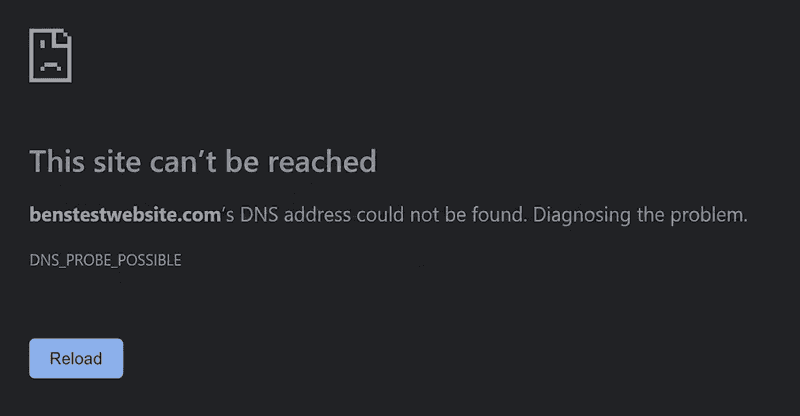
DNS is the system that translates your domain name (like yourwebsite.com) into a server address (called an IP address). If it breaks, your website effectively vanishes from the internet - not because your server is down, but because nobody can find it. Your server is fine, your hosting is fine, but nobody can reach you. Without monitoring, you'd never know why traffic just stopped.
If you have seen this page, the website has a DNS issue.
Broken Pages, Forms, and Checkout Processes
Imagine your checkout button stops working. Just stops. Customers add items to their cart, get to the payment page, click "Buy Now" and... nothing. They assume you're broken and buy elsewhere. You assume it's just a slow sales day.
This is one of the most financially devastating things that can happen to an e-commerce site, and it happens more often than anyone admits. A proper monitoring setup doesn't just check that your homepage loads - it checks that your critical user journeys actually work.
How Website Monitoring Apps Directly Affect Your SEO
If you're not already religious about SEO, here's the short version: it's how people find you on Google. The higher you rank, the more free traffic you get. Free traffic means free customers. It is, as the young people say, a vibe.
Here's how monitoring affects it directly:
Uptime = Crawlability
Google sends bots (called crawlers or Googlebot) to visit your website regularly. They read your content, follow your links, and use all of that to decide how to rank you. When your site is down and Googlebot shows up, it gets an error. Do this repeatedly and Google starts to see your site as unreliable. Unreliable sites rank lower. It's not complicated, but the consequences compound over months in ways that are genuinely painful to unpick.
Page Speed Is a Ranking Factor
Google confirmed page speed as a ranking factor for desktop back in 2010 and added it to mobile rankings in 2018. It uses a set of metrics called Core Web Vitals — measuring things like how fast your page loads, how quickly it becomes interactive, and how much the layout jumps around as it loads (nobody wants to click a button and accidentally hit an ad because the page shifted at the last second).
Website monitoring apps that track performance metrics give you a running log of how your site is performing against these benchmarks, letting you spot degradation before it becomes a Google penalty.
👉 Myself, father Matt and wife Alicia ran a website agency and you would be AMAZED how many companies came to us for a new website because they were getting no enquires. We opened their existing page and waited 5, 6, 7, 8 seconds before it finally opened at about 10 seconds.
Security Issues Tank Rankings
If Google detects malware or suspicious code on your website (things like pharma hacks that inject hidden links to dodgy drug sites into your pages) it slaps a "This site may be harmful" warning on your search listing.
Click-through rates drop to approximately zero. Some monitoring tools scan for malware and unexpected content changes, which is exactly the kind of protection most website owners never set up until it's already too late.
Redirect Chains and Broken Links
Poor site health (broken internal links, pages that redirect through three or four hops before arriving anywhere) dilutes your SEO authority and frustrates users. Monitoring and uptime tools often flag these issues, giving you actionable data rather than vague anxiety.
The Different Types of Website Monitoring Apps (Without the Technical Jargon)
The market has a lot of options, and they're not all doing the same job. Here's a plain-English breakdown of what's out there.
Uptime Monitoring
The most fundamental type. Checks your site from multiple locations around the world at regular intervals (every minute, every five minutes, etc.) and alerts you immediately if it can't be reached. This is the bare minimum every website should have.
👉 If you currently have nothing, start here.
Performance Monitoring
Goes beyond "is it up?" to ask "how well is it working?" Tracks load times, measures Core Web Vitals, and flags when something is making your site sluggish. Essential if you care about SEO or user experience.
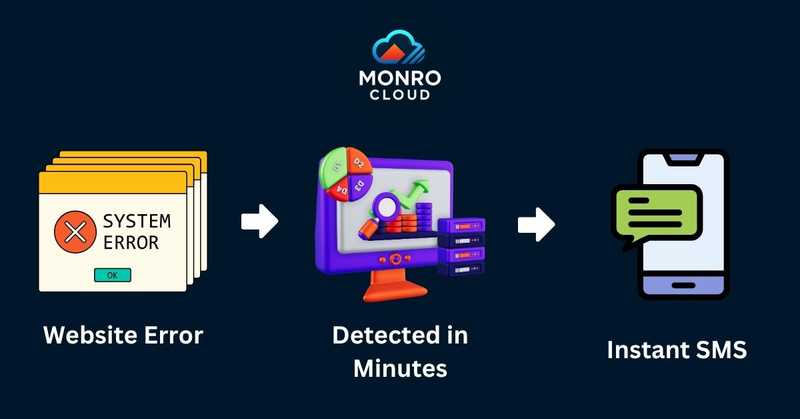
🔥 Monro Cloud Monitoring is an exceptional choice for this. It allows users to easily monitor their website performance, track changes and receive an SMS if something is wrong.
Transaction Monitoring
Tests specific user journeys - logging in, searching for a product, adding to cart, completing a purchase etc, to verify they work end-to-end. For e-commerce sites, this is non-negotiable. For anyone with a lead generation form, contact form, or booking system, it's worth serious consideration.
Infrastructure Monitoring
This is where things get a bit more technical, but stay with me. If you run your own servers (or have a hosting setup more complex than a basic shared host), infrastructure monitoring watches the health of the underlying systems (CPU usage, memory, disk space, network performance). When a server starts running hot before it crashes, you get a warning rather than a surprise.
This is also territory where small-mid sized businesses can use Monro Cloud Monitoring (built on the battle-tested Zabbix platform). Zabbix has been trusted by some of the world's largest organisations for decades, and Monro Cloud Monitoring brings that power to businesses who want serious monitoring without needing a dedicated IT team to configure it.
Synthetic Monitoring
Automated scripts that simulate real user behaviour on your website continuously, checking that everything works as expected even during quiet periods. Think of it as a robot that visits your site every few minutes, clicks around, fills in forms, and reports back on whether anything is broken - even at 3am when no real users are there to discover the problem first.
What to Look for in a Website Monitoring App
Not all tools are created equal. Here's what actually matters when you're choosing one.
Alert speed and reliability. An alert that reaches you 45 minutes after your site went down is not a monitoring service. It's a delay mechanism. Look for tools that alert you within one to two minutes via multiple channels - email or SMS are the primary means.
Monitoring frequency. Checking your site every 30 minutes sounds reasonable until you realise your site could be down for 29 minutes before anyone notices. Minute-by-minute checks are standard for serious monitoring.
Maturity. A website monitoring app must be able to check website changes, uptime, response times, SSL certificates and DNS issues. Don’t settle for an overpriced “up” checking white noise machine.
Meaningful dashboards. You shouldn't need a computer science degree to read your monitoring reports. The best tools present data in a way that non-technical business owners can understand
Integrations. Does it work for WordPress right the way through to a Wix website your friend made you? A good website monitoring app connects to any website.
Scalability. If your business grows and your website becomes more complex, can your monitoring tool grow with it?
⚠️ Our solution hit the market in 2025 and is dominating web design monitoring. At only $1.5 per website per month, Monro Cloud Monitoring is an absolute powerhouse.⚠️
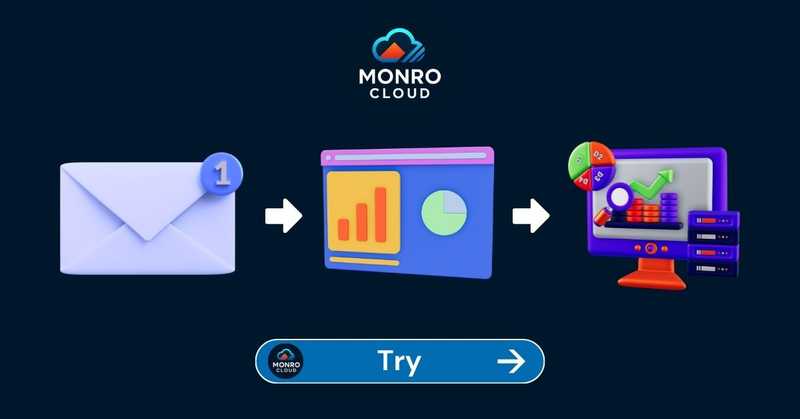
Setup of Monro Cloud takes minutes.
- Sign up & receive an email.
- Use the 3 steps in the email to connect a website.
- Passwordless login to the dashboard to see your website being monitored.
Real Scenarios Where Website Monitoring Apps Save the Day
Let's make this concrete with some scenarios that are more common than most website owners would like to admit.
Scenario 1: The Friday Afternoon Deployment - Your website guy pushes an update on Friday at 4:30pm and heads off for the weekend. The update introduced a bug that causes the site to crash for anyone using a mobile device. Without monitoring, you find out Monday morning when your inbox is full of angry emails. With monitoring, you get an alert Friday at 4:32pm and have it fixed by 5pm. Your developer is briefly annoyed. Your customers never knew.
Scenario 2: The Shared Hosting Neighbour From Hell You're on shared hosting, which means your website lives on the same server as dozens of other websites. One of those other websites gets a massive spike in traffic - maybe they went viral for being accidentally hilarious. Their traffic surge consumes server resources and takes your site down with it. Monitoring catches this immediately and you can escalate to your hosting provider with specific timestamps, rather than "uh, I think something's wrong?"
Scenario 3: The SSL Expiry of Doom You bought an SSL certificate two years ago, set it up, and promptly forgot it existed. Today it expired. Every visitor to your site is now greeted with a full-page security warning. Google is watching. Your conversion rate has just hit zero. A monitoring alert three weeks ago would have taken you five minutes to fix. The aftermath takes considerably longer.
Scenario 4: The Sneaky Hack Someone has injected hidden links into your website footer - invisible to the human eye but visible to search engines. These links point to gambling or pharmaceutical sites. Google detects it, flags your site as potentially harmful, and your rankings crater. With content monitoring in place, you'd have been alerted the moment the page content changed unexpectedly.
How to Get Started Without Losing Your Mind
The best website monitoring apps are designed to be set up in minutes, not days. Here's a sensible approach for non-technical website owners.
Step 1: Start with uptime monitoring. This is the single highest-value thing you can implement immediately. Most tools offer a free tier that covers the basics. Get your homepage monitored with minute-by-minute checks and make sure alerts go to your phone, not just your email.
Step 2: Add SSL certificate monitoring. Set it to alert you 30 days before expiry. This takes approximately two minutes to configure and saves a spectacular amount of embarrassment.
Step 3: Set up performance baseline tracking. Know what your normal load time looks like so you can spot when something starts dragging it down. This becomes your canary in the coal mine for plugin conflicts, server issues, and CDN problems.
Step 4: If you have an e-commerce site or any critical user journey, add transaction monitoring. Test your checkout, your contact form, your login process. Do it now, not after a problem surfaces.
Step 5: Consider a more comprehensive platform as you grow. Tools like Monro Cloud Monitoring provide a centralised dashboard that covers uptime, performance, and infrastructure health in one place — with the enterprise-grade backbone of Zabbix under the hood, without requiring you to understand what Zabbix actually does. Think of it as hiring a very diligent, highly caffeinated technical team that works 24/7 and never asks for a pay rise.
The Difference Between Free Tools and Professional Monitoring
Free monitoring tools exist. Some of them are genuinely useful for getting started. But there are some important limitations to understand.
Free tiers typically check your site every five minutes from a single location. That means a three-minute outage might never be detected at all. They often don't monitor from multiple global locations, so a regional issue looks fine from their one server. Advanced features (transaction monitoring, detailed performance metrics, content change detection) are typically locked behind paid plans.
For a business that depends on its website, the cost of professional monitoring is trivially small relative to the cost of even a single hour of undetected downtime. A mid-tier monitoring plan costs less per month than the revenue lost in 15 minutes of downtime for most e-commerce businesses.
Professional platforms like Monro Cloud Monitoring bring enterprise-level monitoring infrastructure to businesses of all sizes. The Zabbix foundation means you're getting the same technology trusted by telecoms companies, banks, and large enterprises - adapted into something a business owner can actually use without an IT degree.
A Note on Monitoring and Peace of Mind
There's a psychological benefit to website monitoring that doesn't get discussed enough: the elimination of low-grade, background anxiety.
Every website owner who doesn't have monitoring set up carries a nagging uncertainty. Is the site okay? Did that update break anything? Why is traffic down this week? Is it me, or is something wrong?
Monitoring doesn't just fix problems. It confirms when things are working correctly. A clean uptime report showing 99.9% availability over the past 30 days is genuinely satisfying information. It means your hosting is solid, your site is healthy, and the traffic fluctuations you're seeing are marketing problems, not technical ones. That's useful context.
When something does go wrong (something will eventually go wrong) a website monitoring app will; catch it in minutes rather than days, respond proactively rather than reactively (far less stressful) and make you look competent rather than clueless.
The Bottom Line
A website without monitoring is a business operating with its eyes closed.
It's not a question of whether something will go wrong, servers crash, certificates expire, plugins conflict, hackers probe, traffic spikes put pressure on infrastructure. The only question is whether you'll find out before or after your customers, your competitors, and Google do.
Website monitoring apps exist to make sure you're always first to know. They protect your revenue, your SEO rankings, your reputation, and honestly your sanity.
The All-in-One Platform for Effective SEO
Behind every successful business is a strong SEO campaign. But with countless optimization tools and techniques out there to choose from, it can be hard to know where to start. Well, fear no more, cause I've got just the thing to help. Presenting the Ranktracker all-in-one platform for effective SEO
We have finally opened registration to Ranktracker absolutely free!
Create a free accountOr Sign in using your credentials
Setting up basic monitoring takes less time than brewing a pot of coffee, and the ROI is immediate the first time it catches a problem you'd otherwise have missed for hours.
If you're ready to take it seriously - if you want monitoring that actually scales with your business and gives you the kind of visibility that enterprise teams rely on - take a look at Monro Cloud Monitoring.
Built on Zabbix, designed for business owners who care about reliability without needing a PhD to configure it. Your website never sleeps, now your monitoring doesn't either.
Set up monitoring before the next outage.

