
Intro
A production-and-measurement workflow for adding video to the pages that deserve it — without a studio budget
Most pages lose the visitor before the second scroll. You earned the click — the title matched the query, the snippet looked promising — and then the reader skimmed two paragraphs, hit the back button, and went straight back to Google. That round trip is the pattern behind weak dwell time, and it quietly caps how far a page can climb.
Video changes that math, and AI video content has changed who can afford to use it. Producing a two-minute clip used to mean a camera, an editor, and a week of turnaround. Now a marketer can generate a usable product walkthrough in an afternoon. So the interesting question is no longer "does video help engagement?" It's "which pages deserve a video, and how do you prove it moved rankings?"
That's what this post covers: how video changes on-page behavior, a practical workflow for adding AI-generated video to the right pages, and how to measure the effect on your organic positions — plus the places where AI video still falls short.
What dwell time tells you (and what it doesn't)
Dwell time is the gap between someone clicking your search result and returning to the results page. It's not the same as time on page or session duration — it only counts visitors who arrive from the SERP, which is exactly why SEOs watch it. Ranktracker's guide to dwell time draws the useful distinction: bounce rate tells you someone left, while dwell time tells you they went back to Google. That second behavior reads like "this result didn't answer me," and it's the one you want to eliminate.
One honest caveat before we go further. Google has never confirmed dwell time as a direct ranking factor, and there's a long-running debate about how engagement signals feed into rankings. Here's what isn't debatable: a visitor who stays three minutes is more likely to convert, click deeper into your site, and remember your brand than one who left at eight seconds. Optimizing for longer, more satisfying visits pays off whether or not any single metric feeds the algorithm — and pages that satisfy visitors tend to accumulate the links, return visits, and brand searches that definitely do.
Why video holds attention when text can't
A visitor scanning text makes an exit decision in seconds. A visitor who presses play makes a commitment measured in minutes. Watching is passive — no scanning effort, no deciding what to read next — so a ninety-second product demo will routinely hold someone who would have skimmed the same information in forty seconds of text and left.
Survey data backs this up. In Wyzowl's annual video marketing survey, the large majority of marketers who use video report that it has increased the average time visitors spend on their pages, and most also credit it with helping users understand their product better. Self-reported, yes, but consistent year after year across thousands of respondents.
The All-in-One Platform for Effective SEO
Behind every successful business is a strong SEO campaign. But with countless optimization tools and techniques out there to choose from, it can be hard to know where to start. Well, fear no more, cause I've got just the thing to help. Presenting the Ranktracker all-in-one platform for effective SEO
We have finally opened registration to Ranktracker absolutely free!
Create a free accountOr Sign in using your credentials
There's a second-order effect worth naming too. A page that holds visitors longer tends to earn more scroll depth, more internal clicks, and more "pages per session." Each of those gives the rest of your site a shot at the visitor. And on the SERP itself, a page with properly marked-up video can pick up a video thumbnail or appear in video carousels, which changes the click before the visit even starts.
The real bottleneck was never strategy
If video helps this much, why does the average blog post still have zero? Nobody needed convincing. The blocker was production cost.
Traditional video math looks like this: a script, a half-day of filming or screen recording, two rounds of editing, then revisions when the product UI changes next quarter. Even a modest talking-head explainer eats days of someone's time or a four-figure agency invoice. A content team shipping eight posts a month could never justify a video for each one, so video got rationed — one flagship asset per quarter, usually parked on the homepage where it does the least SEO work.
AI generation changed that specific constraint. When a clip costs minutes instead of days, you can afford to put video on the commercial pages that actually compete in search, not just the homepage. The strategy question flips from "can we make a video?" to "which pages earn one?"
A workflow for adding AI video to the pages that earn it
Don't add video everywhere. A clip that restates the intro adds page weight and nothing else. Here's the sequence I run, page by page.
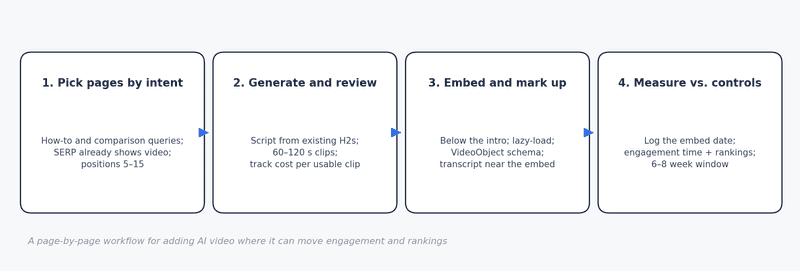
Step 1: pick pages by query intent, not by traffic
Start with queries where a moving image genuinely answers faster than text: how-to tasks, product comparisons, anything with the words "tutorial," "demo," "setup," or "examples." Run your candidate terms through the Keyword Finder to check volume and difficulty, then look at what actually ranks with the SERP Checker. If the results page already shows a video carousel or video thumbnails, Google is telling you it treats that query as video-friendly. That's your shortlist.
Pages stuck between positions 5 and 15 are the sweet spot. Page-one leaders have less to gain; page-three pages usually have bigger problems than engagement.
Step 2: produce the clip from what the page already says
You don't need a new script. Your H2s are the outline; the intro is the hook. Compress the page's core answer into 60–120 seconds — longer clips lose completion rate fast, and an abandoned video is a weaker signal than no video.
For the generation itself, I work in Medeo, an AI video platform that takes a product image or an idea to a finished video in one workflow, which keeps the demo visually anchored to the real product instead of a generic AI approximation. Whatever tool you use, the discipline matters more than the brand: generate several variants, review them like an editor, and only publish the ones that would survive a client's scrutiny.
The All-in-One Platform for Effective SEO
Behind every successful business is a strong SEO campaign. But with countless optimization tools and techniques out there to choose from, it can be hard to know where to start. Well, fear no more, cause I've got just the thing to help. Presenting the Ranktracker all-in-one platform for effective SEO
We have finally opened registration to Ranktracker absolutely free!
Create a free accountOr Sign in using your credentials
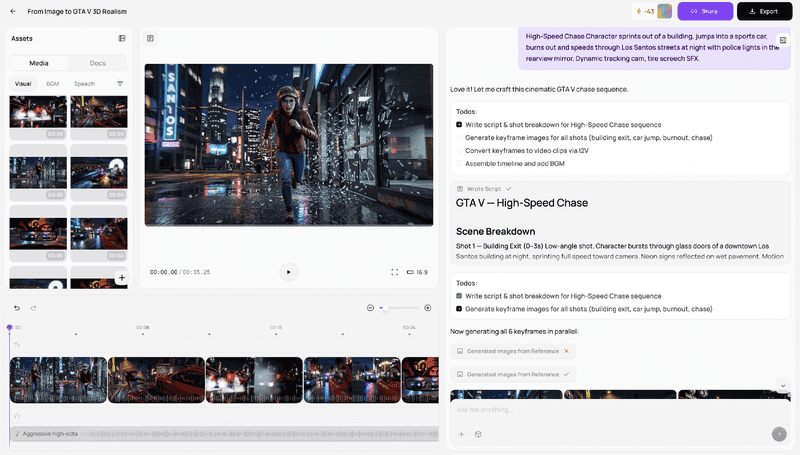
One metric keeps this honest: cost per usable clip — total generation spend divided by the number of clips that pass review. If you generate ten variants and publish two, your real cost is five times the sticker price. Track it, because it's the number that decides whether this workflow scales.
Step 3: place and mark up the video properly
Placement decides whether anyone presses play. Put the video after your intro but before the first deep section — high enough to be seen, low enough that the text answer still leads. Then handle the technical layer:
- Lazy-load the embed so the video doesn't drag down loading speed.
- Add VideoObject schema so search engines understand what the video contains and can show a thumbnail.
- Publish a transcript or detailed description near the embed. The video itself isn't crawlable text; the transcript is.
- Use a custom thumbnail that shows the actual subject, not a random frame.
After embedding, run the page through a Web Audit to confirm the new element didn't introduce speed or layout problems. A video that tanks your Core Web Vitals trades one ranking input for another.
How to measure whether it worked
This is the step most teams skip, and it's the one that turns an experiment into a repeatable playbook.
Record the embed date for every page you touch. In GA4, watch average engagement time and engaged sessions for those URLs — engagement time is the closest proxy you have for dwell time, since Google doesn't expose dwell time directly anywhere. In parallel, track the page's target keywords in Rank Tracker so position changes line up against your embed date on the same timeline.
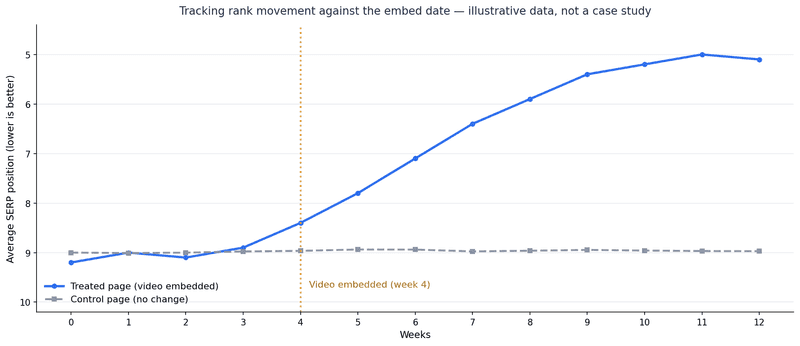
A worked example — illustrative numbers, not a case study: a comparison page sits at position 9 with 42 seconds of average engagement time. You embed a 90-second demo, engagement time climbs to just under two minutes over the following month, and the page settles around position 5 six weeks later. Nothing in that sequence proves causation — a competitor may have slipped, or the page picked up a link — which is exactly why you want several treated pages and a few untouched control pages of similar age and authority. If treated pages move and controls don't, you've got signal.
Give each test six to eight weeks. Engagement shifts show up in days; ranking movement is slower and noisier. For the video-side numbers — completion rate, watch time, where viewers drop off — Ranktracker's guide on measuring video marketing performance covers which metrics belong to which funnel stage, so I won't repeat it here.
Where AI video still falls short
I'd rather you hear the limitations from someone who uses these tools daily than discover them after publishing.
The All-in-One Platform for Effective SEO
Behind every successful business is a strong SEO campaign. But with countless optimization tools and techniques out there to choose from, it can be hard to know where to start. Well, fear no more, cause I've got just the thing to help. Presenting the Ranktracker all-in-one platform for effective SEO
We have finally opened registration to Ranktracker absolutely free!
Create a free accountOr Sign in using your credentials
On-screen text renders unreliably. Generated video still mangles small text — labels, UI copy, prices. Keep any text you need legible in editor-applied overlays, not in the generated footage itself.
Complex products drift. Fine textures, reflective materials, and intricate mechanical details can warp between frames. Starting generation from a real product photo — the approach behind image-to-video workflows — keeps the product recognizable, but inspect every frame that shows your product up close before publishing.
Human close-ups sit in uncanny territory. Hands and faces in tight shots still read as slightly wrong to attentive viewers. Favor product-centric framing, screen captures, and motion graphics over synthetic presenters unless you've tested audience reaction.
Volume is a temptation, not a strategy. Because generation is cheap, the failure mode is publishing everything you generate. A page with a sloppy video sends a worse engagement signal than a page with none — viewers bail in three seconds and take your dwell time with them. Keep the review bar where it would be for footage you paid a videographer for.
The takeaway
AI video content earns its place in an SEO strategy the same way any on-page element does: by making the visit better. Pick pages where the query begs for a moving answer, generate against your existing content, hold a real quality bar, and measure engagement time and rankings against control pages. Dwell time improves in days when the video genuinely helps; SERP rankings follow more slowly, and only when the rest of the page deserves it. The teams winning with this aren't the ones generating the most video — they're the ones measuring which videos deserve to exist.

