
Intro
Pick the wrong proxy type and your automation stack will tell you fast. Crawlers stall on connection resets, and browser profiles leak your real IP through WebRTC checks. Accounts that behaved fine on Monday get flagged by Friday. The fix is rarely a better tool. It's matching the proxy to what the tool actually does, and two questions settle most of it. Does your traffic run over TCP alone, or does it also need UDP? And does each session need a stable identity, or a fresh IP on every request? The first question picks your protocol, HTTP or SOCKS5. The second picks the IP type behind it. Get both right and proxies for automation tools become plumbing you stop thinking about. Get either wrong and you'll burn hours debugging bans that were really configuration problems. This guide answers both, with the config details that trip people up in practice.
What automation tools actually need from a [
An automation tool has two hard requirements. The proxy must speak a protocol the tool supports, and the connection must survive whatever concurrency you throw at it. The first is rarely the blocker people expect: Scrapy, Puppeteer, Playwright, and nearly every antidetect browser accept both HTTP and SOCKS5. Concurrency bites harder. A residential line that holds up at 10 threads can start shedding requests at 200, and no protocol choice fixes an overloaded endpoint.
There's a third, softer requirement, and it breaks more setups than the first two: the IP behind the proxy has to match the job. A price monitor hitting 10,000 product pages an hour wants rotation and doesn't care about reputation. A proxy for bots and scripts that log into accounts needs the opposite, one clean address per identity that never changes. And if the goal is SERP data, question whether you should be scraping at all. Ranktracker's rank tracker already runs that collection layer, proxies included, and costs less than maintaining your own Google scraper.
HTTP vs SOCKS5, the one real difference
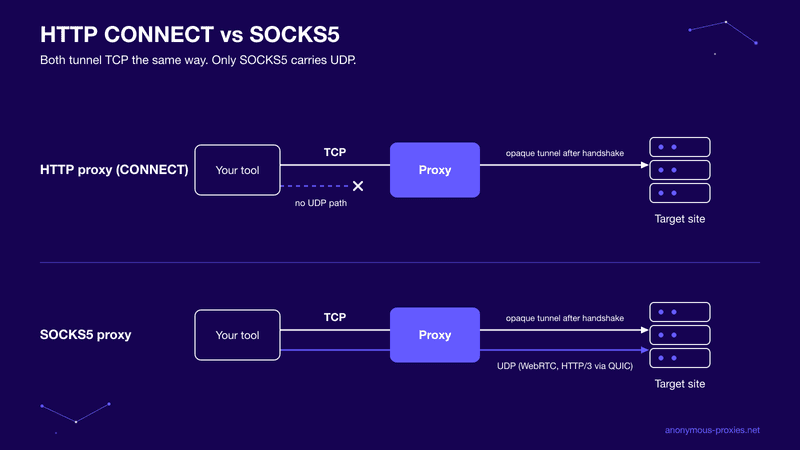
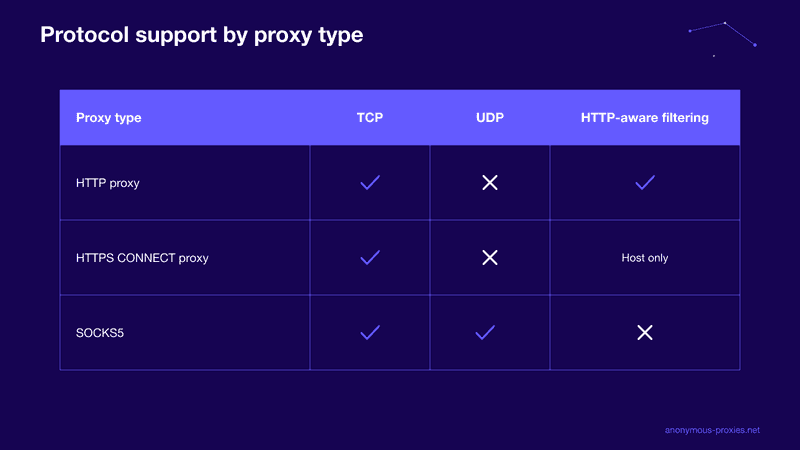
People argue about SOCKS5 vs HTTP proxy setups as if picking wrong will sink a project. It usually won't. An HTTP proxy understands web traffic: for plain HTTP it reads and forwards your requests, which lets it rewrite headers or cache responses, and for HTTPS it opens a CONNECT tunnel and passes encrypted bytes untouched. A SOCKS5 proxy skips interpretation entirely and relays raw connections without caring what protocol rides inside.
That sounds like a wide gap. For the TLS traffic that dominates scraping, it isn't. According to iProxy Online's 2026 protocol comparison, both SOCKS5 and HTTP CONNECT behave as opaque TCP tunnels once the initial handshake completes. Same path, same bytes. Speed differences on TCP workloads are measurement noise.
The one real difference is UDP. SOCKS5 carries it, HTTP proxies can't. If your tools only speak TCP, stop comparing protocols and start comparing prices.
Where SOCKS5 fits: UDP, WebRTC, and HTTP/3
So when does UDP actually show up? More than it used to, and two shifts explain it. The first is WebRTC. Browsers use it for real-time connections, and anti-bot scripts abuse it to expose your real IP even when normal traffic goes through the proxy. Antidetect browsers counter this by faking the WebRTC address or routing it through the proxy, and routing only works when the proxy carries UDP.
The second is HTTP/3. It runs on QUIC, which is UDP-based, and it already fronts a large share of high-traffic sites. Point an HTTP proxy at HTTP/3 traffic and the browser quietly falls back to TCP. Pages still load, but the fallback changes your connection fingerprint, and that mismatch is the kind of signal modern detection systems score.
The All-in-One Platform for Effective SEO
Behind every successful business is a strong SEO campaign. But with countless optimization tools and techniques out there to choose from, it can be hard to know where to start. Well, fear no more, cause I've got just the thing to help. Presenting the Ranktracker all-in-one platform for effective SEO
We have finally opened registration to Ranktracker absolutely free!
Create a free accountOr Sign in using your credentials
One check before you pay: SOCKS5 delivers UDP through a command called UDP ASSOCIATE, and not every provider implements it. Ask, because an endpoint without it gives you nothing over HTTP.
Integrating proxies with crawlers and tools
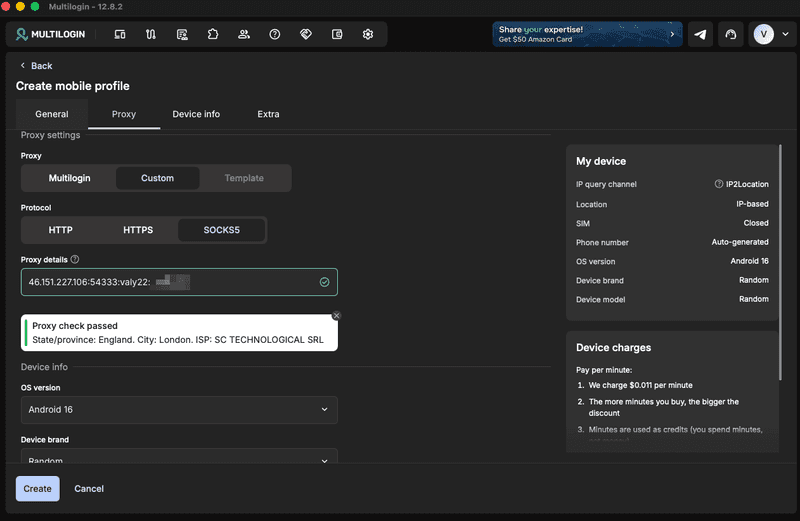
Integration is where the protocol decision turns into config lines. Most command-line tools read the standard environment variables, so exporting HTTP_PROXY and HTTPS_PROXY routes curl and most scripts through the proxy with zero code changes. Scrapy assigns proxies per request through middleware, which is what you want for rotation. Puppeteer and Playwright take a --proxy-server flag at launch and accept socks5:// URLs as readily as http://. One Python catch: use socks5h:// in requests, not socks5://, or DNS resolves locally and leaks every domain you touch.
Authentication is the usual snag. Chromium-based launchers ignore user:pass credentials embedded in the proxy URL, so either authenticate through page.authenticate() or whitelist your server's IP with the provider. Test it before a long run, because auth failures usually surface as generic timeouts.
When browsers and raw scripts share one job, running everything through SOCKS5 proxies that handle any protocol removes the per-tool guesswork, since a single endpoint covers whatever you plug into it. And if part of the stack only exists to pull keyword data, check whether Ranktracker's keyword finder already surfaces it. Buying clean data is usually cheaper than proxying for it.
Multi-account setups
Multi-account work flips the logic. Scrapers want churn. Accounts want the same IP every day, because platforms score identity consistency and a login that jumps cities overnight looks stolen. The working pattern is one dedicated IP per account, bound permanently to one browser profile. Antidetect browsers exist for exactly this mapping, and Ranktracker's roundup of the best antidetect browsers covers which ones handle per-profile proxy binding without leaks.
Rotating residential pools are the wrong buy here. Sessions drop mid-action, and yesterday's address lands on a stranger's account today. Static addresses keep profiles believable, and pairing them with static ISP endpoints gives each profile an ISP-registered identity that passes reputation checks and never rotates mid-login. Budget for the real ratio too: fifty accounts means fifty addresses, since doubling profiles onto one IP is how a single ban spreads through a clean batch.
Performance and security realities
Latency comes down to IP class. A proxy adds one hop, datacenter endpoints typically add 5 to 50 ms, and residential or mobile connections can add hundreds while dropping often enough that retry logic stops being theoretical. Match the class to your tolerance: bulk scraping absorbs slow residential IPs fine, while checkout or sniping scripts die on them.
Security comes down to trust. The provider terminates your connection and can read anything you send as plain HTTP, credentials included. Keep third-party proxy traffic on HTTPS, and treat any provider running open, unauthenticated endpoints as a data leak with a monthly fee.
The decision in one pass
Run the choice in order. Protocol first: all-TCP traffic gives you a free pick, and any UDP narrows it to SOCKS5 with working UDP ASSOCIATE. IP type second: rotation for public scraping, one pinned ISP address per profile for accounts. Ten minutes of matching beats a week of debugging bans.
FAQ
Does SOCKS5 encrypt traffic?
No. SOCKS5 moves packets without encrypting them, a point NordVPN's protocol documentation states outright. The 5 is a version number, not a security rating. HTTPS stays private through the proxy because TLS did the work, while plain HTTP crosses it readable. For an encrypted tunnel, layer SSH or a VPN on top.
Are datacenter proxies enough for automation?
For unprotected targets and most APIs, yes, and they're the fastest, cheapest class. The ceiling is sites behind serious anti-bot layers, which flag datacenter ranges on sight. When clean requests start dying at the door, move that target to ISP or residential addresses.
Should scraping and account work share the same proxies?
No. Scraping burns IP reputation by design, and an address that just fired 5,000 requests at one site is the profile platforms train detection on. Keep two pools, disposable rotating IPs for collection and untouched static ones for logins, and never mix them.
How many proxies do I need?
Work backward from rate limits. Test how many requests per hour one IP survives on your target before throttling, divide hourly volume by that, and add headroom for bans and retries. Renting 20 IPs for a 60-IP workload is the slow version of using none.

