
Intro
Your scraper works fine on a few hundred pages. Point it at a few hundred thousand and half your requests come back as 403s, CAPTCHAs, or blank pages. The parser didn't fail. The target noticed your traffic doesn't behave like a person, and it started pushing back.
Scraping at scale is mostly a game of not standing out. Any site worth scraping runs some form of bot detection, and every extra request is another chance to get flagged. You beat that with the basics done well: the right web scraping proxies, honest request pacing, requests that pass for a real browser, and a plan for when a site fights back. This piece maps how blocks actually happen and how to build a pipeline that keeps pulling data without setting off every alarm.
Why sites block automated collection
Sites don't block scrapers to be difficult. They block because your traffic costs them money and gives away data they'd rather keep. One aggressive scraper can fire thousands of requests a minute, straining servers and skewing analytics. Prices, product listings, and reviews are exactly what a rival wants, so the sites holding that data defend it hardest. Assume your target has already planned for people like you.
How blocking systems decide
Blocking is rarely a single rule. Most defenses keep a running score for each visitor, and crossing a line earns you a CAPTCHA or a closed door. That score answers three questions: who you are, how fast you move, and what you look like up close.
Who you are is IP reputation: a known datacenter range, or an address that misbehaved before, starts with strikes against it. How fast you move is request rate. What you look like is your fingerprint, the headers you send plus your TLS handshake, which give away whether a real browser or a bare script is calling.
Cloudflare and Akamai fold all three into a live score per request. It's why one scraper glides through a small site and slams into a wall on a protected one running the same code.
Building a proxy pool for scale
Start with who you are, because one IP can't carry a big job. Send a hundred thousand requests from one address and you'll trip the reputation check fast. A pool spreads that load across many IPs so none stands out, the base layer of any large scale data collection setup. The web scraping proxies you pick here set the ceiling for everything downstream.
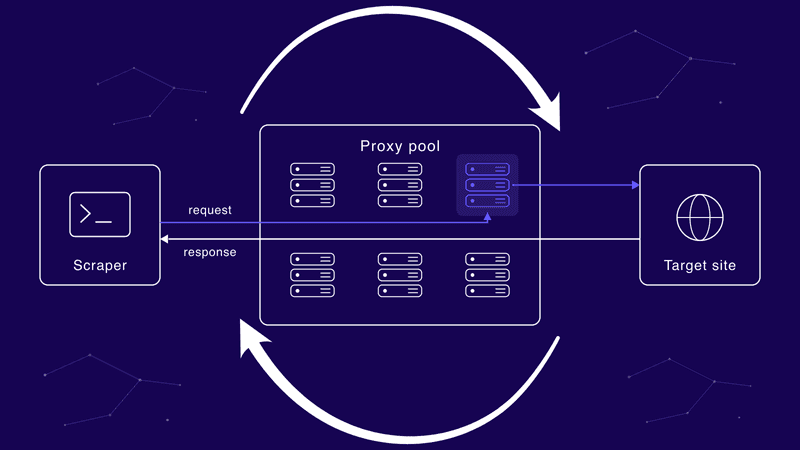
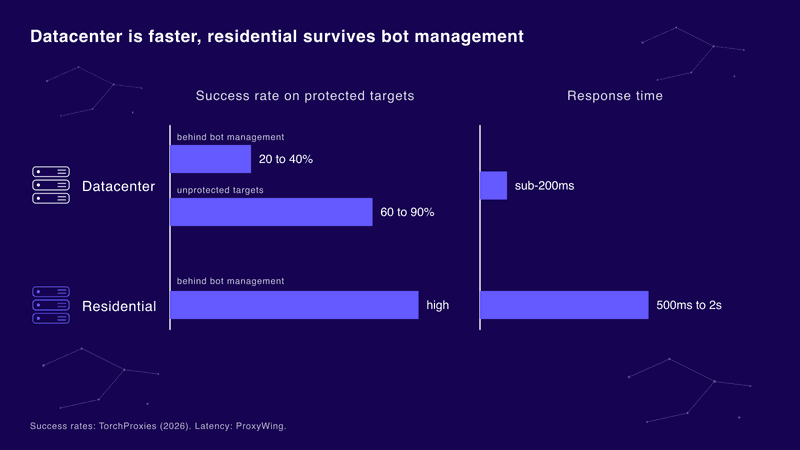
On sites with weak or no protection, datacenter IPs do the heavy lifting: cheap, fast, available in bulk. For volume work you want datacenter IPs built for high-volume data collection rather than a few shared addresses that burn out in a day. The catch is they're easy to spot. Datacenter proxies hit 60 to 90 percent success on unprotected targets, then drop to 20 to 40 percent behind Cloudflare or Akamai bot management, according to TorchProxies (2026).
The All-in-One Platform for Effective SEO
Behind every successful business is a strong SEO campaign. But with countless optimization tools and techniques out there to choose from, it can be hard to know where to start. Well, fear no more, cause I've got just the thing to help. Presenting the Ranktracker all-in-one platform for effective SEO
We have finally opened registration to Ranktracker absolutely free!
Create a free accountOr Sign in using your credentials
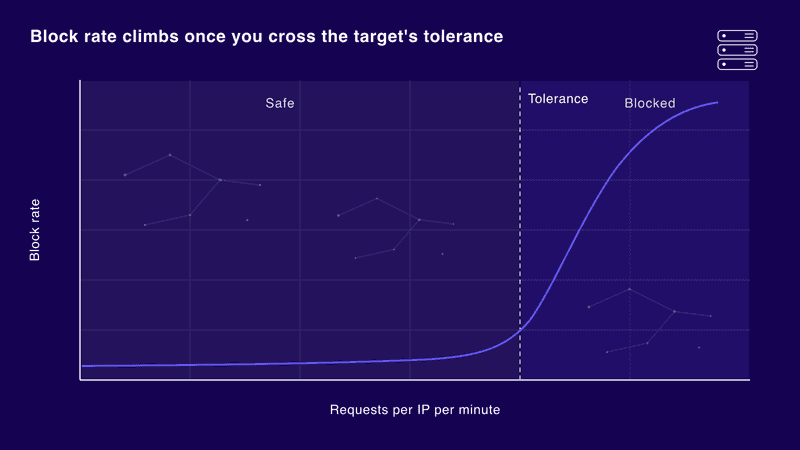
Sizing is arithmetic: if a site tolerates about 10 requests per IP a minute and you need 6,000, that's 600 clean IPs minimum, plus headroom for flagged ones.
Request pacing and rotation logic
Next is how fast you move. Rotation decides which IP takes each request; pacing decides the gap between them.
Per-request rotation hands every call a fresh IP, good for stateless work like independent product pages. Sticky sessions hold one IP across a run of related requests, needed when a site tracks a session, like a checkout.
Pacing is where people either avoid blocks when scraping or walk straight into them. Randomize the delay between requests, since a flat 200ms gap is a bot signal by itself. Cap the rate per IP and add exponential backoff, so errors make you slow down instead of pushing through. The chart above shows why: block rate hugs zero until you cross the target's tolerance, then spikes. Ranktracker's guide to web scraping for SEO tools shows how the same pacing keeps a rank tracker accurate.
Headers and fingerprints
Last is what you look like. Clean IPs paced sanely still get caught if the requests themselves scream script. Every request carries headers and a TLS fingerprint, and detection compares both to a real browser.
Start with the User-Agent, but don't stop there. A real browser sends a matching set of Accept, Accept-Language, and Accept-Encoding headers in a consistent order, and a request that skips them or scrambles that order stands out. Underneath sits the TLS handshake, boiled down to a JA3 fingerprint. A Python client and Chrome shake hands differently even when their visible headers match, so strong anti-bot systems read the handshake to catch scrapers that only faked the surface. Make each request look like a browser end to end.
Handling CAPTCHAs and soft blocks
Not every block waves a flag. A hard block is obvious: a CAPTCHA screen or a 403. A soft block hides. The site returns a 200, but the body is throttled, thinned out, or seeded with wrong data meant to rot your dataset without telling you.
Detection is job one. Flag responses that come back suspiciously small, or identical across pages that should differ, and treat them as failures even when the status says success. Bad inputs corrupt everything built on them, so data-quality checks matter as much as access. Ranktracker's guide to accurate rank tracking shows how noisy inputs wreck the numbers you report.
The All-in-One Platform for Effective SEO
Behind every successful business is a strong SEO campaign. But with countless optimization tools and techniques out there to choose from, it can be hard to know where to start. Well, fear no more, cause I've got just the thing to help. Presenting the Ranktracker all-in-one platform for effective SEO
We have finally opened registration to Ranktracker absolutely free!
Create a free accountOr Sign in using your credentials
When CAPTCHAs show up, solving services exist, but the cheaper fix is upstream: slow the rate, rotate more, clean up the fingerprint, and you stop earning the challenge.
When to escalate to residential
Sometimes the IP tier itself is the ceiling. When bot management keeps blocking your datacenter pool no matter how well you pace and disguise traffic, that's your cue to move up.
The All-in-One Platform for Effective SEO
Behind every successful business is a strong SEO campaign. But with countless optimization tools and techniques out there to choose from, it can be hard to know where to start. Well, fear no more, cause I've got just the thing to help. Presenting the Ranktracker all-in-one platform for effective SEO
We have finally opened registration to Ranktracker absolutely free!
Create a free accountOr Sign in using your credentials
Residential IPs come from real home devices, so they carry trust datacenter ranges never earn. For the stubborn targets, switching to rotating residential IPs gives you traffic that reads as ordinary home users, clearing filters that reject datacenter addresses on sight.
The price is speed and money. Datacenter proxies run 3 to 10 times faster, roughly sub-200ms against 500ms to 2 seconds for residential, according to ProxyWing. Over millions of requests that adds up, so tier it: keep datacenter as the default and route only the blocked requests to residential.
Search results are the classic case. If you're scraping SERPs to feed a tool like Ranktracker's SERP Checker, the hardest pages often push you onto residential.
Test on one target before you scale
Before you point a scraper at your full target list, run it against a single protected site and watch the response codes. Start with a small datacenter pool, pace it conservatively, then push the rate up until blocks appear and step back to the last clean level. That number is your per-IP ceiling, and it sizes the pool for the whole job. Get your web scraping proxies and pacing right on one site, and the same setup scales across the rest.
Frequently asked questions
How many proxies do I need to scrape at scale?
Depends on the target's tolerance and your throughput. Work out how many requests a minute one IP survives before it's flagged, divide your target rate by that, then add a buffer. Need 6,000 a minute against a site that tolerates 10 per IP? That's 600-plus clean IPs, not a handful worked to death.
Are datacenter or residential proxies better for web scraping?
Neither wins outright. Datacenter is faster and cheaper and handles unprotected sites fine. Residential is slower and pricier but survives tough bot management. Most pipelines run both, default to datacenter, and escalate only where blocks force it.
Why do I still get blocked even with proxies?
Usually pacing or fingerprints, not the IPs. Rotate a big pool but fire it at machine speed with default headers and the pattern still shows. Slow down, randomize, and look like a browser first.
Is scraping public data allowed?
It's a legal gray area that shifts with your jurisdiction and the site's terms of service. Stick to publicly visible data, honor robots.txt where you can, leave personal data alone, and get legal advice before any big commercial pull.

