
Intro
Your rank tracker ran all night and came back with a gap where Tuesday's SERP data should be. The proxies test fine in the browser, the subscription is paid, and yet the scheduler logged a wall of connection errors and quietly gave up. When that happens, most teams start shopping for different IPs. The quieter culprit is often the protocol, the agreement between your tool and the proxy about what kind of traffic gets carried and how.
That choice usually comes down to SOCKS5 or HTTP, and picking wrong means silent failures, wasted budget, or paying for capability you never use. This guide walks through the socks5 vs http proxy decision from a marketing data perspective: SERP collection, price checks, content monitoring. You'll know which protocol each of your tools needs, how to confirm it, and when the cheaper option is genuinely the better one.
What a proxy protocol actually decides
A proxy protocol defines how your scraper talks to the proxy server and what kinds of traffic the proxy will relay. It's a separate question from where the IP comes from. You can buy the best pool on the market and still watch jobs fail because the tool speaks one protocol and the endpoint expects another.
Concretely, the protocol decides three things: which traffic types the proxy can carry, how the connection gets established, and what the proxy understands about the data passing through it. For a team collecting search rankings or monitoring competitor pricing, this translates directly into whether a job runs or dies, and a mismatch often fails without a useful error message. That's why choosing a proxy protocol for web scraping deserves ten deliberate minutes before you configure anything, not a shrug at the checkout page.
How SOCKS5 differs from HTTP in plain terms
An HTTP proxy works at the application layer. It understands web requests, reads their headers, and can act on that understanding: routing by hostname, handling authentication, tunneling HTTPS through a CONNECT request. The trade-off is scope. It's built for web traffic and expects to see web traffic.
SOCKS5 sits lower. IETF RFC 1928 defines it as a framework for client-server applications in both the TCP and UDP domains, operating as a shim layer between the application and transport layers. In practice that means a SOCKS5 proxy doesn't inspect or interpret what your tool sends. It opens a connection to the destination and relays bytes in both directions, whatever those bytes represent. One precision worth flagging: the protocol itself supports UDP, but actual UDP support varies by provider, so treat it as a feature to confirm rather than assume.
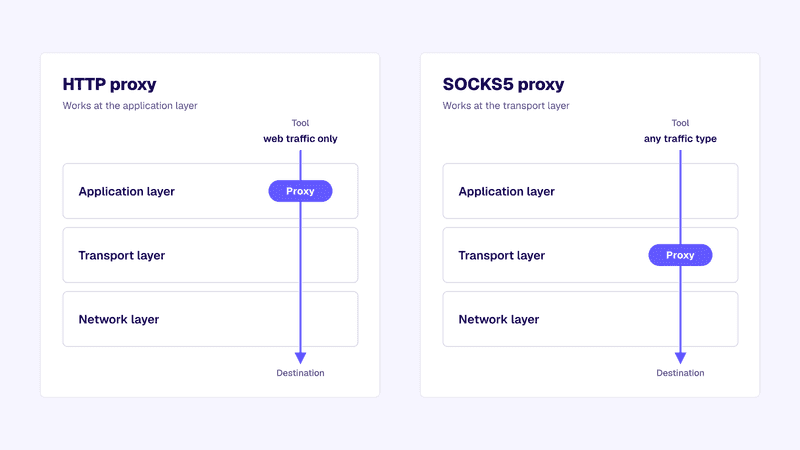
That's the whole difference: HTTP proxies participate in the conversation, SOCKS5 proxies carry it. Neither is better in the abstract. Each fits a different set of jobs.
When marketing data tasks need SOCKS5
Reach for SOCKS5 when your tools generate traffic that isn't plain web requests, or when you can't predict what they'll send. Common cases from marketing data work:
- Custom automation over raw TCP. In-house scripts that talk to APIs over non-standard ports, or crawlers with their own connection handling, often choke behind an HTTP-only endpoint.
- Tools that tunnel everything. Some schedulers and headless browser farms route all system traffic through one proxy setting. That stream includes DNS lookups and background connections an HTTP proxy was never designed to relay.
- UDP-dependent workflows. If a tool resolves DNS through the proxy or uses QUIC-based connections, you need the UDP association SOCKS5 offers, provider support permitting.
The pattern across all three: unpredictable or non-web traffic needs a transport-layer proxy that carries whatever your tools send instead of one that filters for web requests it recognizes. Teams doing local SEO scraping with custom geo-targeting scripts hit this more often than they expect, because homegrown tooling rarely sticks to textbook HTTP behavior.
When HTTP is the better and cheaper pick
Most marketing data collection is standard web traffic. A SERP checker requests a results page. A price monitor requests product pages. A content tracker requests articles and compares them to yesterday's copy. Every one of those jobs is an ordinary GET request, and for ordinary GET requests, an HTTP proxy does everything you need at a lower price point.
The All-in-One Platform for Effective SEO
Behind every successful business is a strong SEO campaign. But with countless optimization tools and techniques out there to choose from, it can be hard to know where to start. Well, fear no more, cause I've got just the thing to help. Presenting the Ranktracker all-in-one platform for effective SEO
We have finally opened registration to Ranktracker absolutely free!
Create a free accountOr Sign in using your credentials
There's a practical bonus, too. Because an HTTP proxy understands the requests passing through it, header handling and authentication tend to be simpler to configure, and nearly every commercial scraper supports the protocol out of the box. The tooling ecosystem around web scraping for SEO grew up assuming HTTP endpoints, so you're working with the grain rather than against it.
Cost matters at volume. If you're running thousands of SERP checks a day and every single request is standard web traffic, plain HTTP endpoints on fast datacenter IPs get the job done without paying for transport-layer flexibility you'll never touch. Buying SOCKS5 for a pure-HTTP workload isn't harmful, just unnecessary.
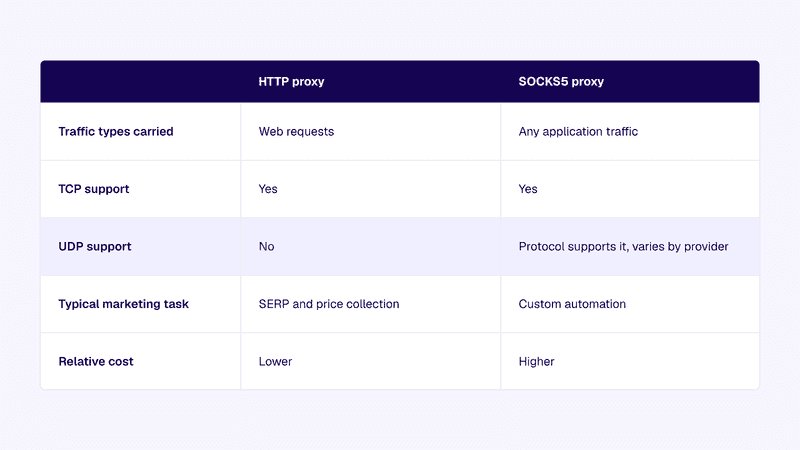
Keep that table handy when a vendor quote lands. It answers the question faster than the sales call will.
How to check what your scraper or scheduler supports
Before buying anything, confirm what your tools can actually use. Three places to look:
Read the proxy configuration format
Open your tool's proxy settings or config file. The URL scheme tells you everything: http:// means an HTTP endpoint, socks5:// means SOCKS5, and socks5h:// means SOCKS5 with DNS resolved on the proxy side. If the field only accepts host and port with no scheme, the documentation should state which protocol it assumes. Many tools assume HTTP and never say so out loud.
Test outside the tool first
Run one request through the proxy using curl or a short Python script with both protocol schemes. If the request succeeds as http:// but fails as socks5://, you've learned something about the endpoint. If both fail, the problem is credentials or IP allowlisting, not protocol. Isolating the variable here saves hours later.
Check what the scheduler passes downstream
A scraper might support SOCKS5 while the scheduler wrapping it only forwards HTTP proxy settings to the jobs it launches. Trace the chain from config file to the process that opens the connection; the weakest link sets your real requirement.
A quick decision flow for teams
Here's the short version to run through for each tool in your stack. Is every request the tool makes standard web traffic? If yes, buy HTTP endpoints and keep the savings. If no, or if you can't say for certain, go SOCKS5. Does any tool in the chain rely on UDP or proxy-side DNS? Then SOCKS5, and confirm UDP support with the provider before paying. Are you mid-migration or testing new tooling next quarter? Flexibility wins, so lean SOCKS5.
Providers such as Anonymous Proxies expose both HTTP and SOCKS5 endpoints on the same plan, so you can switch protocols without re-buying. That removes most of the penalty for guessing wrong, though it doesn't remove the need to configure each tool correctly.
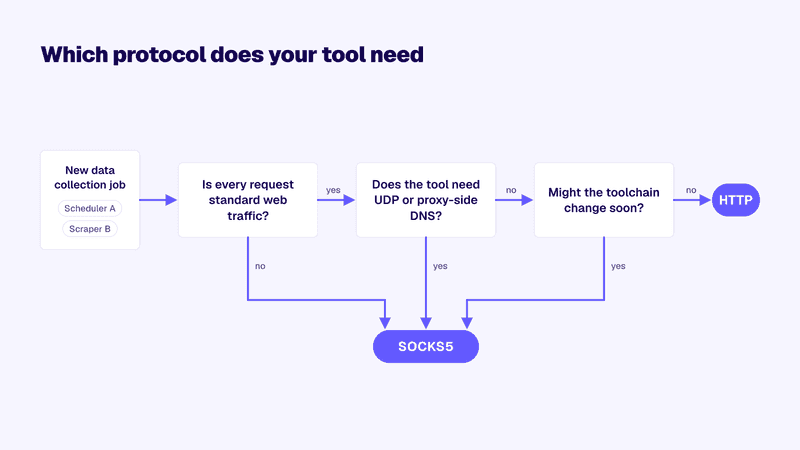
Source: Anonymous Proxies (original graphic)
Run each tool through the flowchart once and record the answer in your runbook. Protocol decisions age well until the stack changes.
FAQ
Do scraping tools need SOCKS5?
Most don't. Mainstream scrapers and rank trackers generate standard web requests, which HTTP endpoints handle fine. SOCKS5 becomes necessary when custom scripts, full-tunnel setups, or UDP-dependent components enter the stack.
Is SOCKS5 faster than HTTP?
Not inherently. SOCKS5 skips request interpretation, which trims a little overhead, but real-world speed depends far more on the proxy's network and location than on the protocol. Don't pick a protocol expecting a speed win.
Does SOCKS5 encrypt my traffic?
No. Neither protocol encrypts anything by itself. Encryption comes from the connection your tool makes, such as HTTPS to the target site. Treat proxy protocol and encryption as separate decisions.
Picking the protocol that keeps your data flowing
The socks5 vs http proxy question is really a question about your tools, not about the proxies. Standard web collection jobs run cheaper and simpler on HTTP endpoints, while custom automation and anything touching UDP or full-tunnel routing needs the wider carriage SOCKS5 provides. Confirm what each tool supports before you buy, test with one request outside the scheduler, and write the answer down so nobody re-litigates it in six months. Get the protocol matched to the tool once, and those silent 3 a.m. failures stop being a recurring line in your incident channel.

